
You open a page in Chrome, it shows for a split second, and then the whole tab turns white. Reload it, and the same thing happens again.
I would check Chrome's graphics switch before anything else. Google lists it among its own fixes, and it is the best-confirmed owner fix in the Super User thread.
The Super User question about pages going blank has 133,996 views since 2012, and a Windows owner confirmed its acceleration fix on Chrome 109 in 2023.
Why the page vanishes after it loads
The page has loaded; Chrome fails to draw it. Chrome hands drawing to your graphics chip, and when that handoff breaks, you see an empty tab.
On its Chrome crash and open help, Google says the cause can be your hardware: "There could be a problem with how your computer's hardware works with Chrome".
Ours: Chrome 155.0.8059.40 on this laptop has acceleration on, and its switch now reads Use graphics acceleration when available. Google's page still calls it Use hardware acceleration when available.
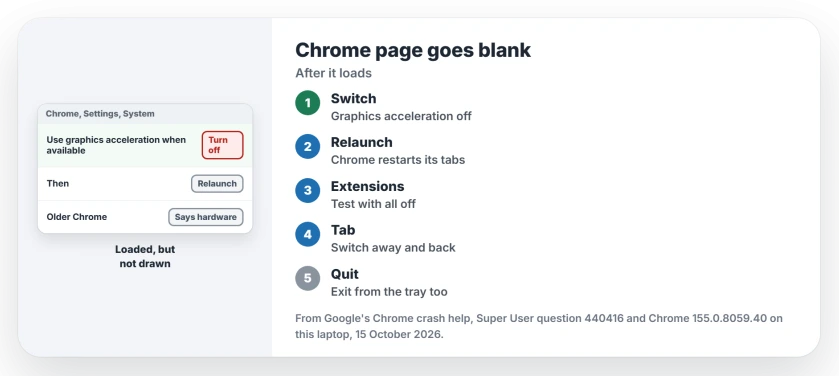
Status: on 15 October 2026 I compared Google's Chrome help with the switch in Chrome 155 on Windows 11 25H2. The setting was read, not changed.
1. Turn off graphics acceleration
Open Chrome's menu, then Settings, then System. Turn off Use graphics acceleration when available and select Relaunch.
Older versions say hardware instead of graphics. It is the same switch.
On a Chromebook, the separate video-decoding control affects playback and some display faults; the desktop System switch isn't the same setting.
The 2013 answer put it simply: "Hardware acceleration caused the problem". An owner on Chrome 109 and Windows 10 added in 2023: "This fixed it for me".
If pages draw again, update your graphics driver from its maker later, then try the switch on once more.
2. Test with extensions off
An owner traced the blank pages to an extension called Download that they never knowingly added. Turning it off fixed it for them.
Open a guest window, or turn every extension off at chrome://extensions, and reload the page. If it draws, switch them back on in small groups until the blank returns.
Some older extensions stopped working on their own. The extensions no longer supported page explains why.
3. Switch tabs and come back
Two owners found the page returns when they switch to another tab and back, or minimize Chrome and restore it, which points to a drawing fault rather than a missing page.
It is a test, not a fix. Do it once, then go back to step 1.
Closing Chrome did not help?
Quit Chrome fully, including from the notification area by the clock. In their words, one owner had to "close Chrome running from the systray", since nothing else short of a reboot cleared it.
Menus stuck as well as the page? Compare a Chrome freeze by scope, from a single busy tab to an unresponsive browser session.
If tabs then show Aw, Snap instead of white, the Aw, Snap page reads the error code for you.
Could the website be at fault?
Sometimes. A 2012 answer collected a case where a server sent a wrong Content-Length header, and Chrome stalled where other browsers coped.
If a page stays visible but its controls are inert, inspect Chrome's script permission before treating it as a graphics failure.
If the site never loads and a report shows Chrome's internal error address, recover the original URL and connection code before changing drawing settings.
A 2023 owner found another. The pointer still changed shape over links you could not see, because a page script had made the whole page transparent.
If one site goes blank in Chrome but works in Firefox, I would tell the site owner, and if every site does it, the problem is on your PC.
When the new window never opens at all, inspect Chrome's blocked-pop-up permission before treating it as a drawing failure.
The Short Version
- The page loaded; Chrome failed to draw it.
- Turn off Use graphics acceleration when available under Settings, System, then relaunch.
- Test with extensions off, then switch them back on in small groups.
- Switching tabs and back brings the page back, but only as a test.
- Blank everywhere? Quit Chrome from the notification area too.
Where to Next
Graphics switch or extension: which one cleared your blank tabs? Put your graphics chip and Chrome version in the comments; I am noting which pairs still need acceleration off.

Isaac Smith is the founder and editor of PC Glance, a website that covers computers, laptops, and technology. He is a tech enthusiast and a computer geek who loves to share his insights and help his readers make smart choices when buying tech gadgets or laptops. He is always curious and updated about the latest tech trends.