
Chrome shows you Aw, Snap! instead of the page. Under it sits the line Something went wrong while displaying this webpage.
I would read the small error code under that line before trying any fix, because each code points at a different cause.
On Microsoft Q&A the thread about Aw, Snap on every page is marked 200+, and the Super User question about finding its cause has 89,434 views since June 2013.
One page, or every page?
Google's own line on the message is short: "Chrome is having problems loading the page". Its next advice draws the line that matters: "If other sites open normally but one site crashes, that site might be the cause of the problem".
Then reload, and leave it. When every page fails, Chrome's own settings pages included, the cause is on your PC. It is usually security software, a Windows program setting or memory.
A page that shows for a moment and then turns white, with no Aw, Snap at all, points at drawing instead, and the blank page fix starts with graphics acceleration.
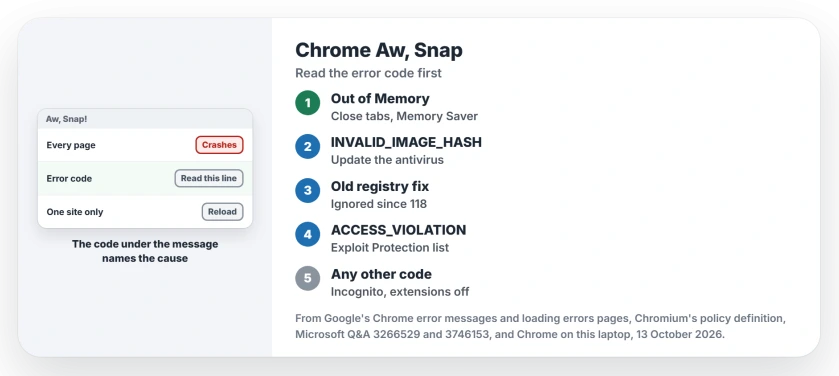
Status: Chrome 154 on Windows 11 25H2, checked 13 October 2026. The error code names the cause. The old registry fix died in Chrome 118.
Ours: Chrome 154 runs here, 155 is waiting. Its English language file holds the whole crash page, including "Not enough memory to open this page" and "Try closing other tabs or programs to free up memory".
The code fills a slot after Error code.
An internal address in a report needs the failed navigation details too, especially when the site never opens.
Error code: Out of Memory
Chrome explains this one on the page itself. A 2024 asker on Microsoft Q&A quoted it as "Error code: Out of Memory" on a laptop with 8 GB.
Google's page on loading errors says "If your device doesn't have enough available memory, it might have reduced performance and may lead to issues like page crashes and loading errors".
Close tabs you are not reading, then reload. Memory Saver helps over time, and you switch it on in Settings, Performance. Google says "Chrome deactivates tabs that you aren't currently using".
If Windows itself warns about low memory while the RAM meter looks fine, the page file is the next suspect. Our low memory warning guide covers it.
When inspecting browser memory, compare task names and workload instead of assuming each Chrome process represents an extra tab.
Error code: STATUS_INVALID_IMAGE_HASH
This code means an unsigned file was blocked from loading into Chrome's page process. The 200+ thread came from it in October 2019, when Chrome 78 turned on a page protection that clashed with some security software.
The asker had found a half fix: "Chrome will temporary work if changed to compatibility mode but reverts when PC is restarted".
The answer passed around since then was a registry policy called RendererCodeIntegrityEnabled. Google's own policy file now says "This policy was removed in Chrome 118 and is ignored if set". So that fix does nothing today.
Even before that, Google wrote "Only turn off the policy if there are compatibility issues with third-party software". The real fix is that third-party software. Update your antivirus or endpoint suite, or uninstall it to test.
Ours: the policy key for Chrome does not exist on this laptop, so a leftover value cannot explain a crash here.
Error code: STATUS_ACCESS_VIOLATION
The common forum answer is to rename chrome.exe. One owner who looks after an organization's PCs tried it in January 2024 and wrote "That worked for a bit but made no sense".
Then they found the reason, "until I found the Windows 10 Exploit Protection system settings". Chrome sat in its program list with extra protections switched on. Their fix: "you can simply delete Chrome.exe from the list for a quick fix".
That explains the rename. Microsoft says an entry made by name applies "to any running process with that name", so a renamed chrome.exe escapes it.
Open Windows Security, App and browser control, Exploit protection settings, then Program settings. If chrome.exe is listed, remove it or turn its overrides off one at a time.
Ours: Get-ProcessMitigation reads this list without admin. On this laptop 46 programs carry entries, mostly Office and Internet Explorer files, and chrome.exe is not one of them.
Get-ProcessMitigation -Name chrome.exeAny other code: the order I would try
First, an Incognito window with Ctrl+Shift+N. The crash page offers it, and Incognito runs with your extensions off. If pages load there, switch every extension off, then turn them on again one by one.
Then restart Chrome and the computer, the other two choices the page shows. If a restart lost your tabs, copy the session files before Chrome writes new ones.
If there is no crash code and the menus simply stop responding, work through Chrome's freeze checks while keeping your existing profile.
If it still crashes, a Super User answer suggests reporting it with a crash ID, "by going to chrome://crashes/ page". Google's engineers can read what the crash was from that.
The Short Version
- One site only: reload and move on.
- Out of Memory: close tabs, turn on Memory Saver.
- STATUS_INVALID_IMAGE_HASH: update or remove your security software. The registry policy was removed in Chrome 118.
- STATUS_ACCESS_VIOLATION: remove chrome.exe from Exploit Protection's program settings.
- Anything else: Incognito, extensions off, then restart.
Where to Next
Which code sat under your Aw, Snap? Post the code and your antivirus in a comment, and this page will list it.

Isaac Smith is the founder and editor of PC Glance, a website that covers computers, laptops, and technology. He is a tech enthusiast and a computer geek who loves to share his insights and help his readers make smart choices when buying tech gadgets or laptops. He is always curious and updated about the latest tech trends.