
A box says "Your computer is low on memory" and offers to close your programs, while Task Manager shows gigabytes of RAM available. A game may even drop you to the desktop when it appears.
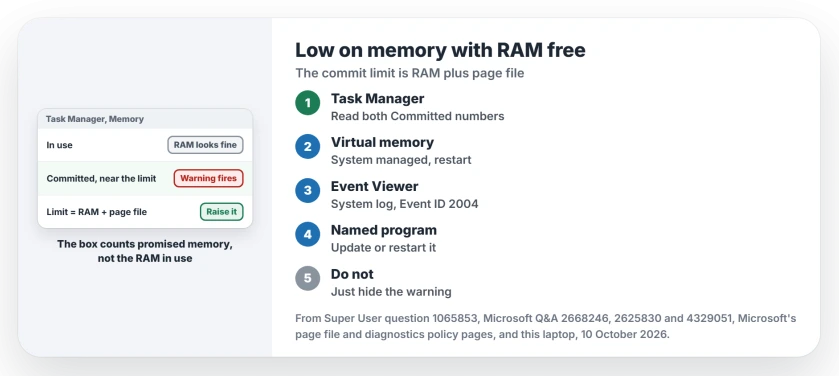
I would look at your page file before blaming the RAM sticks. The warning counts memory that programs have been promised, not memory in use, and a small or missing page file lowers that ceiling.
A Super User asker with 16 GB saw it at about 30 percent use, and their 2016 question has 42,588 views. A Microsoft Q&A question that only asks how to turn the box off has 50+ under Same question.
What the warning is counting
Microsoft documents the ceiling on its page file sizing page: "The system commit charge can't exceed the system commit limit. This limit is the sum of physical memory (RAM) and all page files combined".
So switching your page file off shrinks the limit to roughly your RAM. Microsoft adds that with no page file, "the system commit limit is slightly less than the physical memory that is installed".
An independent advisor with 12 MVP awards told one owner the same: your warning "appears when committed memory reaches its limit". Free RAM can sit unused while the promises run out.
Ours: the box comes from radarrs.dll.mui on this laptop, part of Windows Resource Exhaustion Detection. Its text promises you "Windows will only close enough programs to restore needed memory".
Status: Microsoft's page file and diagnostics policy pages, this laptop's commit limit and Event ID 2004 entries, and Q&A owners, 10 October 2026. System managed ended it.
Read the Committed line, not the percentage
Open Task Manager, then Performance, then Memory. Find the Committed line. It shows two numbers: what your programs hold, and the limit. When the first nears the second, you get the warning, whatever the RAM graph says.
Ours: this laptop has 16 GB of RAM. Its commit limit is 41,512,656 KB, about 39.6 GB, thanks to a system-managed page file of 24,926 MB, and the most that file has ever held is 3,223 MB.
That gap is the point. The page file barely gets written, yet its size lifts your limit. Even so, this laptop hit its limit twice in July, as the next section shows.
1. Set the page file back to system managed
Type View advanced system settings into Start. Under Performance, choose Settings, then the Advanced tab, then Change under Virtual memory, and tick Automatically manage paging file size for all drives. Restart your PC.
The Super User asker had capped theirs at 3 GB, and after switching to system managed, they reported back: "I'm not running into low memory warnings or issues now".
Microsoft describes why that helps you: "when the system commit charge is more than 90 percent of the system commit limit, the page file is increased to back it". A fixed small size cannot grow.
Short on disk space for it? Our free up disk space guide finds you room without touching pagefile.sys itself.
If a box at every start now warns about a temporary page file, that message has causes of its own, BitLocker among them.
2. Find the program eating the commit
Windows writes down who did it. Open Event Viewer, then Windows Logs, then System. Look for source Resource-Exhaustion-Detector with Event ID 2004.
Each entry says "Windows successfully diagnosed a low virtual memory condition". Then it names the three biggest programs. An owner with 32 GB found SearchIndexer.exe, MsMpEng.exe and explorer.exe listed that way.
Ours: this laptop logged two such entries on 16 July 2026. Both named the same desktop app first. The second time it held 13,154,537,472 bytes, about 13.2 GB, with node.exe and chrome.exe far behind.
Your culprit usually grows for days. The Super User asker only saw the box after a few days without a restart, so update that program, or restart it before it gets that far.
Hiding the box is not a fix
On Microsoft Q&A, 100+ people marked one answer helpful that, on Pro, switches off Configure Scenario Execution Level under Windows Resource Exhaustion Detection and Resolution in the Group Policy editor.
Microsoft says turning that policy off means Windows "won't be able to detect, troubleshoot or resolve any Windows Resource Exhaustion problems". Your limit stays where it was.
Programs still fail at the limit. One Q&A owner there saw apps crash and Chrome refuse pages with "Out of Memory", so I would fix your page file and leave the warning on.
Chrome's crash page prints other codes as well, and each of them leads to a different fix, from antivirus to Exploit Protection.
Is it my RAM after all?
Not on its own. One Q&A owner's memory test passed while the warnings went on. Another ran Windows Memory Diagnostic to no avail. If the RAM percentage alone worries you, our high memory usage guide explains why available is not free.
The Short Version
- The warning fires at the commit limit, which is RAM plus page file.
- Check the two Committed numbers in Task Manager, Performance, Memory.
- Set the page file back to system managed and restart.
- Event ID 2004 in the System log names the program behind it.
- Turning off the warning leaves your limit where it was; programs crash instead.
Where to Next
Did Event ID 2004 name a program on your PC? Put its name in a comment. I am collecting the repeat offenders, and yours goes on the list.

Isaac Smith is the founder and editor of PC Glance, a website that covers computers, laptops, and technology. He is a tech enthusiast and a computer geek who loves to share his insights and help his readers make smart choices when buying tech gadgets or laptops. He is always curious and updated about the latest tech trends.