
You open Chrome and a box says two of your extensions were turned off because they are no longer supported. Your ad blocker or download helper has vanished. No switch brings it back.
That is annoying. Before you lose an evening to registry tricks, I would check the date on each one, because the tricks owners used in 2025 stopped working.
The Super User question on that box, asked in March 2025, has 47,356 views. Google closed the last door on 31 August 2026.
What Chrome turned off
The asker was on Chrome 133 when the box appeared, reading "2 extensions were turned off" and naming DownThemAll and uBlock Origin. They wanted both, in a Chrome-based browser.
The accepted answer pins it on Manifest V3, the newer rule set for what an extension may do in Chrome. Both of theirs used the older Manifest V2.
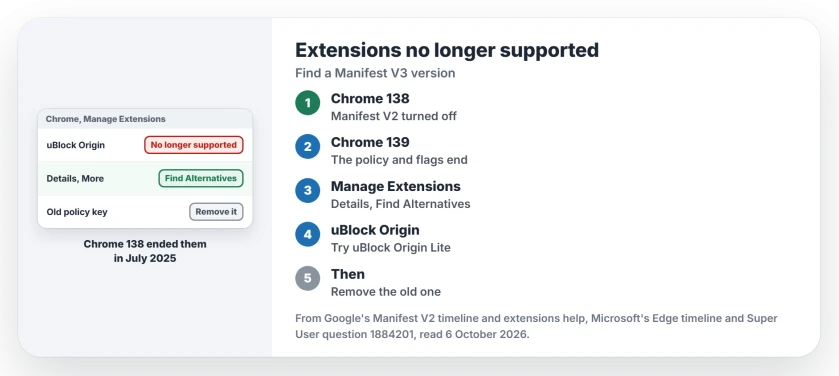
Status: checked 6 October 2026. Chrome 138 turned off Manifest V2 extensions for good in July 2025, and Google removed the last of them from its store on 31 August 2026.
The box's own title says what Chrome wants: "These extensions are no longer supported. Chrome recommends that you remove them". Removing is one choice. Replacing is usually better for you.
The dates that closed every door
Google keeps a Manifest V2 timeline for developers. Its entry for 24 July 2025 covers Chrome 138, which turned these extensions off on every channel; "Users can no longer turn them back on", Google says.
That is why your toggle is gone.
The same entry says the company policy that kept them alive "will be removed with Chrome 139". From then on, your old extensions "will cease to function for any user upgrading" to that version or later.
The last step came on 31 August 2026, when the store dropped them. Installs on Chrome 138 or earlier still run, but they "can no longer receive updates or be reinstalled if removed".
What owners tried, and when it stopped
The asker's first stopgap was the blue switch on the Extensions page, which brought both back "for a limited amount of time". Chrome 138 took that switch away.
Another answer set a registry policy, ExtensionManifestV2Availability, to 2, and one owner confirmed it on Chrome 138: "This trick works for Chrome Version 138.0.7204.101".
Its author expected it to "stop working with Chrome 139". Google's dates say they were right.
One more answer said to install an old Chrome and switch off its updater. The asker called that "a reckless idea", since an old browser stops getting security fixes. I agree with them.
Ours: if a page offers you a flag, a switch or a .reg file today, check its date first. Google's dates say these extensions stop working on Chrome 139 and later, whatever you set.
1. Ask Chrome for a replacement
Google's help page on managing extensions has a section on this, since Chrome "may disable extensions that don't meet these requirements", and it gives you a way to find another one.
Open the three-dot menu, then Extensions, then Manage Extensions, find the turned-off extension, select Details, and look for Find Alternatives under More. Then, in Google's words, add an extension from the Chrome Web Store.
2. For uBlock Origin, try uBlock Origin Lite
A commenter under the question put it plainly: "Can you use uBlockO Lite? It has v3 support". The accepted answer says uBlock Origin's own developers point to it "as a limited alternative".
Another answer is kinder: it "supports majority of filtering capabilities uBlock Origin had". Do not expect every custom rule you set up to carry over.
Some old extensions have no new version at all, and the same answer notes that DownThemAll "has not been maintained for ages".
For downloads, Chrome's own list opens with Ctrl+J. If that shortcut does nothing on your PC, two trial features may be to blame.
3. Remove what has no replacement
On the same Manage Extensions page, select Remove on the old extension, because keeping it changes nothing when Chrome will not run it.
On ChromeOS, Launcher app removal differs from extension removal. Check which kind of installed item the Chromebook is showing before deleting it.
If you added the ExtensionManifestV2Availability key in 2025, take it out too, since its answer warns that it left Chrome and Edge "managed by organization".
Our page on clearing a stuck Edge policy shows the same registry cleanup. Chrome's key sits under Policies, Google, Chrome, where Edge's sits under Policies, Microsoft, Edge.
Also inspect Chrome's Home destination and startup list if an unwanted page opens. Removing an extension and correcting saved launch pages are separate tasks.
An extension that still runs can do the opposite and blank whole pages, which the Chrome blank page guide tests for with every extension off.
Will Edge keep them running?
For now, and not for long. Microsoft's Edge timeline, updated on 15 September 2026, has warnings from mid-September: "Deprecation warnings will be displayed to some users".
For companies, Microsoft says "deprecation of Manifest V2 extensions is expected to begin" in early 2027. Moving to Edge buys you months, not a fix.
In March 2025 the accepted answer said Firefox planned to keep Manifest V2 with no end date. I would check Firefox if the old extension matters more to you than Chrome does.
The Short Version
- The box means a Manifest V2 extension, and Chrome 138 ended them.
- The 2025 switch, policy and flags no longer work on Chrome 139 and later.
- Use Find Alternatives under the extension's Details.
- For uBlock Origin, uBlock Origin Lite is the closest you will get in Chrome.
- Remove the old extension, and any leftover policy key in the registry.
- Edge started its own warnings in September 2026.
Where to Next
Open Manage Extensions, select Details on the turned-off extension, and try Find Alternatives first.
Which extension did you lose, and did you find a replacement? Tell me in a comment.

Isaac Smith is the founder and editor of PC Glance, a website that covers computers, laptops, and technology. He is a tech enthusiast and a computer geek who loves to share his insights and help his readers make smart choices when buying tech gadgets or laptops. He is always curious and updated about the latest tech trends.