
Your own AirTag starts chirping from a suitcase, a car or a bag your partner borrowed. It plays a few notes and goes quiet. Then it starts again the next time the bag moves.
I would read that sound as the AirTag saying it has lost you. It is Apple's alert against unwanted tracking. It fires on your own tags too.
An Ask Different question from an owner whose tags chirped while their partner traveled has 43,744 views. Apple updated its own page on these alerts on 24 September 2026.
Why your own AirTag beeps
Apple's page on tracking alerts says a tag "separated for a period of time from its owner emits a sound when it's moved". The owner, for the tag, is your iPhone, using the Apple Account the tag was added to.
So the beep needs two things. The tag has lost touch with your iPhone. Then something moves it. An answerer noted that luggage sitting in storage "won't trigger this".
Apple does not publish the time limit. One answerer has set it off on a trip of "only a few minutes/miles", and another puts the range at the reach of Bluetooth, about 30 meters.
Ours: none. No AirTag was moved for this page; the cases come from owners and Apple's guides.
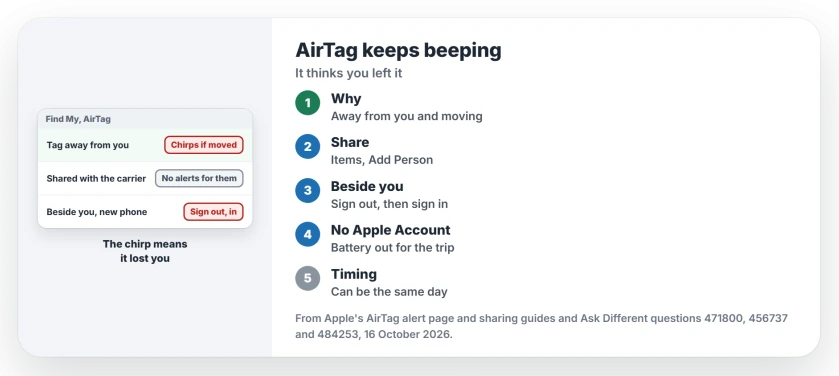
Status: Apple's AirTag alert page (published 24 September 2026) and its sharing guides, set beside five Ask Different questions on 16 October 2026.
Someone else carries it? Share it
If a partner or a friend has the bag, share the AirTag in Find My. Tap Items, choose the tag, then tap Add Person under Share AirTag.
Apple's iPhone guide says "People you're sharing items with don't receive tracking notifications when the items are moving with them". Its safety guide adds that alerts for a shared tag "are suppressed for all sharing group members".
There are limits. The owner and each borrower need iOS 17, iPadOS 17 or macOS 14 or later, and Apple warns "You can't share with a child account".
A Family Sharing member who borrows a tag can also tap the alert and turn off alerts for that tag for a day or for good.
Apple's sharing pages talk about notifications, not the chirp itself. I would test a shared tag on a short trip before trusting it on a long one.
Chirping right beside you? Sign out, then sign in
A tag that chirps while your iPhone sits beside it has lost track of its owner.
One owner hit this after setting up a test iPhone from their own and then erasing it. Every AirTag started "chiming when moved once a day", and Play Sound said the tag was out of reach.
Their fix, in their words: "Signing out from Apple and signing in again resolved the issue". Afterwards they could play sounds again, and "the stalking alert is gone when they are moved".
On your iPhone that is Settings, your name, then Sign Out at the bottom. Know your Apple Account password before you start. If the map also puts the tag in the wrong place, re-pairing it is the next step.
A tag in your car may chirp anyway
Two owners describe a car tag that chirps. One hears it when they drive after a day away from the car, "2-3 times, in total less than 30 seconds".
Another hears it on the drive home with their own iPhone, Mac and iPad in the car. That case does not fit Apple's description, and the thread holds no fix for it.
Signing out and back in is the only owner fix I found for a tag that chirps beside you.
Traveling with someone who has no Apple Account?
Sharing needs an Apple Account. That rules out a partner on Android. The 2024 asker was in exactly that spot.
The top answer gives two choices. Take the battery out, which "stops the beeping and stops the tracking capabilities", or send an Apple device along and share the tag with its account. Put the battery back for the trip home.
A 2026 answer suggested adding the hotel as a safe place under Notify When Left Behind. That setting decides when your iPhone alerts you, so I doubt it silences the tag.
If Find My shows no location for the tag at all, that is a separate problem.
Can you turn off the AirTag sound?
Not in any setting. An answerer wrote that Apple offers no middle option where tracking stays on and the sound stays off. Others pried tags open to remove the speaker, which risks the tag. Sharing is the supported way to quiet it for people you trust.
How long before an AirTag starts beeping?
Apple does not say. An answerer in 2025 found reports from three days down to 24 hours, and others have triggered it within minutes, so plan as if it can happen the same day you hand the bag over.
The Short Version
- An AirTag beeps when it is out of touch with your iPhone and something moves it.
- Lending it out? Share it in Find My; sharing groups get no tracking notifications.
- Chirping right beside you? Sign out in Settings, then sign in again with your account.
- A partner with no Apple Account: take the battery out for the trip.
- Timing is unpublished, so expect it the same day.
Where to Next
Did sharing quiet the tag on your trip, or did it still chirp? Tell me in a comment. Apple's pages only promise silence for notifications, and your reports settle the sound.

Isaac Smith is the founder and editor of PC Glance, a website that covers computers, laptops, and technology. He is a tech enthusiast and a computer geek who loves to share his insights and help his readers make smart choices when buying tech gadgets or laptops. He is always curious and updated about the latest tech trends.