
You erase a Mac you bought second hand, reinstall macOS, and setup stops at a Remote Management screen naming a company you never worked for. Continue asks you to enroll. There is no Skip.
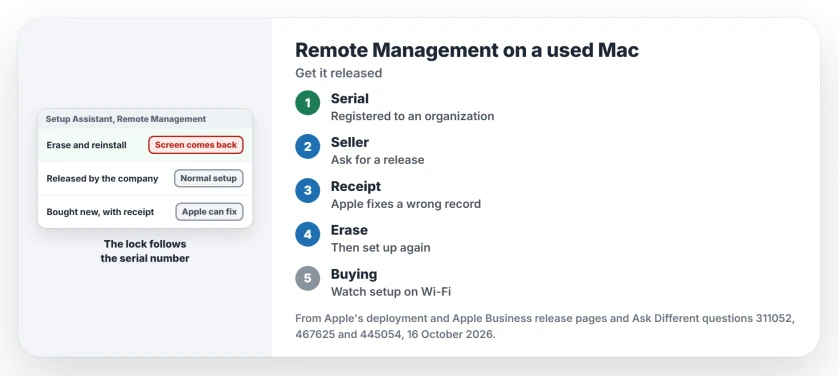
I would contact the seller before you try anything else. This lock lives on Apple's servers, not on the Mac's drive, so another erase will not touch it.
The Ask Different question about this screen has 175,415 views. A second one, on how to tell whether a Mac is enrolled, has 58,118.
What the screen means
The Mac's serial number is registered to an organization through Apple's device enrollment. Apple's own summary: it lets organizations "configure and manage devices from the moment someone removes a device from its box".
Apple's deployment guide explains why erasing fails: "As long as the device remains registered to the organization, when the device is erased, Setup Assistant requires a network connection to proceed with future activations".
The 2018 asker had formatted the drive and used Apple's own installer, yet setup still asked them to join IBM's private network. The accepted answer, with 27 votes: "This cannot be bypassed. You should contact the seller".
Ours: none. With no enrolled Mac to test, this page rests on Apple's deployment guides and owners' threads.
Status: drawn from Apple's deployment and Apple Business pages on 16 October 2026, and six Ask Different threads dated 2017 to 2024.
Ask the seller to have it released
The lasting fix has a name: a release. Apple uses it for an organization removing a Mac from its account, and says "You remove a device from the program if it's been sold, lost, or can't be repaired".
Apple documents the release from the organization's side. Its release steps for Apple Business say organizations "need to release any devices you don't own or control", so a company that sold or gave away the Mac is meant to do it.
An Apple Authorized Reseller can release devices too. Send the seller the serial number and the organization name shown on the screen. After a release, Apple says the Mac "needs to be erased and restored", so erase it and run setup again.
Bought it new from Apple yourself?
Then the record may simply be wrong. A 2023 owner who bought their MacBook from Apple in 2015 met a travel company's enrollment screen while preparing it for sale.
The answer, with 20 votes: "Contact Apple support with your purchase details and ask them to fix the enrollment of the serial number on the affected Mac". The answerer suspected "a clerical mixup on the record keeping".
The same answerer wrote in 2024 that "Apple will assist if you are the original owner and present a verifiable bill of sale". I would find the receipt before you call.
From an old job or a liquidation sale?
Kept a Mac from an old job? Your former employer's IT team holds the key. One owner hit the screen six months after leaving, during a clean install, and the accepted answer was short: "Contact them".
Auctions are harder. A buyer at a liquidation sale got no help from the agent, who said the laptop was sold as seen.
An answerer's view: "The only way to reverse this is for them to have Apple de-register the serial number". Another added that with proof of purchase, "you may convince Apple to do it".
Once the Mac sets up under your own account, switch on Find My Mac so it is protected for you, then bring your files across with Migration Assistant.
Can you skip Remote Management?
Not for long. Apple notes the pane cannot be skipped for a Mac registered in Apple Business or Apple School Manager, and a registered Mac on macOS 14 or later that avoids enrollment gets a full-screen setup screen. Not now hides it for eight hours only. Even owners who posted workarounds say they wear off: one had to redo theirs after a macOS update.
How can you check a used Mac before buying?
Watch it set up. I would ask the seller to erase it and start setup on Wi-Fi while you look on. A registered Mac shows Remote Management, with the organization's name, once it is online, because Apple's setup checks the serial number over the network.
The Short Version
- Remote Management means the serial number is registered to an organization; erasing will not remove it.
- Ask the seller, or the organization named on the screen, to release it in Apple Business.
- Bought it new yourself? Contact Apple with your proof of purchase.
- After a release, erase it and run setup once more.
- Before buying, watch the Mac reach setup on Wi-Fi.
Where to Next
Did the seller release it, or did Apple fix the record from your receipt? Your comment, and the days it took, will help the next buyer stuck on this screen.

Isaac Smith is the founder and editor of PC Glance, a website that covers computers, laptops, and technology. He is a tech enthusiast and a computer geek who loves to share his insights and help his readers make smart choices when buying tech gadgets or laptops. He is always curious and updated about the latest tech trends.