
A Brother printer's Replace Drum message calls for a new drum, not another toner cartridge. On the models here, transfer the usable toner into the replacement drum, then reset its counter with the correct buttons.
Replacing toner alone does not complete that job. The counter reset also has different cover-position requirements on the HL-L2400D and its LCD-equipped relatives, so read the model label first.
Match the printer model before buying the replacement
Search the exact model on Brother Support, then open its Manuals and supplies information. Match every letter and suffix; the cartridge name on a shopping receipt is not the printer model.
Brother documents the replacement and reset procedures for HL-L2400D, HL-L2405W, HL-L2420DW, HL-L2460DW, HL-L2460DWXL and HL-L2865DW. The examples here are limited to that family.
Already fitted a new drum? Perform its counter procedure before ordering another one.
Status: Brother's listed HL-L24xx/HL-L2865DW replacement and counter instructions checked October 25, 2026. The two model groups differ; no printer or consumable was tested.
A different Brother family can use another drum and another button sequence. Use its own replacement chapter. Do not try every reset combination until one appears to clear the display.
For a mark on the page, start with the model's print-quality chapter. The printer streak overview compares affected parts; use this family's dry-only drum instructions for cleaning.
Move the toner cartridge into the new drum unit
Finish any print job. Follow the model's handling precautions and keep the new drum away from direct sunlight or prolonged room light. For the listed family, Brother's replacement chapter starts with the machine turned on.
- Open the front cover and remove the combined toner-cartridge and drum assembly.
- Press down the green lock lever and lift the toner cartridge out of the old drum.
- Unpack the replacement drum. Push the toner cartridge into it until it locks securely.
- Put the combined assembly into the printer and close the front cover.
Keep fingers off the drum's photosensitive surface. Brother's manual forbids liquids on that surface. Reuse the existing toner when it is still serviceable; a new drum does not itself require a new toner cartridge.
The replacement chapter then requires the counter operation. Closing the cover finishes installation of the part, but does not necessarily tell the printer that the drum is new.
Reset the counter with the cover in the correct position
The button sequence is documented by Brother. Perform it only after fitting a new drum. Resetting a used drum falsifies its remaining-life indication.
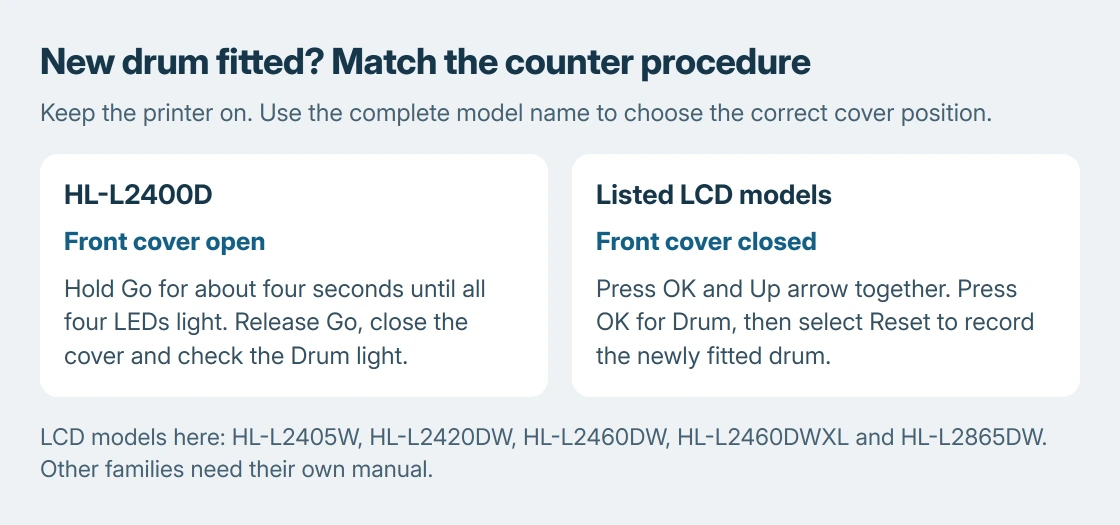
For HL-L2400D, leave the machine on and open its front cover. Hold Go for about four seconds, until all four LEDs light. Release Go, close the cover, and check that the Drum light has gone out.
For HL-L2405W, HL-L2420DW, HL-L2460DW, HL-L2460DWXL and HL-L2865DW, leave the machine on with the cover closed. Press OK + Up arrow together. Press OK for Drum, then select Reset.
If the expected prompt never appears, recheck the complete model and cover position. A sequence for the LED-only printer is not interchangeable with the LCD sequence.
Check the message and the next printed page
Check the printer's own display or Drum light after the reset, then print a small document. A cleared life warning and clean print are separate results; resetting the counter cannot remove a scratch or repair a badly seated assembly.
Microsoft says a Windows test page checks printer communication. In Windows 11, select the printer under Settings > Bluetooth & devices > Printers & scanners, open Printer properties, then General > Print Test Page.
If Windows cannot reach the printer, use the Brother connection procedure for that separate fault. Reinstalling the Windows driver does not perform the printer's drum-life reset.
Our stopping point is a new, correctly matched drum with the proper sequence completed but the warning still present. Contact Brother with the printer model, drum part number and exact message before buying another part.
The Short Version
Match the drum to the printer, transfer the usable toner into the new drum, then reset its counter. HL-L2400D uses Go with the cover open; the listed LCD models use OK and Up arrow with the cover closed. Other models need their own manual.

Isaac Smith is the founder and editor of PC Glance, a website that covers computers, laptops, and technology. He is a tech enthusiast and a computer geek who loves to share his insights and help his readers make smart choices when buying tech gadgets or laptops. He is always curious and updated about the latest tech trends.