
White spots on a phone screen can be software controls or a fixed display fault. First check whether the mark moves or opens a menu; that points to an on-screen control rather than a physical bright patch.
A fixed bright patch that survives app changes and a restart needs a display assessment.
Start by checking the spot's behavior, then turn off only a feature you recognize. Do not press, massage or heat the screen to try to shift a mark inside it.
A persistent panel fault has no confirmed settings-based cure in the sources used here.
Watch whether the spot moves or opens a menu
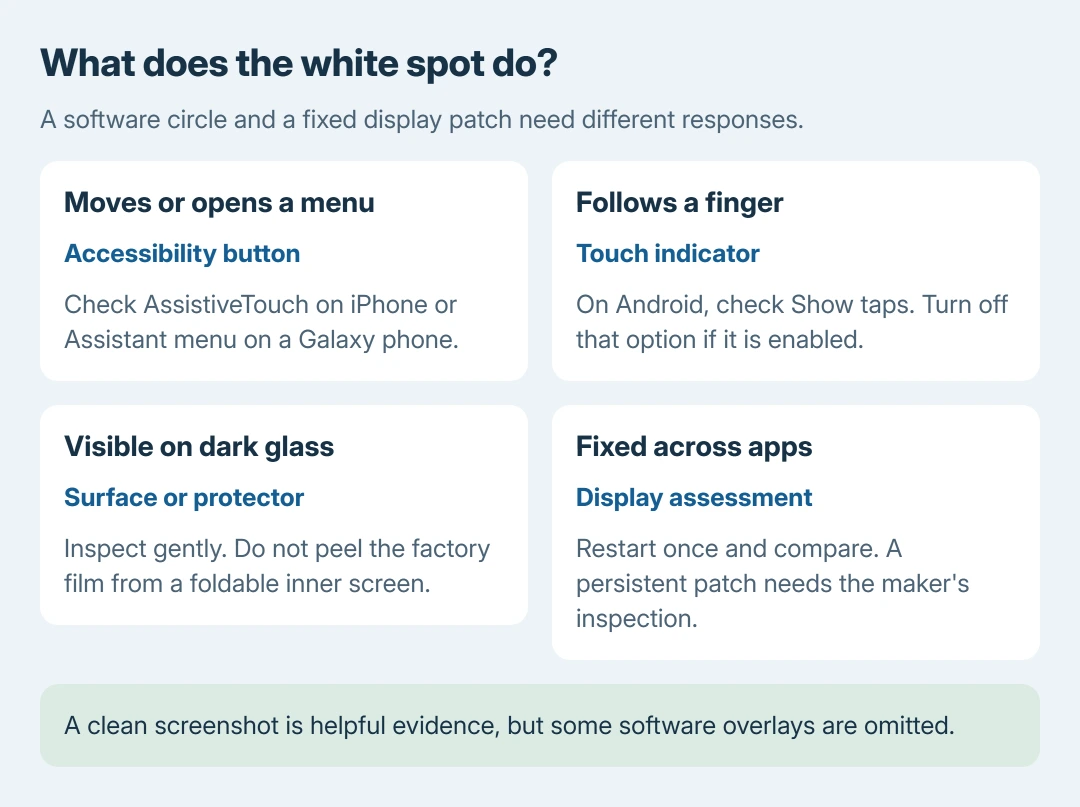
Touch the circle once. If it opens a menu or can be dragged to an edge, check the phone's accessibility controls. A physical bright patch cannot be dragged around the screen like a button.
Apple documents the movable AssistiveTouch button in its AssistiveTouch instructions. On iPhone, open Settings > Accessibility > Touch > AssistiveTouch and switch it off if that is the unwanted circle.
Status: Apple and Samsung accessibility, display-care and repair guidance checked October 27, 2026, with Android's tap-indicator documentation. No phone screen was tested or repaired.
On a Galaxy phone, check Settings > Accessibility > Interaction and dexterity > Assistant menu. Samsung says this feature supplies an on-screen menu of common controls. Disable it only if it matches the button being removed.
Keep an accessibility feature enabled if it is needed to operate the phone. The useful result is the identified button disappearing when its control is switched off, not disabling every accessibility setting.
A circle follows each touch on Android
A dot that appears under a finger and follows movement can be the Show taps developer option. Google's developer-options reference documents that visual feedback.
Search the phone's Settings for Show taps, or open its already-enabled Developer options and find Input > Show taps. Turn that option off, then touch a blank area to check whether the circle has stopped appearing.
Menu location differs by manufacturer. There is no need to enable Developer options merely to search for a fixed white patch. If Show taps was already off, inspect the surface next without changing other developer controls.
Check the surface without pressing the panel
Turn the display off and inspect the glass under ordinary light. A smudge visible on the dark glass can be a surface mark. Apple recommends a soft, slightly damp, lint-free cloth in its iPhone cleaning guidance.
Unplug the phone before cleaning, keep liquid away from openings and wipe gently. Do not scrub a bright point that remains under clean glass. Cleaning can remove material on the surface; it cannot reach inside a sealed display.
Inspect an added protector for a bubble or trapped debris. On a foldable phone, do not peel off the factory inner-screen film. Samsung's foldable film guidance directs users to professional help for that layer.
For the same symptom on a computer, the white spots on a laptop screen page covers laptop hardware. Phone panels, sealed assemblies and accessibility controls require different checks.
Compare apps, then restart once
Open a different app with a plain background and rotate the phone where rotation is supported. Our comparison is whether the mark stays attached to content or remains at the same point on the glass.
Take a screenshot and inspect it on another working screen. A spot included in the saved image suggests something in the rendered content.
A clean screenshot makes a panel or surface issue more plausible, but is not conclusive: some overlays are omitted from captures.
Restart using the phone's ordinary power controls, then check the same area again. A spot limited to one app calls for that app's update or support. A patch still present across apps and during startup needs the device maker's inspection.
For a long colored stripe rather than a dot or patch, the iPhone screen-line guidance deals with that pattern. A screenshot comparison cannot name the component that failed.
Arrange repair for a fixed bright patch
Samsung recommends service for internal display damage, and notes that pressure or impact can damage a panel while the outer glass remains intact. The exact cause still requires inspection.
A small bright point and a broad pale patch are not interchangeable diagnoses. Apple states that OLED produces light at each pixel and has no separate backlight in its Super Retina display explanation.
That matters when a supposed repair involves a backlight reflector: it cannot explain an OLED phone in that way. Avoid opening a glued screen or trying pressure and heat to fix an unidentified mark.
Back up accessible data and photograph the spot with another camera before arranging an assessment. Tell the maker whether it began after impact, pressure, liquid exposure or repair.
Ask what warranty or accidental-damage coverage applies before authorizing work.
The Short Version
Remove an identified floating control or tap indicator through its own setting. Clean surface debris gently.
A fixed patch that persists after changing apps and restarting needs inspection; a screenshot comparison guides the next step without proving a particular hardware failure.

Isaac Smith is the founder and editor of PC Glance, a website that covers computers, laptops, and technology. He is a tech enthusiast and a computer geek who loves to share his insights and help his readers make smart choices when buying tech gadgets or laptops. He is always curious and updated about the latest tech trends.