
No Signal followed by power-saving mode on an LG monitor means the screen has not received a usable video signal. Start by waking the computer and selecting the monitor input that matches the cable.
The message appearing briefly does not establish a failed panel. A sleeping computer, wrong input or interrupted connection can leave the monitor waiting for video.
Read the monitor's own message first
Try waking the PC with a keypress or mouse movement. Then use the LG monitor's physical button or joystick to open its menu. The control's location varies by model, so check its manual if necessary.
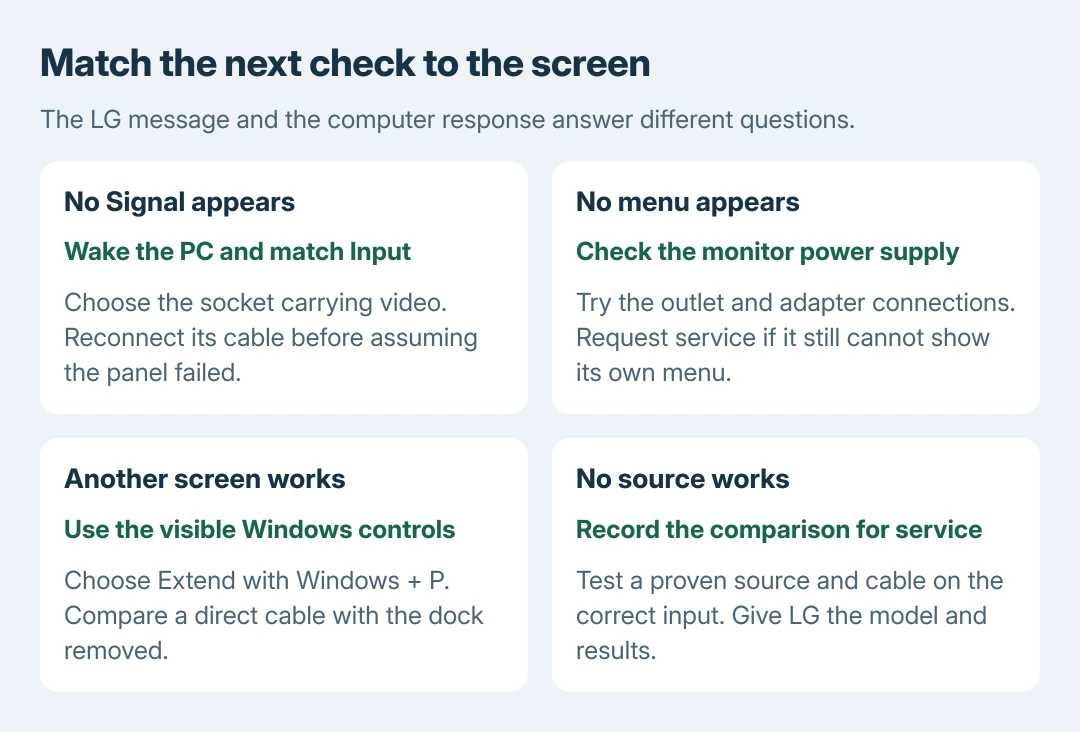
The input and connection checks are documented by the vendor. Select Input, then pick the cable's socket. For example, a cable in HDMI 1 requires that input.
Status: LG's August 2026 monitor guidance and Microsoft's external-display checks reviewed October 28, 2026. Control layouts vary. No LG monitor tested.
Read the label beside the cable socket. HDMI 1 and HDMI 2 are separate inputs. Selecting an unused one leaves a powered monitor without a picture from the computer.
If the monitor cannot show even its own menu or message, check the outlet and firmly reconnect its power adapter. A missing menu needs this power check first. Request LG service if it remains unresponsive.
Reconnect the signal path before changing Windows
Switch the computer and monitor off, then disconnect the video lead from each device and reconnect it firmly. Inspect the connectors for damage. Try another compatible cable if available, preferably one already working with another screen.
On a desktop with a separate graphics card, connect to that card's video output. The motherboard's display sockets can belong to a different graphics device and may be inactive in the current configuration.
A dock or adapter adds another possible failure point. Microsoft documents comparing a direct display connection with adapters and accessories removed.
Use a direct connection only when the computer's port supports that display connection. Some USB-C connections carry no video despite their matching shape. Check the computer and cable specifications before buying an adapter.
Check whether the computer is responding
On a keyboard with a Num Lock indicator, press Num Lock and watch whether the light changes. LG includes this check because an unresponsive PC can stop supplying the expected picture.
A changing light is useful evidence of input response, not proof that the graphics output works. No light response also needs context: some keyboards lack the indicator or may themselves be disconnected.
If the computer is frozen, restart normally through another working screen when possible. Use a forced shutdown only when normal control is unavailable; unsaved work can disappear. Then check whether a startup picture returns.
On Windows with a working laptop screen or spare monitor, press Windows + P and choose Extend for the additional display. Avoid navigating invisible menus by guesswork.
An LG that works from startup but loses video specifically after sleep needs the monitor wake troubleshooting. Record that timing instead of treating every No Signal event as identical.
Compare another source and send the useful result to support
Try the LG with a known working computer and compatible cable, choosing the correct input again. Alternatively, test the original computer with a working spare monitor.
This comparison order is ours. A screen that works with another source suggests checking the original PC and its connection equipment. Failure with a proven source and cable gives LG a more useful service report than the message alone.
If Windows is running but the additional display remains absent, use the second-monitor detection checks. Include which display works and whether Windows detects the LG at all.
For persistent failure, send LG or the PC manufacturer the exact models, selected input and comparison results. Do not buy a replacement panel or graphics card solely because the screen entered standby.
The Short Version
Start with the source awake and the correct monitor input selected, then inspect the connection. Use the graphics card's output when fitted. Compare another source or screen, then direct the service request to the side that still fails.

Isaac Smith is the founder and editor of PC Glance, a website that covers computers, laptops, and technology. He is a tech enthusiast and a computer geek who loves to share his insights and help his readers make smart choices when buying tech gadgets or laptops. He is always curious and updated about the latest tech trends.