
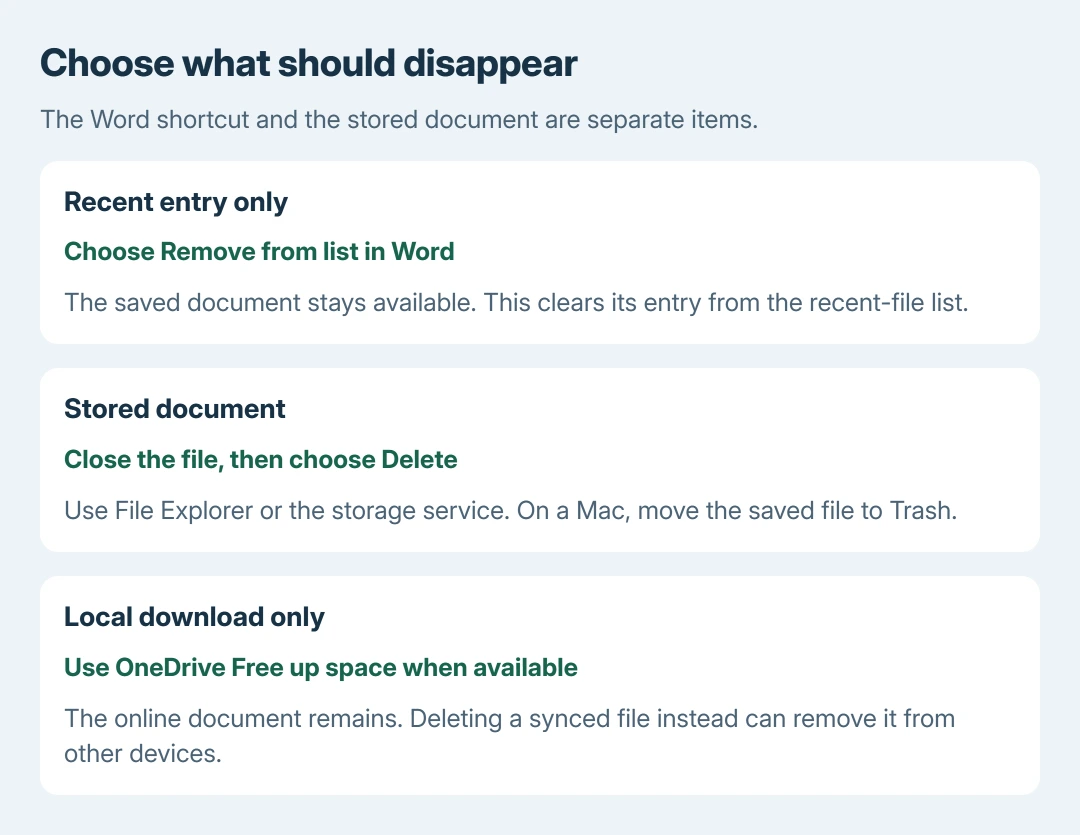
Deleting a Word document means removing its saved file. Close it, find the correct file in Windows File Explorer, and select Delete. Choosing Remove from list in Word only clears its Recent entry and keeps the document.
Check the saved location first. A OneDrive document can disappear from other synced devices when deleted, while a local copy and a separately saved duplicate are different files.
Choose whether the file should still exist
If the document must remain available, use Word's File > Open list, right-click the entry and choose Remove from list. Microsoft says this changes the recent-file list rather than deleting the saved document.
Its Recent files guidance distinguishes that command from Delete file. Read the command before confirming; they have different consequences.
Status: Word file deletion, Recent-list behavior, OneDrive deletion and Mac Trash instructions checked October 28, 2026. No document deleted for this guide.
If only one page inside the document is unwanted, use the Word blank-page removal checks. Removing a complete document cannot preserve its other pages.
For a document that really should be discarded, continue with its stored file. Keep a separately named Word copy first if any content must survive.
Delete the saved file on Windows
Close the document in Word and any other program using it. Microsoft documents this prerequisite in its file-deletion instructions. An open file can remain locked against deletion.
- Press Windows + E to open File Explorer.
- Open the folder containing the document. Check its filename and saved location, particularly when Documents and OneDrive contain similar copies.
- Select the intended .docx or .doc file, then press Delete or use its right-click Delete command.
- Read any confirmation and check that the intended item disappears from that folder.
A normal local deletion can move the file to the Recycle Bin. Do not assume every location offers that recovery: network storage, removable media and permanent-deletion choices can behave differently.
Leave the Recycle Bin alone until certain the right document was removed. Emptying it is an additional action, not a requirement for clearing a document from its original folder.
For OneDrive, decide between deletion and local space cleanup
Deleting a synced file is different from removing its downloaded copy. Microsoft explains in its OneDrive deletion guidance that deleting from OneDrive affects the online file and connected devices.
To remove that document deliberately, sign in to OneDrive on the web, locate the correct file, select it and choose Delete. Check the account and folder before confirming, especially with shared work.
To keep the online document while reclaiming local disk space, choose Free up space on a synced file where Files On-Demand is available. Do not use Delete for that goal.
A shared document may belong to someone else or be protected by your organization's permissions. Ask the owner or administrator when deletion is unavailable. Removing your Recent shortcut cannot remove their original.
On a Mac, move the document to Trash
Close the document, select its saved file in Finder and choose File > Move to Trash, or press Command + Delete. Apple's file-removal guide documents the Finder procedure.
The document leaves its original folder. It remains recoverable through Trash until that copy is removed there. Check whether the folder syncs with a cloud service before assuming the change affects only the Mac.
Emptying Trash is separate. Keep that step for a deliberate cleanup after confirming what was removed, rather than adding it automatically to every document deletion.
Handle a refusal or an accidental deletion
For an in-use message, close the app holding the document. For a permission error on shared storage, contact its owner. Avoid changing ownership or disabling work policies just to remove a file.
If the wrong local file was deleted, open the Recycle Bin or Trash and restore it before further cleanup. Cloud files have their service's own recycle bin. Recovery availability depends on the location and its retention rules.
Our recommendation is ours: preserve the exact error and file location when asking IT for help. Those details separate an app lock, a permission restriction and an online file that reappears through synchronization.
The Short Version
Remove from list keeps the document and hides its Word shortcut. To delete the file, close it and use File Explorer, Finder or its cloud storage. Check synced locations and keep recovery bins intact until the choice is certain.

Isaac Smith is the founder and editor of PC Glance, a website that covers computers, laptops, and technology. He is a tech enthusiast and a computer geek who loves to share his insights and help his readers make smart choices when buying tech gadgets or laptops. He is always curious and updated about the latest tech trends.