
A Xiaomi screen problem with missed taps or touches that happen by themselves needs an input check. Start with dry fingers, a clean screen and the charger disconnected. Xiaomi also provides a built-in CIT touchscreen test.
That test addresses touch response. A permanent colored line, cracked glass or a completely dark display needs a different assessment, and CIT cannot run when the phone's controls are inaccessible.
Remove the conditions that can disturb touch
Check for cracks or liquid damage first. Stop testing damaged hardware and ask Xiaomi about inspection. With an intact screen, dry your hands and wipe away moisture before repeating the same tap or swipe.
Remove a third-party case or screen protector if it interferes with touch. Compare the phone while it is disconnected from charging. Xiaomi's accessory and charging checks cover both conditions.
Status: Xiaomi's CIT touchscreen procedure and Google's Android screen checks reviewed October 28, 2026. Test availability varies by model. No Xiaomi phone was used.
If touch works unplugged but fails while charging, compare the original compatible cable, adapter and a stable power source. Do not keep using a damaged charger. This comparison identifies the charging condition that needs attention.
If the fault remains with those conditions removed, continue to the built-in test. General phone touch-response checks cover other causes, but iPhone button combinations do not apply to a Xiaomi handset.
Open CIT and check the affected area
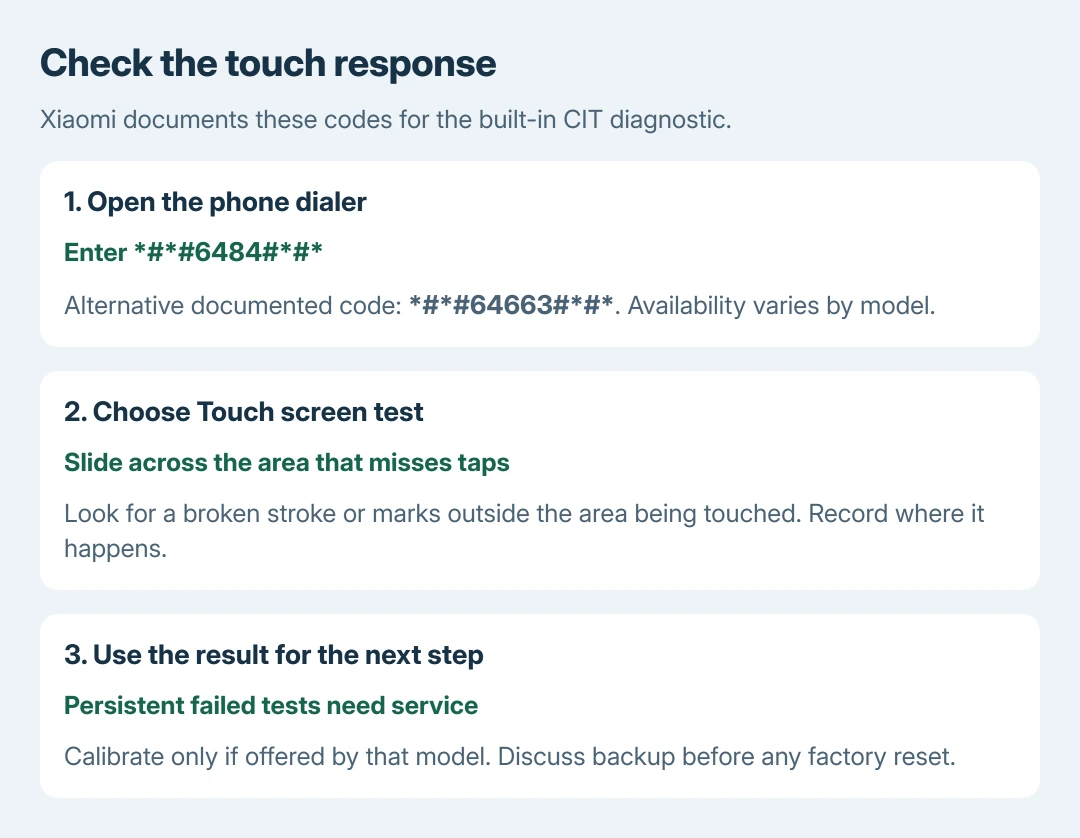
The current Xiaomi diagnostic codes are documented by the vendor. Open the phone's dialer and enter either code:
*#*#6484#*#**#*#64663#*#*Use the available Touch screen test entry. Menu names and available tests differ between models. If neither code opens the diagnostic, consult the exact model's support information rather than trying unrelated service codes.
Slide a finger through the area that misses taps. Look for breaks where the stroke should continue, or extra marks where the screen was not touched. Record the position and result for service.
Some models offer calibration. Use it only when the diagnostic actually provides it, and follow the displayed instruction to leave the screen untouched until calibration finishes. Do not assume every Xiaomi phone has that option.
The recommendation is ours: leave unrelated items in the diagnostic menu alone. Record touch behavior without adjusting other sensors or erasing the handset.
Compare a single app with the rest of the phone
Test the same screen area in another app or in Settings. If only one application misses input, preserve its unsynced data before following Xiaomi's uninstall-and-reinstall advice for an app-specific fault.
Google says in its Android screen guidance that safe mode can help check downloaded apps. Use Xiaomi's model-specific safe-mode instructions; the entry method is not universal across Android phones.
A normal CIT result and an app-specific failure support checking that app first. They do not certify that an intermittent touch fault is repaired. Note whether the issue returns in ordinary use.
Use the result to choose software help or repair
Xiaomi lists updating the phone's software and, after backup, testing a factory reset without restoring the backup among later options. A reset erases local data. Check the Android backup contents before considering it.
For failed tests, unsuccessful calibration or persistent trouble, contact Xiaomi's local service center. Explain any charging-only trigger, the affected area and what CIT showed. Cracks or liquid damage also need service.
When touch is completely dead, do not assume an erase is the only route to repair. Tell the technician that data is not yet backed up and ask about preservation before authorizing work.
Permanent display lines or a dark panel need display assessment rather than repeated touch calibration. A test that cannot be opened provides no result about the screen's health.
The Short Version
Check moisture, accessories and charging first. Record missing or extra strokes in Xiaomi's CIT test when accessible, and compare app-specific behavior. Persistent faults need service, with data preservation discussed first.

Isaac Smith is the founder and editor of PC Glance, a website that covers computers, laptops, and technology. He is a tech enthusiast and a computer geek who loves to share his insights and help his readers make smart choices when buying tech gadgets or laptops. He is always curious and updated about the latest tech trends.