
An old Android phone unable to connect to Google may have hit a sign-in limit. Google blocks device sign-in on Android 2.3.7 and earlier, so check the version before resetting the phone or changing a working password.
Newer old devices have different limits. Android 3.0 to 4.4 can still accept an existing Google Account under Google's published guidance, but cannot create one through Settings. Google Play services has a separate support requirement.
Read the Android version before choosing a fix
Open Settings, then look for About phone or About tablet and Android version. Manufacturer menus differ, especially on older phones. Record the full version number, not just the model name or security-patch date.
Google's Android version instructions distinguish these entries. A phone's age alone cannot tell whether the problem is blocked sign-in, account creation or an outdated app service.
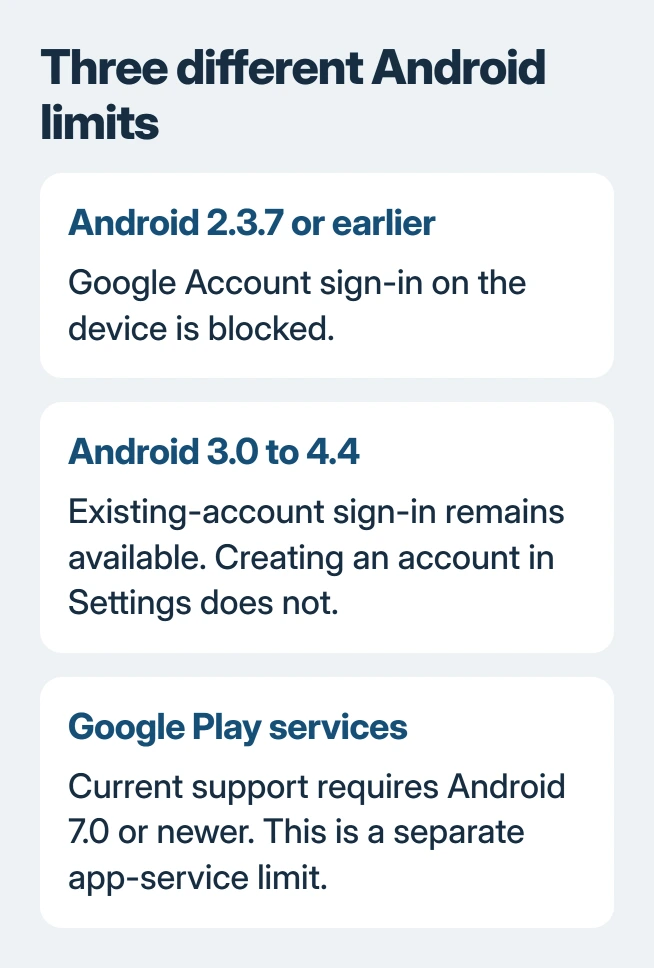
Status: Google's old-Android sign-in, account-creation and Play services limits checked November 2, 2026. These are separate restrictions; no phone or account was tested.
If ordinary websites also fail, first check the phone's Wi-Fi connection. A working connection is needed for sign-in, but reconnecting Wi-Fi cannot remove a version-based account restriction.
Android 2.3.7 or earlier: use another route to the account
Google says account sign-in is blocked on these versions in its old-device access notice. The failure can appear as a username or password error even when the credentials work elsewhere.
Deleting the account from the phone and then re-adding it encounters the same restriction. A factory reset also leaves the old Android version in place and can put the phone back at a sign-in screen it cannot complete.
Check the manufacturer's update instructions for the exact model. Google's notice recommends updating to Android 3.0 or later where possible, but that historical sign-in threshold is not a promise that current Google apps will run.
Google offers browser access as an alternative for some services. Open myaccount.google.com in the phone's browser to try account access, or mail.google.com for Gmail.
If the browser itself cannot sign in, use a current browser on another supported device. Google's browser requirements say older browser versions can be unsupported; the web fallback is not guaranteed on every old handset.
Android 3.0 to 4.4: separate creating an account from signing in
Trying to create a new account inside Settings can produce a username or email-address error. Google states in its account-creation guidance that this route is unavailable on Android 4.4 and earlier.
For Android 3.0 through 4.4, use an existing Google Account instead. If a new account is needed, create it at accounts.google.com/signup in a supported browser, then add the completed account to the phone.
This distinction matters: account creation and device sign-in are separate operations. Creating an account elsewhere does not make Android 2.3.7 capable of signing in; that earlier version remains subject to the first restriction.
Check whether Google Play services is still supported
Google Play services helps apps connect to features such as Google Sign-In. It is separate from the Play Store and from the Android system version.
Google's current Play services help lists Android 7.0 or newer as its supported range. An account that can be added under the older sign-in rule does not guarantee a supported Play services installation.
On an older version, ask the manufacturer whether a supported system update exists. Repeatedly clearing app storage cannot raise the Android version or restore official support to an unsupported release.
For a supported phone, use Google's update instructions for Play services before considering its storage-reset steps. Google adds that clearing service data can remove saved information and require signing in again.
Preserve local files when the phone has no supported update
Check which photos, contacts and other files exist only on the old device before replacing or erasing it. The Android backup coverage guide explains why one backup indicator does not cover every kind of data.
Confirm important copies from another device rather than assuming a failing Google connection uploaded them. Ask the manufacturer about local transfer options if account access no longer works on the handset.
If a supported phone rejects a working account, report its error, Android version and browser sign-in result to Google support. Those details help distinguish an account fault from an unsupported device.
The Short Version
Read the Android version, then distinguish blocked device sign-in, blocked account creation and unsupported Play services. Use a supported browser or newer device where needed, and confirm saved files before retiring the old phone.

Isaac Smith is the founder and editor of PC Glance, a website that covers computers, laptops, and technology. He is a tech enthusiast and a computer geek who loves to share his insights and help his readers make smart choices when buying tech gadgets or laptops. He is always curious and updated about the latest tech trends.