
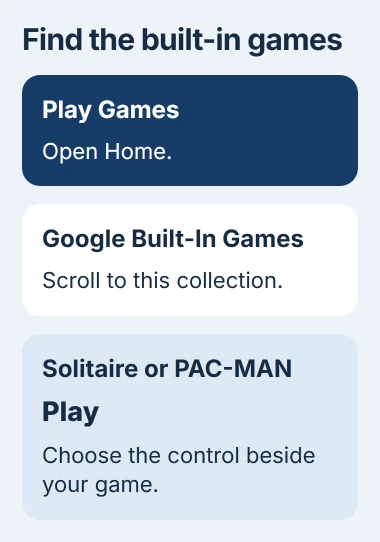
Solitaire, Minesweeper, Snake, PAC-MAN, Cricket and Whirlybird are offline Android games included in Google Play Games. Open that app's Home tab and look for Google Built-In Games, then choose Play beside a game.
Set up the app while you're online. Some Android phones also offer Instant Games, a separate collection with limits on what you can save offline. For a simple game to play on a trip, start with the built-in collection.
Start with the games inside Play Games
Open Google Play Games on your Android phone or tablet. This is separate from the Google Play Store, where you install apps. If Play Games isn't installed, find the version published by Google LLC in the Play Store.
Google lists these six titles as playable offline in the app's official listing. They give you a choice of card, puzzle and arcade games without searching through unrelated downloads.
| Game | What you play |
|---|---|
| Solitaire | A card game for arranging the deck. |
| Minesweeper | A puzzle about choosing safe squares. |
| Snake | A growing snake that you steer around the play area. |
| PAC-MAN | A maze game with dots to collect and ghosts to avoid. |
| Cricket | A short batting game. |
| Whirlybird | An arcade game about keeping a flying character moving. |
Inside Play Games, tap Home and scroll to Google Built-In Games. Tap Play for the title you want. That route is also in the built-in game instructions.
Stick to that collection if you want these offline games. Play Games also advertises separate games you can download, and their developers decide whether you need internet access to play.
I'd open the game I want before leaving home. That gives you time to finish an app update or any first-use setup while a working connection is available.
Check offline play before the journey
While you're online, start a round and try the controls, then go back to the phone's Home screen. This checks that you've opened a game you can play, rather than a preview or store description.
Open the phone's Settings and switch on Airplane mode under Network & internet or Connections. Turn Wi-Fi off too. On a Pixel, the network settings hold both controls.
Check Wi-Fi separately because Android can remember that you kept it on in Airplane mode. The airplane symbol can appear while Wi-Fi still provides an internet connection.
Reopen Play Games and launch your chosen game. Try playing past the opening screen with both connections off. If it works, you know that part of the game is available offline.
When you're done checking, turn Airplane mode off and reconnect as usual so you can receive ordinary cellular calls and messages again.
If it asks for internet access, note when: as you open the app, start the game or load another section. That helps you work out whether you still need to finish setup or that part of the game needs a connection.
Use Instant Games only when your phone offers it
Some Android phones have Instant Games, previously called Mini Games, where you find your apps. These are separate from Play Games' built-in collection. You'll find their settings through the phone's Home screen.
Touch an unused area of your Home screen and hold until options appear. Open Home Settings and look for Add Instant Games. If both the tab and that setting are missing, your phone model doesn't support the feature.
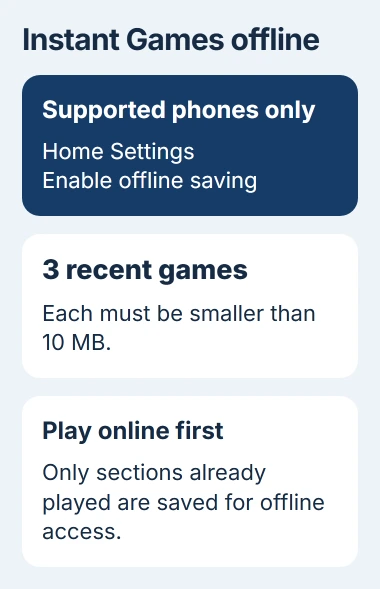
On a supported phone, turn on Enable offline saving in Home Settings. Play a suitable game online first so your phone can save what it needs. It can't prepare those files if you first open the game without a connection.
Use the Available offline filter in Instant Games to find games you can save. The offline-saving instructions say you can keep three recently played games, each smaller than 10 MB.
The Continue Playing section can show ten recent games, even though only three can be saved offline. A game can stay in that list while being too large to save for play without internet access.
Offline saving keeps only the sections you've already played online. If a later section won't load on your trip, connect to the internet when you can and play that part to prepare it.
Keep saved progress separate from offline access
Playing offline and saving progress to an online account are separate features. A game can work without internet on your phone, while sending your progress to another phone still needs a connection.
For a game you've downloaded separately, read the developer's description for offline play and account requirements. Being installed, free or single-player doesn't tell you whether it can open without internet access.
Before replacing your phone or removing a game, check its save and account controls. As the Android backup guide explains, a phone backup doesn't always include your game progress.
Keep the game set up as it was when your offline check worked. Clearing its storage can erase progress saved on the phone or content you downloaded for the game.
Instant Games saves copies for offline play, which differ from full game installations. A game you install from the store won't join that tab, and the tab's three-game limit doesn't apply to all installed Android games.
Fix an app that won't open even while online
Reconnect to the internet if you've been checking offline play. If Play Games still won't open, check for updates in the Play Store: tap your profile picture, open Manage apps & device, and review what's available.
Restart the phone after updating, then try Play Games again. For a single frozen app, open its App info screen through Settings and use Force stop, then reopen it. The exact app-settings route varies by phone.
If apps are closing across the phone, use the Android app-crash checks. Fix crashes affecting several apps before relying on a game for your trip.
Google recommends contacting the developer when one app still fails while others work. Report the phone model, Android version, app version and the screen where it stops. For Play Games itself, use Google Play support.
If only a separate game's online features fail, ask its developer which modes work offline. For this trip, it may be easier to choose a built-in game than change your phone's network or account setup.
The Short Version
Start with Play Games' built-in titles and try one with Wi-Fi and cellular data off. Instant Games can save a few games on supported phones, but has limits on size and saved sections. Open and prepare your game before traveling.
Checked November 4, 2026.

Isaac Smith is the founder and editor of PC Glance, a website that covers computers, laptops, and technology. He is a tech enthusiast and a computer geek who loves to share his insights and help his readers make smart choices when buying tech gadgets or laptops. He is always curious and updated about the latest tech trends.