
For RDR2 keyboard input lag that makes desktop typing crawl while the game is open, enable Disable Windows key in Rockstar Games Launcher's settings. Restart the launcher and game, then use Alt+Tab to check typing in another window.
This has helped players whose game runs smoothly but typing lags in chat or a browser. If your whole game stutters, or typing is slow even with RDR2 closed, the first check will help you tell those problems apart.
1. Confirm the delay follows RDR2
Close the game and type a short sentence in Notepad. Leave Notepad open, launch RDR2, and use Alt+Tab to return to it. Type again and watch whether letters appear immediately or continue arriving after you've stopped.
Microsoft's Windows shortcut reference lists Alt+Tab for switching between open apps. Leave Notepad open so you have a typing window to switch back to.
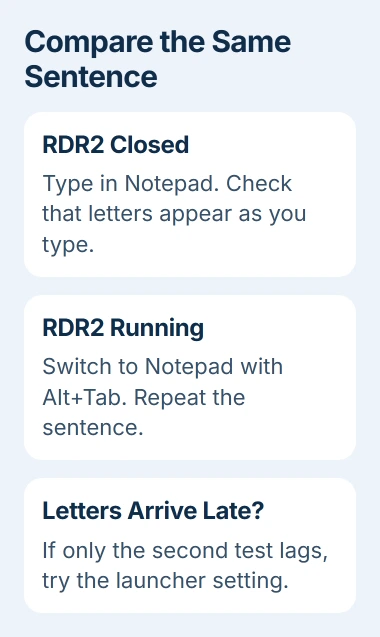
If typing is slow in both tests, start with the Windows keyboard-lag checks. A launcher setting won't explain a delay that's already there before you start the game.
If typing works but online players teleport or your actions take time to register, check game connection latency, the delay in sending data over the network. That's separate from letters arriving late in Notepad.
Note whether the delay happens in Story Mode, Red Dead Online or both. The benchmark workaround later in this guide isn't available in every edition, and a fix that works now may need repeating next time you play.
2. Enable Disable Windows key in the launcher
Exit RDR2 through its menu. Open Rockstar Games Launcher, select Settings, then General. Find Disable Windows key and enable it. Leave the box checked, even though the setting's name starts with Disable.
Close and reopen the launcher, then start the game again. If you normally launch through Steam, use that same route for the comparison. Test the same Notepad sentence once you're back in the game.
Players in a Steam discussion said this setting fixed the typing delay, including a follow-up in March 2026. Use the Notepad test to see whether the workaround helps on your PC too.
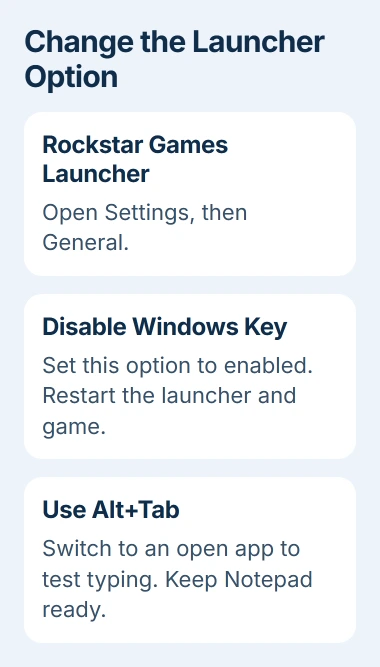
With this setting on, you can't use the Windows key to leave the game as usual. Press Alt+Tab to switch to Notepad or another open app, then check whether the Windows key works outside the game.
I'd try this before replacing your keyboard or changing graphics drivers. It's helped with this specific typing problem, and you can check whether it works without changing the game's picture quality.
If the setting was already on, restart the launcher and test again. If typing still lags, try the next step instead of repeatedly switching the checkbox on and off.
3. Try minimizing the launcher during startup
In the launcher's Settings > General, enable Minimize on close if available. Start RDR2, then close the launcher window so that it minimizes while the game continues loading.
Close the window without ending any launcher processes in Task Manager. Once the game reaches its menu, switch back to your typing window and see whether letters respond normally.
In an earlier part of the discussion, one owner shared this combination and another said it worked. Try it if the Windows-key setting alone hasn't helped.
If closing the window asks to quit the launcher and game, cancel and check the minimize setting. Keep the game running for the typing test, since that's when the delay happens.
Keep your game settings as they are during this test. That way, you can tell whether minimizing the launcher window made the difference.
4. Use the benchmark workaround if your edition offers it
From RDR2's main menu, open Settings > Graphics. Look for Run Benchmark Tests; players reported an X keyboard prompt beside it on PC. Start the benchmark and let a scene run briefly.
Cancel the benchmark using its on-screen control, return to the menu and load the game. Then repeat the typing comparison. This workaround only lasts for the current session, so the delay can return the next time you launch RDR2.
The standalone Red Dead Online edition may not show the benchmark control. If it's missing, skip this step; I wouldn't buy Story Mode just to try fixing delayed typing.
Check the in-game display afterward too. Some players lost stamina or horse icons after trying the benchmark. If that happens, restart the game and stop using this workaround.
One suggestion was to load Story Mode and return to the menu, but another player said that didn't fix the delay. You can't count on it as a substitute for a missing benchmark button.
If the workarounds fail or the delay comes back
If the game itself is slow too, check that separately. Switching display mode or lowering graphics quality may improve how smoothly the game runs without fixing the typing delay in another app.
Some attempts failed: one player still had the delay after disabling NVIDIA's low-latency setting and after reinstalling the launcher. Another had already switched to a borderless display mode and still had trouble.
The discussion's title says patched, but later replies still report the delay, including players who then fixed typing with the Windows-key setting. Check the result on your PC before treating the problem as fixed.
Leave your saves alone and skip script loaders, tools that load extra game code. These launcher and benchmark checks don't need changes to saved progress or an installed mod, which matters especially for online play.
If the delay continues, send Rockstar Support your game and launcher versions, PC hardware details, and test results. Explain whether typing outside the game slows down and which game mode causes it.
A short recording of the Notepad delay while RDR2 runs can help explain the problem. Type harmless sample text. If typing returns to normal after you close the game, show that comparison too.
The Short Version
For typing that slows only while RDR2 runs, check the launcher's Windows-key setting first. Minimize the launcher if needed, then try the benchmark where available. Report recurring faults with a clear before-and-after typing comparison.
Checked November 4, 2026.

Isaac Smith is the founder and editor of PC Glance, a website that covers computers, laptops, and technology. He is a tech enthusiast and a computer geek who loves to share his insights and help his readers make smart choices when buying tech gadgets or laptops. He is always curious and updated about the latest tech trends.