
Your Mac joins your iPhone's Personal Hotspot, the Wi-Fi menu shows it connected, and no page loads. Open the connection's details, and the Mac reports a Self-assigned IP.
I would check one Mac setting before you spend an hour with your carrier. The fixes that worked for owners sit at two opposite ends: a menu on the Mac, and a switch only the carrier can flip.
Asked in September 2021, that Ask Different question now has 20,551 views. Owners were still adding fixes in March 2026.
What self-assigned means here
The phone handed out an address, just not the kind your Mac needed. The 2021 asker, on an iPhone X, got an IPv6 address from the hotspot while the IPv4 address stayed self-assigned.
A self-assigned address starts with 169.254 and reaches nothing outside your own link. The Mac makes one up when no proper IPv4 address arrives, so the fault is in that handover.
Ours: none. With no iPhone or Mac at hand, I built this from Apple's Personal Hotspot and TCP/IP pages plus the owners on Ask Different.
Status: Apple's Personal Hotspot and TCP/IP pages checked 16 October 2026; the IPv6 menu fix is one owner's 2024 result on two Macs.
Set Configure IPv6 to Automatically
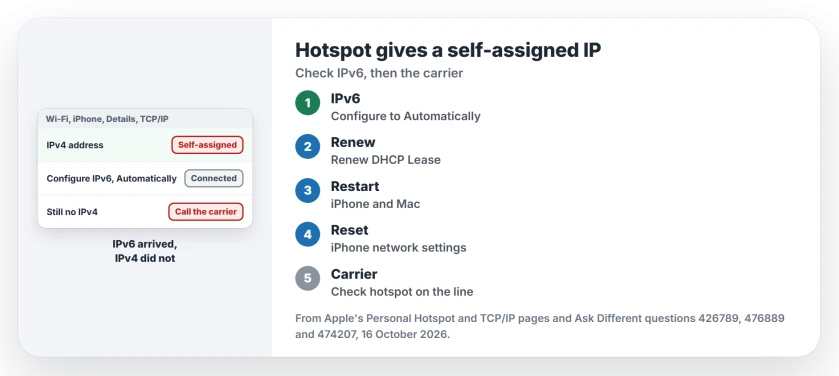
Connect to the hotspot first. Open System Settings, choose Wi-Fi, and click Details next to the iPhone's network. Click TCP/IP and look at Configure IPv6.
An owner with a MacBook Pro on macOS 14.3.1 and an iPhone 15 Pro found theirs on Manually. Their wife's Mac was on Link-Local Only. Both set to Automatically, and in their words "they connected to the hotspot flawlessly."
Apple's TCP/IP page explains the choices. Automatically is for when "you receive an IPv6 address automatically", and Link-local only is meant "to limit IPv6 traffic to the local network". Click OK and apply the change.
On the same screen, Renew DHCP Lease asks for a fresh address in a second. One owner tried it with no luck.
Restart both, then reset the iPhone's network settings
Apple says to restart the iPhone and the device that joins it. Then open Settings, tap General, then Transfer or Reset iPhone, and choose Reset Network Settings under Reset.
That reset is broader than it sounds. Apple's page warns it also wipes saved Wi-Fi passwords, cellular and VPN settings, and your APN settings. The 2021 asker had already tried it, plus a new hotspot name, and still got no IPv4 address.
When only the carrier can fix it
The 2021 asker went to Apple Support, and in their words, "I was informed that this is a setting the Telco/Carrier controls". Their carrier had upgraded equipment, and the new setup was now the default.
Reaching the right staff took over two weeks. Then "the issue was fixed in less than 15 minutes".
An AT&T owner had the same fault in 2024. The cause there was "a SOC (service order code) for the hotspot feature was missing from my line".
Apple's hotspot page sends you to the carrier too, when the hotspot will not turn on, to check your plan includes it. Ask them to check hotspot provisioning on your line. Say you get IPv6 but no IPv4.
Works after a restart, fails after a reconnect?
A different pattern from 2024: an M1 Mac on Sonoma got online on its first hotspot join after a restart, then lost it on every reconnect. The owner quoted Apple's text for that icon: "No internet. This icon is displayed when a router and IP address can't be assigned to the Wi-Fi interface."
Their first try is Wireless Diagnostics, or sudo wdutil diagnose -q in Terminal. When that fails, a restart of the Mac always worked for them. I would start with Wireless Diagnostics, since it is built in and quick.
Can I type a static address instead?
One owner did, in 2026, on Android phones and Linux machines joined to an iPhone SE. They used IP 172.20.10.2, gateway 172.20.10.1, prefix length 28, and their own DNS servers. The hotspot then worked.
On a Mac those fields sit under Configure IPv4, Manually, on the TCP/IP screen. We have not tested that on a Mac. Undo it if you still have no internet.
Does USB tethering avoid it?
Not for two owners. Both saw the same failure over the cable. If your hotspot works but keeps dropping, our page on an iPhone hotspot that keeps disconnecting is the closer fit. If the switch itself is gray on your iPhone, see why Personal Hotspot is grayed out.
The Short Version
- Self-assigned IP means no IPv4 address came from the iPhone.
- On the Mac, set Configure IPv6 to Automatically in the network's TCP/IP details.
- Restart both devices, then reset network settings on the iPhone.
- Still nothing? Ask your carrier to check hotspot on your line; it fixed two owners.
- Fails only after reconnecting? Run Wireless Diagnostics, then restart the Mac.
Where to Next
IPv6 menu or carrier call: what got your Mac online? Tell me your carrier, and I will note the networks that hand out IPv6 only.

Isaac Smith is the founder and editor of PC Glance, a website that covers computers, laptops, and technology. He is a tech enthusiast and a computer geek who loves to share his insights and help his readers make smart choices when buying tech gadgets or laptops. He is always curious and updated about the latest tech trends.