
You scroll your YouTube Home feed on your phone, and the videos are not there. Gray boxes or black gaps sit where the thumbnails should be. The menus look normal.
YouTube listed it as a known issue on 27 September. It was fixed a day later. I would force-quit the app first. That is YouTube's own advice.
The thread on YouTube's help forum has 8,628 upvotes and 1,017 replies.
What YouTube says happened
Ameya from TeamYouTube described the symptoms: "you may see blank or black gaps, or grayed-out boxes instead of video thumbnails, posts, and Shorts as you scroll."
The navigation bars and app icons kept loading. It hit the Home and Subscriptions feeds and profile pages. In their words, "This issue specifically impacts mobile app users on Android and iOS devices."
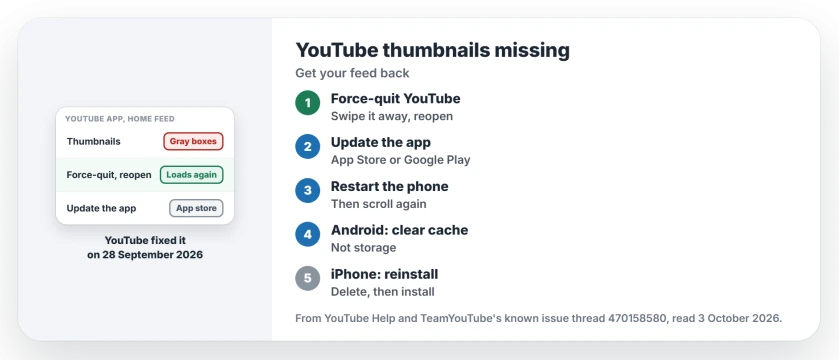
Status: checked 3 October 2026. YouTube marked it fixed on 28 September. If gaps remain, YouTube says force-quit the app; an update fixed it for one owner.
1. Force-quit the app and open it again
The fix notice of 28 September reads: "This issue is now fixed! You should see video thumbnails and content load normally while scrolling again."
For anyone still stuck, YouTube added: "If you are still seeing blank spaces, please try force-quitting and restarting the YouTube app." Swipe it away rather than just leaving it.
On an iPhone, open the app switcher with a slow upward swipe from the screen's lower edge, then flick YouTube off the top. On older models, double-press the Home button first.
On Android, open recent apps and swipe YouTube away, or use Force stop in its App info page.
2. Update the YouTube app
Before the fix, YouTube's own workaround was the app store. It wrote: "Some users have reported that updating the YouTube app to the latest version through your app store resolves the display gaps."
The update fix is user-reported too. One owner wrote on 2 October: "Yes I fix after update". Another wrote "Problem solve" the same day.
Open the App Store or Google Play, search for YouTube, and tap Update if it shows. Then open the app and scroll your feed again. It takes seconds.
3. Restart the phone
YouTube's general help page for video errors has a step for it: "Restart the YouTube app or reboot your device." A full restart also clears anything the app left in memory.
On an iPhone, hold the side button and a volume button, slide to power off, and switch it on a few seconds later. On most Android phones, hold the power button and choose Restart.
4. Still gray? Clear the cache or reinstall
One owner, writing in Spanish on 30 September, said their feed still was not right. They had cleared the app's data and cache and updated it, without luck.
Ours: on Android, clearing the cache alone is the gentler step, because clearing storage wipes your settings too. On an iPhone, delete the app and install it again, then sign back in if it asks.
YouTube's help page agrees on the last resort: "You can also uninstall and reinstall the YouTube app." I would report it in the thread as well, since TeamYouTube asked to hear from anyone still affected.
What did not help
Clearing the app's data did not help that owner, even with an update on top. Their reply came two days after the fix notice.
If the videos themselves will not play in a browser, that is a different YouTube fault, usually a browser one.
Why are YouTube thumbnails not showing on my phone?
In late September 2026 a YouTube app fault left gray boxes and black gaps in mobile feeds on Android and iPhone. YouTube fixed it on 28 September; force-quit the app if you still see gaps.
Is the YouTube blank feed fixed?
Yes. TeamYouTube marked the known issue fixed on 28 September 2026 and asked anyone still affected to restart the app and post in the thread.
A different change is still live: the app opening straight onto a Short, which owners stopped through YouTube's experiments menu.
Does updating the YouTube app fix missing thumbnails?
It did for one owner who replied on the thread. YouTube itself named the update as the workaround before the fix rolled out.
The Short Version
- Gray boxes in your YouTube feed were a known app fault.
- YouTube fixed it on 28 September 2026.
- Force-quit the app, then open it again.
- Update YouTube from your app store.
- Restart the phone if gaps remain.
- Clear the cache on Android, or reinstall on iPhone.
- Still gray after all that? Post in YouTube's thread.
Where to Next
Swipe YouTube away now and open it again, then scroll your Home feed. If the thumbnails load, you are done.
If they still do not, leave a comment with your phone model. I want to know which phones lag behind the fix.

Isaac Smith is the founder and editor of PC Glance, a website that covers computers, laptops, and technology. He is a tech enthusiast and a computer geek who loves to share his insights and help his readers make smart choices when buying tech gadgets or laptops. He is always curious and updated about the latest tech trends.