

On iOS 26, Spotlight comes back with only apps. Search a contact you message daily, an old email, or a photo, and you get App Store links instead of the thing itself.
Search is not dead, since app names still turn up. The part of the index that searches inside your content is stuck, and unlike a Mac, an iPhone gives you no button to rebuild it. So the fix is to force it sideways.
First, rule out the simple causes
Before treating this as the bug, clear the two cases that look identical but are not.
- Let indexing finish. A fresh update rebuilds the Spotlight search index in the background, and that work only runs while the phone is locked, charging, and on Wi-Fi. Leave it plugged in for a few hours. Indexing pauses off power and crawls in Low Power Mode, so a half-built index looks exactly like a broken one.
- Check storage is not full. In Settings > General > iPhone Storage, a nearly full phone stalls indexing. If yours is jammed, iPhone System Data storage on iOS 26 clears room.
- Restart once. A plain restart alone brings search back for some people.
If search is still apps-only after that, the index is corrupt and you need to rebuild it.
Why it comes back with only apps
Status: this is a widely reported iOS 26 bug. The Messages variant appeared around 26.1, a broader apps-only wave around 26.4.1, and 26.5 cleared it for many. Apple has posted no formal fix.
Your iPhone finds app names from one part of its search index and everything else, your contacts, messages, mail, notes, and photos, from another.
The iOS 26 update leaves the second part corrupted on some phones, so apps still match while your actual content returns nothing.
Developers ran into it too, with one describing his Spotlight index as simply corrupted, unable to find apps, email, notes, or messages.
On a Mac you would rebuild the index with a Terminal command. iPhone has no Terminal and no rebuild button, which is why every step below rebuilds it by a side door instead.
Rebuild the index without a Terminal
An iPhone re-indexes whatever you tell it to include in search, so switching those controls off and back on forces it to build that content fresh.
First, know that the setting moved. The old Siri & Search menu is gone on Apple Intelligence iPhones.
The system search controls now live in their own Settings > Search, and the per-app toggles are there too, not buried under Siri.
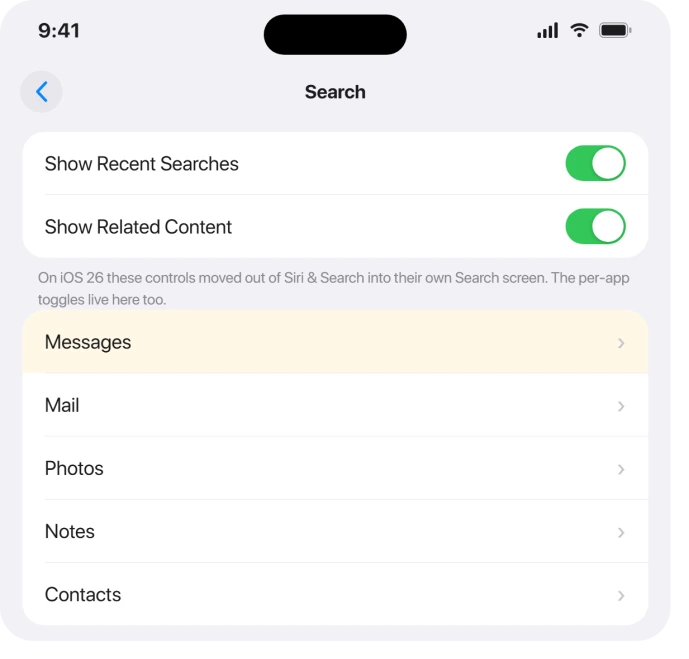
- Open Settings > Search and scroll to the apps list. Tap an app you actually search, like Messages or Mail.
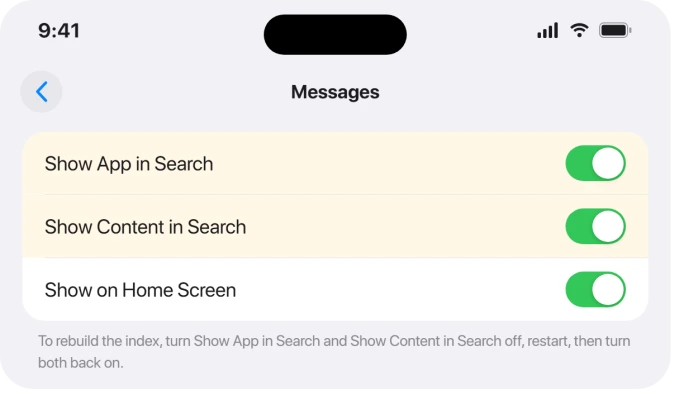
- Turn Show App in Search and Show Content in Search off. Repeat for the few apps whose results you are missing.
- Restart the iPhone.
- Go back into each and turn both on again. That makes iOS rebuild the content index for those apps.
If that does not take, force a full rebuild with a language change.
In Settings > General > Language & Region, tap iPhone Language, switch it to another option like English (UK), let the phone reload, then switch it back.
Changing the language makes iOS rebuild the entire search index. It works for many, though on the buggy releases it can relapse after a while.
One more kick: in Settings > Apple Intelligence & Siri (just Siri on older iPhones), turn Siri off, restart, and turn it back on.
If search still finds nothing
- Reset All Settings. Go to Settings > General > Transfer or Reset iPhone > Reset > Reset All Settings. This keeps your photos, messages, and apps, but resets system settings and rebuilds the indexes. Apple Support has pointed people here, and it clears the corruption for many.
- Update to the newest iOS 26. In Settings > General > Software Update, install the latest version. Because the bug got worse around 26.4.1 and better on 26.5, being on the newest release is the most reliable cure. The iOS 26.5 problems roundup covers what else changed.
- Erase and set up as new, but only as a last resort. A clean wipe rebuilds the index from scratch, yet on the worst releases even that did not fix it for everyone, while the update did. Back up first, and try the update before you wipe.
When it is only Messages or Contacts
If apps and web results show but your Messages, Contacts, or Mail are missing, it is the content half again, scoped to those apps.
In Settings > Search, open the app and confirm Show App in Search and Show Content in Search are on, then toggle them off and on to refresh.
For texts specifically, turning iMessage off for thirty seconds and back on can refresh the message index.
If whole conversations look gone rather than just unsearchable, that is a different problem, covered in where your iPhone messages went.
What will not fix it
- Paid "system repair" apps like ReiBoot, Dr.Fone, and Fixppo cannot rebuild your search index. They reflash iOS, which is a heavier version of the update you can do free. Skip the upsell.
- A Terminal command. There is no Terminal or index-rebuild command on iPhone. The Mac version exists, and if you are chasing this on a Mac, macOS Tahoe Spotlight not working has the real rebuild. On iPhone, any guide promising a command is wrong.
- Old menu paths. Guides pointing you to Siri & Search or Settings > General > Reset are written for older iOS. On iOS 26 it is Settings > Search and Transfer or Reset iPhone.
- Airplane mode and Wi-Fi toggling. Content search is local, so switching your connection only changes web and Siri suggestions, not whether your own contacts and messages appear.
Why does iPhone Spotlight only show apps after iOS 26?
Because the update corrupted the part of the search index that covers your content, while the part that matches app names kept working.
Apps still appear, but contacts, messages, mail, and photos return nothing until you rebuild that index by toggling the per-app search settings, changing the language, resetting all settings, or updating iOS.
Where did Siri & Search go in iOS 26?
On iPhones that support Apple Intelligence, the menu was renamed to Apple Intelligence & Siri, and the search controls were split out into a separate Settings > Search.
Per-app search toggles like Show App in Search now live under Settings > Search, not under Siri. On older iPhones the menu is just Siri.
Does Reset All Settings delete my photos or messages?
No. Reset All Settings returns system settings like Wi-Fi, keyboard, and layout to defaults, but it does not erase your photos, messages, or apps.
It is the safe reset to try for search, distinct from Erase All Content and Settings, which does wipe the phone.
The Short Version
- First rule out a half-built index: leave the phone locked, charging, and on Wi-Fi for a few hours, check storage is not full, and restart once.
- The cause is a corrupted content index from the iOS 26 update. App names still match, your content does not.
- Rebuild it in Settings > Search (the new iOS 26 home for these toggles, not Siri & Search): turn Show App in Search and Show Content in Search off for the apps you search, restart, turn them back on.
- Stronger kicks: change iPhone Language and back, or toggle Siri off and on. Then Reset All Settings, which keeps your data.
- Update to the newest iOS 26, since 26.4.1 made it worse and 26.5 fixed it for many. Skip paid repair apps and any iPhone "Terminal" command, neither of which applies.
Where to Next
- Storage jammed and stalling indexing: iPhone System Data storage on iOS 26
- Messages themselves missing, not just unsearchable: where your iPhone messages went
- Same search bug on a Mac: macOS Tahoe Spotlight not working
- More iOS 26 fixes: iOS 26 problems and fixes
- Back to the start: pcglance home

Isaac Smith is the founder and editor of PC Glance, a website that covers computers, laptops, and technology. He is a tech enthusiast and a computer geek who loves to share his insights and help his readers make smart choices when buying tech gadgets or laptops. He is always curious and updated about the latest tech trends.