
You reach for the Shazam button in Control Center, and nothing happens. No listening animation, no result, just a control that has stopped doing its job.
Reaching for something that worked yesterday and finding it dead is genuinely annoying, and I would not blame you for assuming you broke it.
Status: unresolved on iOS 26.6.1, checked 19 August 2026. Reported since the iOS 26 release candidate in September 2025. Nobody has confirmed a fix, ourselves included.
Read that line before anything else. This page is not a list of fixes, because there are none. It is what is actually known, what to check that costs nothing, and what not to do.
Who this page is not about
Worth two lines, because this symptom attracts people with a different problem.
If the Shazam app itself opens and identifies songs normally, while the Control Center button or Action button does nothing, this page is yours.
If nothing identifies music anywhere, the Shazam app included, that is an app or account problem rather than this break. Reinstalling the app is worth a go there.
What is being reported, and how widely
The evidence first, kept separate from anything we think.
On an Apple Community thread opened after updating an iPhone 16 Plus to the iOS 26 release candidate, the owner reported that the music recognition shortcuts stopped working in Control Center and on the Lock Screen, and that the option no longer appeared in the Action button settings at all.
The detail that makes it more than one person's phone: they erased the device more than once and installed full iOS updates, and it made no difference. Their iPad on iPadOS 26 was unaffected.
Two others replied. One reported the same thing happening with the Camera control from the Lock Screen and Visual Intelligence from Control Center. Another said they now have to open the Shazam app directly to identify anything.
The thread closed with no solution. Three people, one thread, and nothing you can act on yet.
What Apple documents, which is less than you would expect
Now the vendor tier, and what is missing from it is part of your answer.
There is no page in the iPhone User Guide for this feature. We read the guide's own page index, all 987 entries, and there is no Music Recognition page, no Shazam page, and the Control Center page never mentions it.
Where it does appear is the Action button page, under a name most people never search for. Apple: "Recognize Music: Find out what song is playing nearby or on your iPhone with Shazam."
Recognize Music. Not Music Recognition. That alone explains part of why people cannot find the option they are looking for, though it does not explain a control that has stopped responding.
The one check that costs nothing
With no fix available, this is the only thing worth your time.
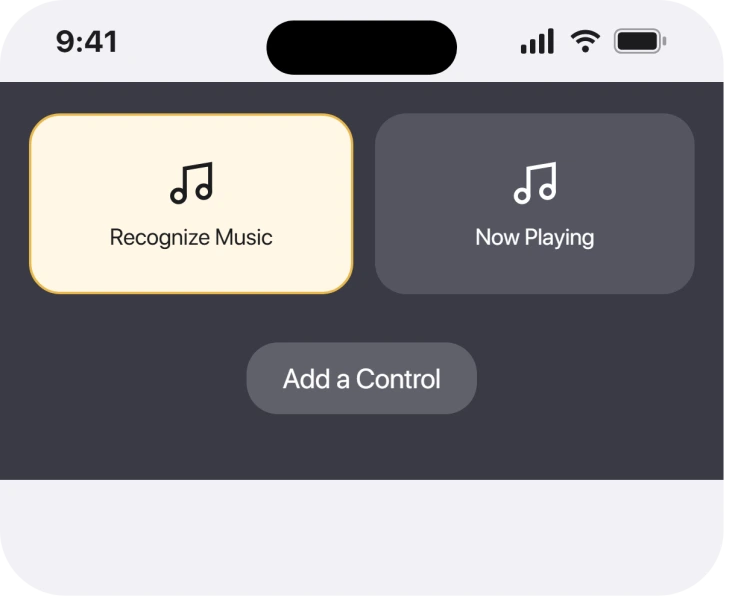
Remove the control and add it back.
Apple's Control Center page gives the route for the second half: "Add more controls: Tap Add a Control at the bottom of the screen to open the controls gallery, then tap a control to add it to Control Center."
So open Control Center, press and hold an empty area, remove the music recognition control with the minus badge, then use Add a Control to put it back from the gallery.
Ours, and marked clearly as ours: the reasoning is that a control which no longer responds may be holding a stale link to a service that changed underneath it, and re-adding rebuilds that entry.
Nobody has confirmed it to us, and the owner on the thread erased their entire phone without success, which is a far bigger reset than this. Treat it as two minutes well spent rather than an answer.
If your Control Center is misbehaving more broadly, Live Activities not showing covers a neighbouring surface.
While you are there, check the Action button too.
Apple lists Controls: Quickly access your favorite control as an option, so if Recognize Music has genuinely vanished from that list you can often reach the same thing by assigning a control instead.
What happened last time something like this broke
This is precedent, not a fix, and it is labelled that way on purpose.
Control Center was rebuilt in iOS 18, and that rebuild moved every control into a gallery with its own identifiers. Features that were previously fixed buttons became removable controls.
The reports here follow the same pattern: not the underlying service failing, but the shortcut to it failing, while the app it points at still works.
One owner on the thread described exactly that, opening Shazam directly and getting results.
Ours, and it is a reading rather than a finding: that pattern usually gets resolved by a point release rather than by anything an owner does. It is why the advice below is to wait rather than to reset.
What to use in the meantime
Practical, and deliberately short.
Open the Shazam app directly. It is the same service, it works, and several owners confirmed that for you.
Ask Siri what song is playing. That route is separate from the Control Center control and has not been reported as broken.
If Siri itself will not respond either, Talk to Siri greyed out is usually a Screen Time restriction rather than a bug.
Then report it, through Apple's Feedback Assistant if you have it installed. The person who opened the thread had already sent feedback, and volume is the only thing that shifts an unacknowledged bug.
What does not help
- Erasing the iPhone. The person who first reported this did it more than once, with full iOS updates in between, and saw no change. That is the most important line here.
- Reinstalling Shazam. The app is not what failed, since it identifies songs perfectly when opened directly.
- Resetting network settings. No report connects it to this, and the price is every Wi-Fi password you have saved.
- Hunting for an official fix. Apple publishes nothing about this feature failing, and saying so beats padding the page.
Why has Music Recognition stopped working in Control Center on iOS 26?
Nobody knows. Reports date from the iOS 26 release candidate in September 2025, the Shazam app itself keeps working, and nobody has confirmed a cure. Erasing the iPhone was tried and made no difference.
Where is Music Recognition in iPhone settings?
Apple calls it Recognize Music rather than Music Recognition, and documents it as an Action button option. There is no dedicated page for it in the iPhone User Guide, so the phrase you expect to find in Settings simply is not there.
Does the Shazam app still work on iOS 26?
Yes. Owners reporting the broken control confirm that opening the Shazam app directly still identifies music, which is the clearest sign that the shortcut has broken rather than the service.
Should I erase my iPhone to fix this?
No. The owner who first reported it erased their device more than once and installed full updates, and the problem survived every time. There is no evidence that a reset of any size helps.
The Short Version
- Reported since the iOS 26 release candidate, still unresolved, no confirmed fix anywhere.
- The Shazam app keeps working, so the shortcut is what broke.
- Apple calls the feature Recognize Music, and gives it no User Guide page.
- Removing and re-adding the control is worth two minutes and is unconfirmed.
- Erasing the iPhone was tried repeatedly by the original reporter and did nothing.
- Siri and the Shazam app are the working routes in the meantime.
Where to Next
A short honest page beats a long list of resets dressed as solutions, especially when the person who found this first already wiped their phone twice for nothing.
Where the Music app opens to nothing rather than failing to identify a song, a blank Home tab has its own fixes.
If yours came back, through an update or through something you did, please tell me below and name the iOS version. Right now there is one thread, three people and no answer, and yours would be the first.

Isaac Smith is the founder and editor of PC Glance, a website that covers computers, laptops, and technology. He is a tech enthusiast and a computer geek who loves to share his insights and help his readers make smart choices when buying tech gadgets or laptops. He is always curious and updated about the latest tech trends.