
You put rain on to sleep, and somewhere in the night it goes silent. Waking to a quiet room, when you set the phone up to prevent exactly that, is genuinely annoying. I have put the six causes in order.
The first two are settings you have probably never opened.
Start at the top. Four are switches Apple documents. The last two come from owners who worked it out themselves.
1. Stop Sounds When Locked is on, and it is the likeliest cause
Go here first, because it explains the exact pattern most people describe.
Open Settings. Apple's Background Sounds page gives the route: "Tap Accessibility, tap Audio & Visual, tap Background Sounds, then turn on Background Sounds."
Scroll right down that screen. Look for Stop Sounds When Locked.
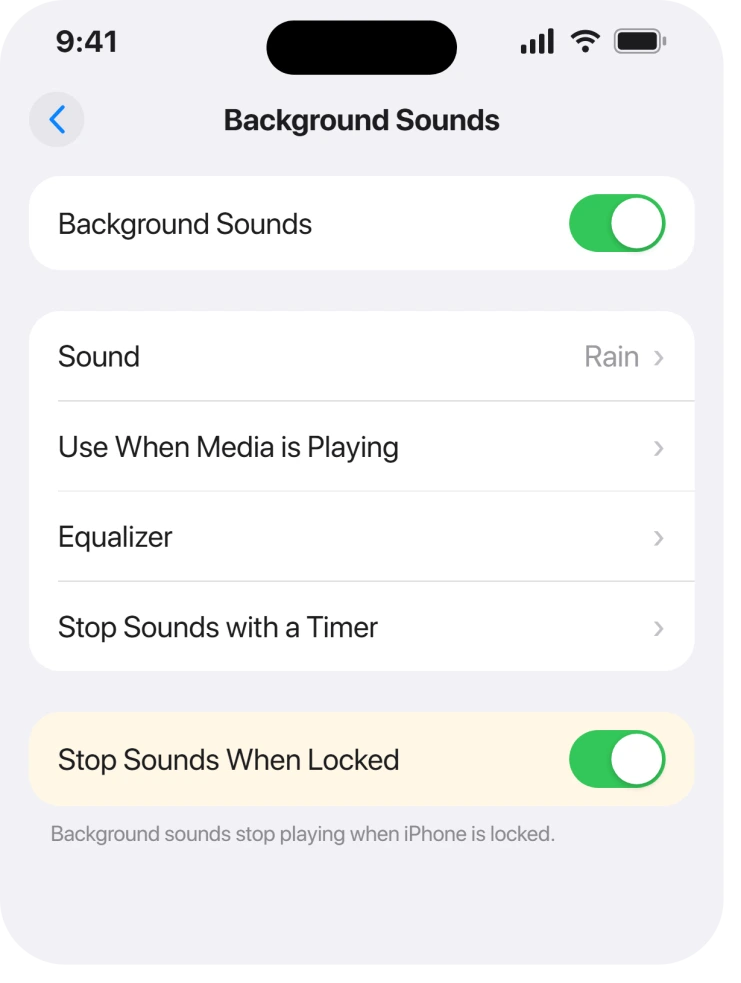
Apple describes it plainly: "Stop Sounds When Locked: Background sounds stop playing when iPhone is locked."
So it plays while you are looking at the phone. It stops the moment the screen locks. Which is exactly backwards for sleeping.
Owners report this as the answer.
One member on the Apple Community thread behind this page wrote: "You might check your Background Sounds settings…I had the toggle at the bottom of the BS Settings screen selected: 'turn off sounds when screen locked.'"
Turn it off and the sound survives the lock screen.
2. A timer is running that you set once and forgot
Second. This one stops the sound at the same time nightly, so it reads as a fault.
Apple: "Stop Sounds with a Timer: Set a timer to stop playing background sounds at a specific time or after an amount of time."
One detail makes it stick. Apple adds a tip about "Repeat the timer settings you selected by turning on" an always-use option. So a timer you set once can quietly apply every night after.
Check the same screen for the timer entry, and clear it if setting one was never your intention.
A sound that always dies after exactly thirty minutes is a timer, not a bug.
3. Media playing alongside it is turning the volume down
Third. This is a volume change that people hear as a stop.
Apple: "Use When Media is Playing: Adjust the volume of the background sound when iPhone is playing music or other media."
Set it low and anything else making noise drops your rain to almost nothing. A video, a podcast, even a short notification chime.
It does not stop. It ducks. But at 2am, quiet enough is the same as off.
Raise that slider, or turn the setting off entirely if you never want the ducking.
4. The audio file has not finished downloading
Fourth. It catches people on a new phone, or on a sound they just picked.
Apple notes it in the middle of the settings list: "Sound: Choose a sound; the audio file downloads to your iPhone."
So the file has to arrive before it can loop. On a slow connection, or straight after a restore, that download is why nothing plays.
Pick the sound, stay on Wi-Fi, and give it a minute before deciding it is broken. If downloads generally stall on your phone, an iPhone stuck on Waiting covers that separately.
5. Closing background apps brought it back for two people
Fifth. From here on it is what owners found, not what Apple documents.
Apple never publishes anything about apps interfering with Background Sounds. This one comes entirely from the community thread.
One member wrote: "I recently found that closing a few open apps in the background brings the background noise back!"
A second person tried it and came back: "it will still stop randomly…trying out the advice that the other user said to close your apps, and so far so good!"
Two owners, one confirming and one cautiously agreeing. Thin evidence, free to try. That is why it sits here rather than higher up.
The same person later added another suspicion: "It might be because my AirPods keep switching over to my Macbook." Audio wandering to another device looks identical from the bed. Worth ruling out if you sleep in AirPods.
6. When it is the switch itself turning off
Last, and this is the version with no fix at all.
Some owners report the feature disabling itself rather than merely going quiet. One put it bluntly: "When my background sound stops, it is ALWAYS the background sound button turning itself off."
That symptom sits apart from the five above. Nothing on the thread resolves it.
Restarting brings it back. It does not keep it back. Another member described the routine: "If you restart your phone it will work for awhile, but then the issue is happening again…Each morning I have to restart my phone."
So if a restart works for you but only until tomorrow, you are in this last case, and there is currently nothing better than that daily restart.
If your phone is going quiet for texts and alerts too, an iPhone silent for texts and email while it still rings is a different chain worth checking.
What does not help
- Restarting, as a fix. Three separate owners reported it working, and one reported having to do it every single morning. It is a reset, not a repair.
- Turning the ringer up. Background Sounds has its own volume slider on its own screen and ignores the ringer.
- Reinstalling anything. It is an Accessibility feature, not an app, so there is nothing to reinstall.
- Assuming it is your headphones. Worth ruling out, and the thread shows it stopping on the phone speaker too.
Status: iOS 26.6.1, checked 19 August 2026. The first four causes are documented settings and are fixable. The self-disabling switch has run since iOS 17 with no confirmed fix.
Why do my iPhone background sounds stop when the screen turns off?
Because Stop Sounds When Locked is on. Apple documents it as making background sounds stop playing when iPhone is locked, and you will find it right down the Settings, Accessibility, Audio & Visual, Background Sounds screen. Turn it off and the sound continues.
Why do background sounds go quiet when something else plays?
That is the Use When Media is Playing setting rather than a stop. Apple describes it as adjusting the background sound volume while music or other media plays, so a low setting makes it almost inaudible instead of silencing it.
Do iPhone background sounds have a sleep timer?
Yes, on the Background Sounds screen. Apple lets you stop them at a specific time or after a set period, and there is an option to reuse those timer settings automatically, so one night's timer can apply every night.
Why does restarting fix background sounds only temporarily?
Nobody knows, and Apple publishes nothing on the subject. Owners describe restarting daily to keep the feature working, which points at the switch disabling itself rather than at anything you have set.
The Short Version
- Stop Sounds When Locked causes most of these, and it sits right down the screen.
- A repeating timer will stop the sound at the same time every night.
- Use When Media is Playing ducks the volume rather than stopping it.
- A newly chosen sound has to download before it plays.
- Closing background apps helped two owners and is unconfirmed beyond that.
- The switch disabling itself is a separate problem, still unfixed.
Where to Next
Work down the list in order. The top four are things you can change tonight, and the bottom two are other people's guesses rather than answers, which I would rather say out loud.
If yours is the switch turning itself off, tell me the model and the iOS version below.
That version has been running since iOS 17 with nothing published about it, and a few dated reports in one place would be more than exists anywhere else.

Isaac Smith is the founder and editor of PC Glance, a website that covers computers, laptops, and technology. He is a tech enthusiast and a computer geek who loves to share his insights and help his readers make smart choices when buying tech gadgets or laptops. He is always curious and updated about the latest tech trends.