
Your screen lights up for a text and nothing comes with it. The keyboard has gone quiet too, and mail leaves without its whoosh. But the ringtone still works, which is the confusing bit, and I know how unsettling a half-silent phone feels.
That split is the useful part, so start there.
Calls and alarms take one path, and text tones, keyboard clicks and mail sounds take another. One set survives, the other does not, so the fault sits in the second path. That narrows this a long way.
1. Flip the switch on the side, twice
Two owners confirmed this exact thing on the same thread, and it takes three seconds. If your iPhone has the small Ring/Silent switch, push it to silent, leave it a moment, then push it back to ring.
One owner on an iPhone 15 Plus reported: "I was able to get my Audio back by flipping the mute switch over a couple of times, problem solved on my device."
Another, on an iPhone 13, confirmed the same thing after flipping it on and then off.
There is a catch here, and it matters. On iPhone 15 Pro and every iPhone 16 and 17, that switch does not exist, replaced by the Action button. Every confirmation I found came from a phone that still has the physical switch.
Got an Action button instead? Use the Silent Mode control in Control Center to toggle silent on and off, or press and hold the Action button if it is assigned to Silent Mode.
No owner has confirmed that works, and I am not going to pretend otherwise.
2. Force restart, which is not the same as a restart
Second, because it worked for somebody after the switch trick did nothing for them. Worth your three minutes.
A normal restart shuts the phone down cleanly, and a force restart does not. That is the whole point of it.
Press volume up and release. Press volume down and release. Then hold the side button until the Apple logo appears, ignoring the slider on the way past.
An owner on an iPhone 14 Pro ran exactly that, on a Community Specialist's instruction. Their outgoing text sounds came back.
3. Check the slider that controls all of it
Now the setting side, where Apple's own wording repays your close attention.
From Apple's page on changing iPhone sounds and vibrations: "Drag the slider below Ringtone and Alerts to set the volume for all sounds."
All sounds. One slider, at Settings, Sounds & Haptics.
Drop that slider to the bottom and your ringtone goes silent too. So if calls still ring and texts do not, this is probably not your cause. Check it anyway, because it takes a second and rules out a whole branch.
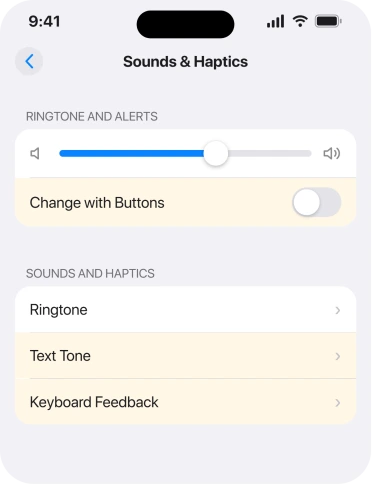
Watch for Change with Buttons. If it is off, the volume buttons no longer touch this slider, so you can turn the volume up all day without moving the one that matters.
4. Keyboard clicks have their own switch, and only their own
Narrower, and it is the rung that explains why one of your three sounds behaves differently from the other two.
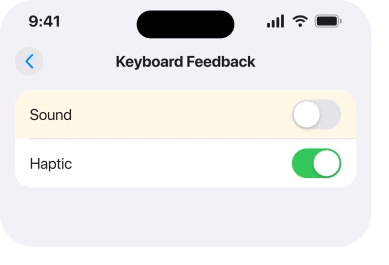
No tone setting covers keyboard clicks. Apple gives them a dedicated control at Settings, Sounds & Haptics, then Keyboard Feedback, with separate switches for Sound and Haptic.
Note where that is: Apple does not put it under Keyboard, which is where most people go looking. So the phone can be set up perfectly everywhere else and still type in silence.
Is the keyboard the only silent thing? Then that switch is your whole answer. Rungs 1, 2, 5 and 6 do not apply to you.
5. A tone set to None, per app or per person
Narrower again, and it explains the case where only some texts are silent. Apple's route for the general tones is Settings, Sounds & Haptics, then Text Tone. Pick a real tone rather than None.
Then there are two places it hides, both easy to set by accident and hard to find on purpose.
Per contact, Apple says: "You can also change the sounds iPhone plays for certain people. Go to Contacts, tap a person's name, tap Edit, then choose a ringtone and text tone." A tone set to None there silences that person only.
Per app, Mail and any other app has its own notification sound at Settings, Notifications, then the app, then Sounds.
If only one person's messages are silent, that is a contact card rather than a phone fault. Our page on notifications from one person goes through it.
And if the tone changed rather than vanished, that is a different fault with a different cause, covered on our page about a ringtone changing by itself.
6. If it began right after an update, it may still be settling
Last, and it is the least satisfying answer on this page, which is exactly why it gets printed rather than dropped.
The owner who started the largest thread on this ran an iPhone 15 on iOS 26. Nine days later they came back to say it had sorted itself out.
"It took a couple of days and I did not change any settings. I guess the update was so large it took a full day for everything to update."
That thread carries 129 Me Too. It is the most-reported version of your symptom that I found anywhere, and the person who raised it fixed nothing.
Apple documents no settling period at all, so reading their outcome that way is ours rather than vendor-documented. What is fair to say is that plenty of people spend a week changing settings for something that clears on its own.
So if yours started within a day or two of an update, do rungs 1 and 2. Then give it forty-eight hours before you reset anything.
Still silent after that? Send Apple a report through the Feedback Assistant. Name which sounds are missing and which still work. That split is the detail their engineers need and it is the one people leave out.
What does not help
Turning the volume up with the buttons does not help: with Change with Buttons off, they do not move the slider that governs alerts. Assuming the mute switch advice applies to you does not help. iPhone 15 Pro and later do not have one.
Checking Do Not Disturb when your keyboard is silent too does not help.
Focus can be set to let calls ring while it silences text tones, so a ringing phone rules nothing out. A silent keyboard does, because Focus never touches keyboard clicks.
Resetting all settings does not help. No thread reports it fixing this, and it costs you every preference on the phone. Looking for a keyboard sound option inside the Keyboard settings does not help either: it lives under Sounds & Haptics.
Status: iOS 26.6.1, checked 18 August 2026. The switch flip and force restart are user-confirmed on phones with a physical switch. The settling period is one owner's outcome, not documented.
Why does my iPhone not make a sound for text messages?
Check the Text Tone at Settings, Sounds & Haptics is not set to None, and that the Ringtone and Alerts slider is up.
If your ringtone works and texts do not, owners most often cleared it by flipping the Ring/Silent switch twice or force restarting.
Why has my iPhone keyboard stopped clicking?
Keyboard clicks have their own control at Settings, Sounds & Haptics, Keyboard Feedback.
No tone setting covers them, which is why the keyboard can be silent while everything else works. Silent mode and the Ringtone and Alerts slider do still mute them along with the rest.
Why did my iPhone lose sounds after the iOS 26 update?
It is widely reported, with one thread collecting 129 Me Too. Some owners cleared it with the mute switch or a force restart, and the person who raised that thread found it corrected itself after a couple of days with no changes made.
How do I force restart an iPhone?
Press volume up and release, press volume down and release, then hold the side button until the Apple logo appears. Ignore the power-off slider when it appears on the way.
The Short Version
- Which sounds still work is the diagnostic, so note that before changing anything.
- Flipping the Ring/Silent switch twice cleared it for two owners on iOS 26.
- iPhone 15 Pro and later have no such switch, and no owner has confirmed an Action button equivalent.
- A force restart brought outgoing text sounds back for a third owner.
- Keyboard clicks have their own switch under Keyboard Feedback and nothing else touches them.
- The largest thread on this ended with the symptom clearing on its own after a couple of days.
Where to Next
The thing to hold on to is that your phone has not gone silent. It has gone silent in one specific lane, and the lane that still works is telling you where not to look.
Write down which of the four still make a noise: ringtone, alarm, text tone, keyboard. Two minutes of that beats an hour of turning switches on and off, and it is the same list Apple's own people will ask you for.
And there is one report I genuinely want. Something that worked on a phone with an Action button rather than a switch. That gap is the single piece of this I could not fill, and it affects every recent Pro.

Isaac Smith is the founder and editor of PC Glance, a website that covers computers, laptops, and technology. He is a tech enthusiast and a computer geek who loves to share his insights and help his readers make smart choices when buying tech gadgets or laptops. He is always curious and updated about the latest tech trends.