
You open Stocks and the same price is sitting there from three days ago, while the market has clearly moved.
Stale numbers on a phone you are making decisions with is a worrying thing to see, and I would want to know why before touching anything.
The short answer: this is almost always the data feed rather than your iPhone. The giveaway is that newly added tickers update fine while the ones you have held for months go stale.
If that describes yours, no reset will fix it, and one of them can cost you your watchlists. Here is what is actually going on.
The pattern that proves it is the feed
Start here. One test separates the two possible problems.
Add any ticker you do not already follow. If the new one shows a live price while your existing holdings stay frozen, the app and your connection are both fine.
A broken app would fail on everything. A broken connection would fail on everything. Only a per-symbol data problem behaves like this.
Owners report exactly that pattern. The owner who opened the Apple Community thread used here noted that new stocks updated normally while previously added ones did not.
A run of replies then named the same single ticker as the culprit for all of them.
One member reported that symbol showing a Check with Server message instead of a price, which is the app telling you plainly that the fault is upstream.
Why a reset cannot help, and one of them hurts
Now the part that matters before you follow the usual advice.
Your iPhone is not calculating these prices. It is displaying what a service sends it, so restarting, resetting network settings and reinstalling change nothing about what arrives.
Apple's Stocks guide page describes the job in one line: "Use the Stocks app to track market activity and view the performance of stocks you follow." Tracking, not producing.
The one piece of advice that genuinely carries a cost is deleting your symbols. Apple gives the method: "Delete a symbol: Swipe left on the symbol in your watchlist, then tap Remove."
Then it adds the warning almost nobody quotes: "If you delete a symbol from the My Symbols watchlist, that symbol is also deleted from your other watchlists".
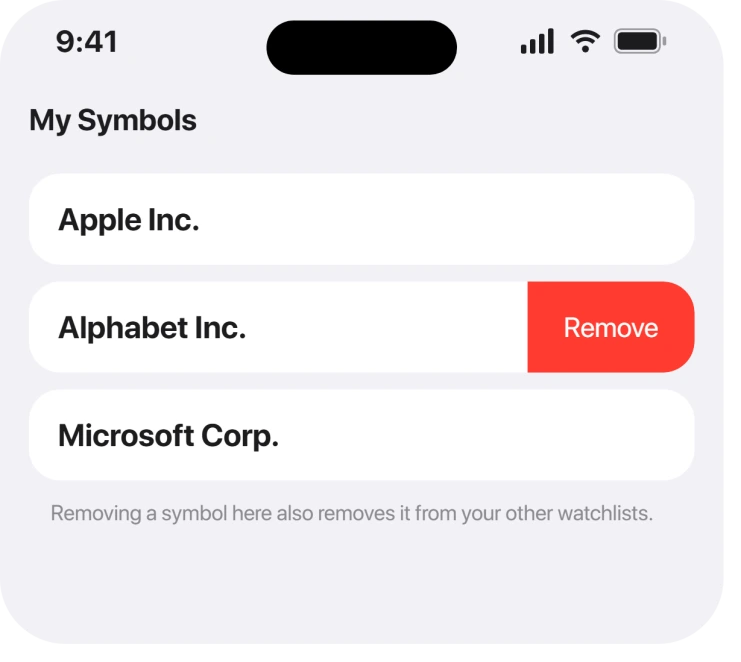
So a tidy-up in one list quietly empties the same holding out of every other list you built. Know that before you start.
The workaround that did work, and its price
Third, because it is the only owner-confirmed fix and it is the expensive one.
Months into the same thread, a member reported that deleting every symbol and adding them all back resolved it for them.
That is a real result and it is the last thing to try, not the first, because of the watchlist warning above. Apple documents the way back in: "Add a symbol: Tap" then search by ticker symbol, company name, fund name or index.
Ours, and marked as ours: write your holdings down before you delete anything. Apple documents that deletion cascades across watchlists and documents no undo, so a list you rebuilt from memory is a list with something missing.
Why waiting is usually the right move
Fourth, and this is what the thread actually shows over time.
Two members reported the problem resolving on its own within days, one of them naming the date the price came back. Neither of them had done anything to their phone.
Then it returned. Weeks later another member wrote that it "most definitely has not been fixed" and that prices had not moved for weeks.
So it comes and goes, on a schedule nobody controls. A fix that arrives while you happen to be restarting your phone will look like your restart worked, and that is how bad advice gets written.
When it really is something on your side
Last, and these are the narrow cases worth ruling out.
If every symbol is frozen, a brand new one included, check that Stocks has data access.
A phone on cellular with data restricted for that app shows a whole watchlist of stale prices, and an iPhone that will not update over cellular data walks through where those switches live.
If your watchlist looks wrong across devices rather than stale, that is iCloud sync rather than the feed.
Apple calls the default list the My Symbols watchlist, describing it as what "appears on the screen" when "you first open the Stocks app". That is the list that syncs.
And an app that refuses to open at all is a separate problem. Apps that close the moment you open them covers that one.
What does not help
- Restarting the iPhone. No report has it working, and prices returned on their own for two people who did nothing at all.
- Resetting network settings. The data is not being blocked, it is not being sent. You lose every saved Wi-Fi password for nothing.
- Reinstalling the app. Stocks is built in, and the symbols come back exactly as stale.
- Deleting one stuck symbol. It removes that holding from all your watchlists, and the replacement often arrives just as stale.
Status: iOS 26.6.1, checked 19 August 2026. This behaves as a server-side data problem, recurring since early 2024 with no Apple acknowledgement. Re-adding symbols is the only known fix.
Why is my iPhone Stocks app showing old prices?
Because the price feed for those symbols has stopped updating, not because your phone is broken. The test is to add a ticker you do not already follow. If the new one is live and the old ones are frozen, the fault is upstream and no reset will change it.
What does Check with Server mean in the Stocks app?
It means the app asked for a price and did not get a usable one back. One owner reported seeing it on the exact symbol that had stopped updating, which points at the data source rather than the device.
Will deleting a stock remove it from my other watchlists?
Yes. Apple states that deleting a symbol from the My Symbols watchlist also deletes it from your other watchlists. Write down what you have before removing anything, because there is no documented undo.
Does restarting the iPhone fix the Stocks app?
There is no evidence that it does. Two owners saw prices return without touching their phones, and the problem later came back for others, so anything done at the moment it resolves gets the credit unfairly.
The Short Version
- Add a new ticker. If it updates and the old ones do not, it is the feed.
- Your iPhone displays these prices, it does not calculate them.
- Deleting a symbol removes it from every watchlist, which Apple documents.
- Deleting and re-adding everything is the only confirmed workaround, and it is the last resort.
- The problem has resolved itself and returned more than once.
- Only a whole watchlist frozen, including new symbols, points at your own phone.
Where to Next
Take away the two-second test at the top. One new ticker settles the question faster than an hour of resets, and it stops you deleting a watchlist you spent years building.
If yours is stuck right now, say which ticker in the comments. This has always turned out to be specific symbols rather than everybody's whole list, and knowing which ones are affected is genuinely useful to the next person.

Isaac Smith is the founder and editor of PC Glance, a website that covers computers, laptops, and technology. He is a tech enthusiast and a computer geek who loves to share his insights and help his readers make smart choices when buying tech gadgets or laptops. He is always curious and updated about the latest tech trends.