
Your apps flash open and dump you straight back on the Home Screen, or they die quietly in the background while you nip to another app for two seconds.
That is maddening, and I am sorry, because it makes the phone almost unusable rather than just annoying.
I have put one obscure switch at number three, because it is behind a lot of the iOS 26 reports.
The first two are cheap, so start there and work down.
1. Force the app closed, then open it again
Apple's own first step, and it clears a genuinely stuck app.
Apple, in If an app on your iPhone or iPad stops responding, closes unexpectedly, or won't open: "Force the app to close. Then open the app to see if it works as expected."
Swipe up from the bottom of the screen and pause. That gets you the app switcher. Swipe the app's card up and away, then open it fresh.
If it is one app misbehaving, this is often the whole job. If it is every app, skip ahead, because closing them one at a time will not help you.
2. Restart the phone, then check again
Second on Apple's list, and it is a different action from step one.
Apple: "Restart your iPhone or restart your iPad. Then open the app to see if it works as expected."
Power the phone all the way down rather than locking it. Wait a moment. Start it again.
One owner, posting as Uncle-Bob on an iPhone 15, had nearly every app crashing on launch. A Level 10 member, Axel Foley, walked them through a force restart, a storage check and a battery check.
The restart was done three times "with no impact". Storage was over 66GB free. The battery read 100 percent.
Then it cleared on its own an hour later. That is worth knowing: some of these are transient, and it is not a reason to erase anything yet.
3. Turn off Fast App Termination, which most people never knew was on
This is the one. If your apps die within seconds of switching away, read this rung carefully.
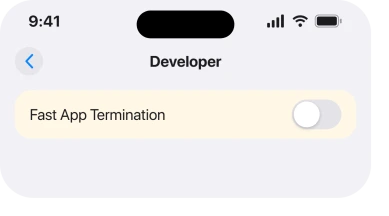
Some iPhones carry a Developer section in Settings. Inside it sits a switch called Fast App Termination. It does what the name says. It closes apps in the background almost immediately, instead of leaving them suspended.
iamsujoy, on an iPhone 13 Pro Max running iOS 26, described the symptom as apps terminating within ten to fifteen seconds of switching away, then restarting from scratch.
Their result: "On iPhone, under Developer Settings, there is an option called Fast App Termination…After turning it OFF, the issue was completely resolved!"
jgwr confirmed it independently on the same thread: "Thank you so much! This solution worked for me…That setting was enabled for me as well, even though I never turned it on."
They had been unable to use a banking app at all, because switching to a two-factor app for four seconds logged them straight back out.
There is a disagreement on that thread and it is worth printing.
KiltedTim, a Level 10 member with 235,600 points, replied: "Developer settings don't turn on by themselves. You turned it on, whether you remember doing so or not." Two owners say they never touched it.
I cannot settle that, and I am not going to pretend I can. What is not in dispute is that turning the switch off fixed it for both of them.
Go to Settings and scroll right to the bottom. If a Developer row is there, open it and look for Fast App Termination. If there is no Developer row, this is not your cause and rung 4 is next.
4. Update the app, then update iOS
Third on Apple's list, and the order in that sentence matters.
Apple: "To see if updates are available for the app, open the App Store, tap your profile icon, then tap App Updates. If updates aren't available for the app, update the software on your iPhone or iPad."
Owners report the app being at fault far more often than iOS, so check the app first. A crash on launch after a system update is very often an app that has not been rebuilt yet. The developer usually ships a fix within days.
If several unrelated apps are crashing, that points the other way and iOS is the thing to update. Go to Settings > General > Software Update.
If the apps are not crashing but simply refusing to finish downloading, that is a different fault and apps stuck on Waiting covers it.
5. Make room, because a full phone behaves like a broken one
Not glamorous. It produces exactly your symptom.
Open Settings > General > iPhone Storage and look at the bar at the top. An iPhone with almost nothing free has no room to page apps in and out. Yours will kill them the moment anything else needs memory.
The Level 10 member in rung 2 asked for this check first for exactly that reason. Their working target for you: fifteen to twenty gigabytes free.
If that screen itself will not load or shows nothing, that is its own fault and iPhone Storage not loading is the page for it.
6. Delete the app and download it again, once you have read the warning
Apple's last step, and the first one on this page that can cost you something.
Apple attaches the warning to the instruction rather than after it: "Delete the app. When you do this, you might lose data that was stored in the app. Then redownload the app."
Read that before you tap. Apple documents the risk in the same breath as the step. Anything held only inside the app goes with it. Notes in a journalling app. Downloads in a podcast app. Offline maps.
So check whether you can sign back in and get your data from the account. If you can, this is safe and often effective. If you cannot, treat it as a last resort rather than a routine step.
7. If it started with a specific update, get it recorded
The narrowest rung. Also the one where I have least to offer you.
Several iOS 26 threads describe exactly this. Apps freezing after the update. Third-party apps closing on launch. The thread behind rung 3 carries 38 Me Too votes, and the one behind rung 2 carries 39.
If none of the six above has done it, use the Feedback form. Describe your pattern precisely. Which apps. How many seconds. On launch, or on switching away.
Those two symptoms have different causes, and the distinction is the useful part of your report.
Then use the phone normally while you wait, because on this evidence erasing it is not the answer.
What does not help
- Turning Background App Refresh off. One owner had it off across most apps and the crashing continued.
- Erasing and restoring. Nobody on the threads read reported it fixing this.
- Closing every app in the switcher habitually. It does not prevent the next crash and it costs battery on relaunch.
- Blaming battery health. The owner in rung 2 was at 100 percent on an eight month old phone.
Status: iOS 26.6.1, checked 19 August 2026. Reported across iOS 26 with 38 and 39 Me Too on two threads. The Fast App Termination fix is owner-confirmed twice and disputed by a Level 10 member.
Why do my iPhone apps close as soon as I open them?
Most often a stuck app, a full phone, or an app that has not been updated for the current iOS. If they die when you switch away rather than on launch, look for Fast App Termination under Developer settings.
What is Fast App Termination on iPhone?
A switch inside the Developer section of Settings that closes apps in the background almost immediately instead of suspending them. Two owners on iOS 26 reported apps dying within seconds until they turned it off.
Does deleting an app lose my data?
It can. Apple says plainly that you might lose data stored in the app, so check that your content is held in an account you can sign back into before you delete anything.
Will an iOS update fix apps crashing?
Sometimes, but check the app first. A single app crashing after a system update usually needs an app update, while several unrelated apps crashing points at iOS.
The Short Version
- Force close the app and reopen it before anything heavier.
- Restart properly, and know that some cases clear on their own.
- Fast App Termination under Developer settings kills apps in seconds.
- Two owners fixed it that way and a Level 10 member disputes how it got switched on.
- Update the app first, then iOS, because the order tells you which is at fault.
- A nearly full phone produces exactly this symptom.
- Deleting an app can lose data held only inside it.
Where to Next
The split that matters here is when the app dies. On launch is one family of causes, and a few seconds after you switch away is a completely different one. Almost every page treats them as the same complaint.
If yours is the second kind, rung three is worth five minutes of your evening. If it is the first, rungs four and five will do more for you.
Tell me whether your Settings even has a Developer row, because that is the piece I am least sure about.
Two owners say it appeared with the switch already on, a Level 10 member says that cannot happen, and more reports either way would settle it.

Isaac Smith is the founder and editor of PC Glance, a website that covers computers, laptops, and technology. He is a tech enthusiast and a computer geek who loves to share his insights and help his readers make smart choices when buying tech gadgets or laptops. He is always curious and updated about the latest tech trends.