
No Wi-Fi anywhere, full 5G bars, and your iPhone's Software Update either refuses outright or spins for an hour and then fails. There is no need to reset anything yet, and I can tell you exactly why the phone is doing this.
Apple gates cellular updating in four separate ways. It only ever tells you about one of them, which is the whole reason this feels random.
1. Check the phone can do it at all
Older iPhones simply cannot, and no setting changes that.
Apple, in Use 5G with your iPhone: "iPhone 12 models or later work with the 5G cellular networks of certain carriers."
Cellular software updates ride on 5G. So an iPhone 11 or earlier shows you a Wi-Fi requirement and nothing else. Signal strength makes no difference.
Check yours in Settings, General, About, at the Model Name row.
2. Turn on Allow More Data on 5G
This is the setting the whole thing hangs on. Most people have never opened the screen it lives in.
Go to Settings, Cellular, Cellular Data Options, then Data Mode. Choose Allow More Data on 5G.
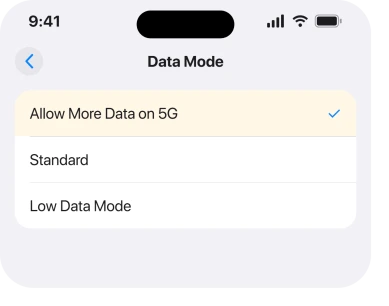
Apple's own explanation of the mode is that it lets apps and system tasks use more cellular data, and it names higher-quality video and FaceTime HD as examples on the same page.
It does use more of your allowance. On some unlimited plans carriers switch it on by default, which is why an update over cellular sometimes works for a friend and not for you.
3. A brand new release is locked to that setting
Almost no page prints this one, and it explains the week-to-week randomness better than anything else does.
Apple publishes the rule in its deployment guide, which is written for people managing fleets of devices rather than for you. Updates arrive in two phases, and the phase decides what is allowed.
Apple, in Review the Apple software update process, on downloading over cellular during initial availability: "Manually by the user when their device is connected to a 5G cellular network and has Allow More Data on 5G turned on."
So in the first stretch after a release, cellular downloads require both things at once. On 5G, and with that switch on. Miss either and the phone asks for Wi-Fi.
That is why the same iPhone can update on cellular in June and refuse in August. Nothing broke. The release moved phase.
4. Your carrier is allowed to block it, and iOS then blames Wi-Fi
Once a release reaches general availability the rule loosens, with one exception that is worth reading twice.
Apple, same page, on the general availability phase: "Manually by the user unless it's deferred by the carrier on the specific cellular network. In this case, users are informed that a Wi-Fi connection is required to download the update."
Read that last sentence carefully. When your carrier defers the update, the message you get is that Wi-Fi is required. It does not say the carrier did it. It does not name anything.
So a Wi-Fi requirement on screen is not proof your phone or your settings are wrong. It is one of the things the phone says when somebody else has made the decision.
If that is your case, nothing on the handset will change it. Ring the carrier or use Wi-Fi.
5. Low Data Mode will stop it quietly
Narrower, and it catches people who set it once to save an allowance and forgot.
Low Data Mode pauses automatic updates and background tasks. It is set per network. So you can have it on for cellular and off for Wi-Fi, and never notice.
Check it in Settings, Cellular, Cellular Data Options, Data Mode. If Low Data Mode is the one selected, that is your answer, and choosing Allow More Data on 5G in step 2 replaces it anyway.
One owner reported a low data mode warning appearing on an iOS 26.6.1 download when they believed the setting was off, so it is worth looking rather than assuming.
6. Rule out storage before you blame the network
A cellular download that spins for ages and then fails looks like a connection problem. Often it is not.
A Level 6 member answering that same iOS 26.6.1 thread put the requirement plainly: full iOS installers now run past eight gigabytes, and the phone needs several times the installer size free while it unpacks and verifies.
Check Settings, General, iPhone Storage. If you are close to full, the download will keep failing on any connection.
Our page on an iPhone that says there is not enough storage to update covers how to make room without deleting anything you want.
7. The three routes that do work
Last, and it is what to actually do once you know the answer is no.
Wi-Fi is the reliable one. The owner who started the iOS 26.6.1 thread tried repeatedly on cellular, gave up, and reported back: "It downloaded as soon as I got to WiFi." That is the plainest confirmation on the thread.
A computer works and Apple documents it. Its deployment page says a device physically connected to a Mac through the Finder, or to a PC with the Apple Devices app, downloads a full copy of iOS that way instead.
That route ignores the cellular rules completely.
Another phone's hotspot is reported to work, and it is disputed. Owners describe joining a second phone's Personal Hotspot, because the iPhone treats it as Wi-Fi. Others say iOS has never downloaded updates over a Personal Hotspot at all.
I could not find an Apple page settling it either way, so it goes here as reported rather than as advice.
And if the Wi-Fi you do have refuses to connect or drops on its own, Wi-Fi not working after iOS 26 is the page to fix that first.
Status: iOS 26.6.1, checked 19 August 2026. The 5G condition, the release phases and the carrier deferral are Apple's own wording. Owners on 26.6.1 still report cellular downloads failing.
Why does my iPhone need Wi-Fi to update when I have 5G?
Because cellular updating needs an iPhone 12 or later, a 5G connection, and Allow More Data on 5G turned on. Your carrier is also allowed to defer the update on its network. Apple states that when it does, the phone simply tells you Wi-Fi is required.
Can you update iOS with mobile data?
Yes, on iPhone 12 or later connected to 5G with Allow More Data on 5G selected in Data Mode. On an older iPhone, or on LTE, or when the carrier has deferred that release, the option is not offered.
Does Allow More Data on 5G use more data?
It does, and that is its purpose. It permits higher-quality video, FaceTime HD and system tasks such as software updates to use cellular. Some carriers switch it on by default on unlimited plans.
Why did my update download on cellular last time and not now?
Most likely the release phase. Apple allows cellular downloads under stricter conditions while a release is in initial availability, and the same phone can therefore succeed with one update and be refused for the next.
The Short Version
- Cellular updating needs an iPhone 12 or later. It needs a 5G connection too.
- Allow More Data on 5G lives in Settings, Cellular, Cellular Data Options, Data Mode.
- During a release's first phase Apple requires 5G and that switch together.
- Your carrier can defer an update, and the phone then simply says Wi-Fi is required.
- Low Data Mode blocks it and is set per network, so it is easy to forget.
- Installers run past eight gigabytes. So your storage can look like a network fault.
- Wi-Fi and a computer both work, and the hotspot trick is reported rather than documented.
Where to Next
One message, four different situations. Wi-Fi required covers an unsupported model, a missing setting, a release phase and a carrier decision, and nothing on the screen tells you which one is yours.
Two minutes settles it. Model, then Data Mode, then whether the release is fresh. If all three are fine and it still refuses, the carrier is the remaining answer and no setting on the phone will move it.
If yours turned out to be the carrier, I would like to know which one and which release, because a carrier that defers regularly is worth naming on this page. Leave it in a comment.
If the download starts and then hangs rather than being refused outright, that is a different fault and an iPhone stuck on Verifying Update is the page for it.

Isaac Smith is the founder and editor of PC Glance, a website that covers computers, laptops, and technology. He is a tech enthusiast and a computer geek who loves to share his insights and help his readers make smart choices when buying tech gadgets or laptops. He is always curious and updated about the latest tech trends.