
A hearing test that will not start looks like a hardware problem. It almost never is. Your AirPods and your hearing are usually fine.
The test quietly checks a few conditions before it will run: a silent room, a good ear seal, an eligible setup. It stalls at the first one that is off, and it does a poor job of telling you which.
So the fix is rarely a reset. It is finding the condition it is stuck on.
First, exit the test and start it again
Before anything else, back all the way out of the test and start a fresh one, with the AirPods still in your ears.
This clears the most common glitches, including a known iOS 26 bug where tapping the screen stops registering partway through.
Apple lists that exact bug in the iOS 26 release notes, and "end the Hearing Test and start a new one" is its official workaround.
A separate user report has the test stuck on "Place the AirPods in your ears" when they are already in, and the same restart clears that too.
Make the room quiet, and loosen the tips
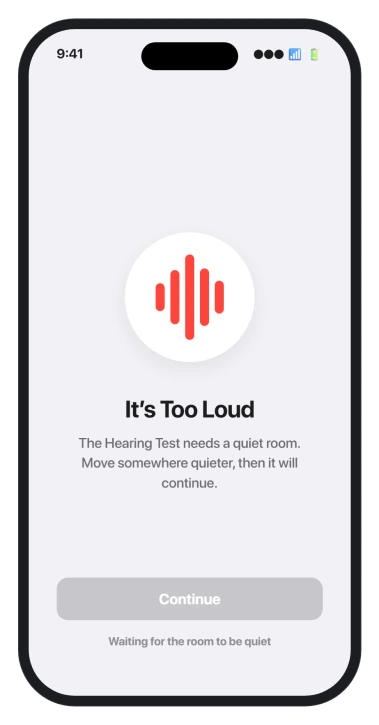
This is the single biggest reason the test stalls. It needs a genuinely silent room and pauses on any noise: a fan, traffic, someone talking in the next room, even you shifting in your seat.
It will not resume until it hears quiet again.
Your own body counts. Breathing, clearing your throat, or scratching your face can pause it. Set the phone down flat, sit still, and stop talking for the few minutes it takes.
Pushing the ear tips in extra tight makes this worse, not better. A very tight seal lets the microphones pick up your own pulse, which the test reads as noise.
Aim for a snug, comfortable seal, not maximum pressure.
That same seal is what lets AirPods heart rate read during a workout, so it is worth getting right.
If it asks you to clean your AirPods
This prompt shows up even on brand-new AirPods, which throws people. Before the test, the AirPods play a quiet tone and listen back with their own microphone.
If the speaker mesh or the small vent next to the ear tip is blocked, or the seal is poor, they cannot hear that tone and ask you to clean them.
So clean the right spots: the speaker mesh and the tiny vent beside the ear tip, using a soft dry brush or a cotton swab barely dampened with 70 percent isopropyl alcohol. Let them dry fully.
Gently clearing that vent has fixed it for people when nothing else did.
Then run the fit test first, so you know the seal is good. On AirPods Pro 2 it is the Ear Tip Fit Test; on Pro 3 with iOS 26 it is the Acoustic Seal Test.
A wrong tip size is a common cause, and the same poor seal is often behind weak noise cancelling or a faint hiss.
If you have AirPods Pro 3 and you are still on iOS 18, update to iOS 26. On the older software the Pro 3 test was not finished and wrongly demanded cleaning.
Take off any third-party case too, since one that stops the lid closing fully can break the same check.
If the test is missing or grayed out
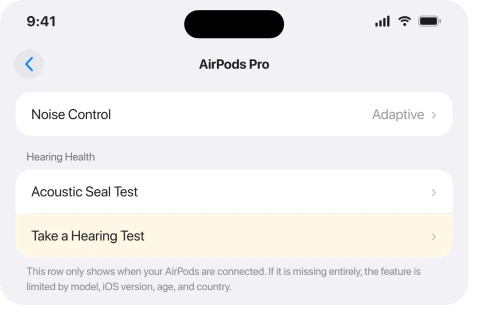
This is a different problem from a test that starts and stalls. If there is no Take a Hearing Test option at all, it is usually eligibility, not a bug.
The feature works only on AirPods Pro 2 and AirPods Pro 3, paired with an iPhone or iPad on iOS 18.1 or later, for people 18 or older. It is also gated by country.
Your Apple Account has to be registered in a supported region, and Apple keeps a live list at its feature availability page.
Apple's own steps for the test are in Take a Hearing Test with AirPods Pro.
Two more things hide it. The AirPods menu only appears in Settings when they are connected, so put them in and wait for the row with their name to show up near the top.
And the firmware has to be current, which happens on its own: leave the AirPods in the case, plugged into power, near your iPhone on Wi-Fi, and it updates in the background.
There is no manual update button to hunt for.
When Settings will not launch the test, open the Health app instead, go to Hearing, and start it from there. For a lot of people it runs every time from Health and never from Settings.
Status: a stuck hearing test is usually the room, the seal, or eligibility, not broken AirPods. Apple has acknowledged an iOS 26 tap-feedback bug, fixed by restarting the test.
How to reset your AirPods the right way
If nothing above helps, resetting clears a stale pairing. First forget them: open Settings > Bluetooth, tap the i in the circle next to your AirPods, then Forget This Device.
Then reset the hardware, and the steps differ by model.
On AirPods Pro 2, put them in the case, open the lid, and hold the setup button on the back for about fifteen seconds, until the light flashes amber then white.
On AirPods Pro 3, there is no button to hold. With the lid open, double-tap the front of the case three times, until the status light flashes amber then white. Then re-pair.
Apple has the full steps in How to reset your AirPods.
What will not fix it
- Assuming your hearing is the problem. A test that refuses to start is about noise, seal, or eligibility, almost never your ears.
- Assuming the AirPods are broken. Save that thought for last, after the room, the seal, and a reset.
- Powering through a noisy room. It structurally cannot run with background noise, including your own breathing. Find a real quiet spot.
- Chasing it in an unsupported country. If your region is not on Apple's list, nothing will surface the test. Check the list first.
- Hunting for a firmware update button. There is not one. Firmware updates on its own while the AirPods sit in the case on power.
Why will my AirPods hearing test not start?
Almost always because a condition is not met, not because anything is broken. The room is too loud, including your own breathing, the ear seal or speaker mesh is off, or the AirPods are not eligible.
Exit and restart the test in a quiet room with a clean, well-sealed fit, and it usually runs.
Which AirPods support the hearing test?
Only AirPods Pro 2 and AirPods Pro 3, with current firmware, paired with an iPhone or iPad on iOS 18.1 or later, for people 18 or older. It is also limited by country.
If you have AirPods Pro 1, AirPods 4, or standard AirPods, the feature is not available on them.
Where do I find the hearing test on iOS 26?
Wear the AirPods, then open Settings and tap their name near the top, and choose Take a Hearing Test. The row only appears when the AirPods are connected.
If Settings will not open it, use the Health app under Hearing, which is often more reliable.
The Short Version
- A hearing test that will not start is almost never broken AirPods or bad hearing. It is the room, the seal, or eligibility.
- First, exit and start a fresh test with the AirPods in. That clears the acknowledged iOS 26 tap-feedback bug and most glitches.
- It needs a silent room. Any noise pauses it, including your breathing, and jamming the tips in too tight lets the mic hear your pulse, so loosen them slightly.
- A "clean your AirPods" prompt means the mesh or vent is blocked or the seal is poor. Clean the mesh and vent, run the fit test, and on Pro 3 update to iOS 26.
- No test option at all is usually eligibility: Pro 2 or Pro 3, iOS 18.1 or later, 18 or older, and a supported country. Start it from the Health app if Settings will not.
Where to Next
- AirPods hissing or weak noise cancelling: AirPods Pro 3 hissing or weak ANC
- AirPods cutting out during audio: AirPods cutting out on iOS 26
- You sound muffled to others: AirPods microphone muffled on calls

Isaac Smith is the founder and editor of PC Glance, a website that covers computers, laptops, and technology. He is a tech enthusiast and a computer geek who loves to share his insights and help his readers make smart choices when buying tech gadgets or laptops. He is always curious and updated about the latest tech trends.