
You put in your new AirPods Pro 3, the noise cancellation clamps down, and underneath the quiet there is a faint hiss. Disappointing on a brand new pair, and I would not send them back yet.
A soft static, like a distant fan or a seashell held to your ear, and once you notice it you cannot unhear it.
The seal and a setting fix some of it in minutes. The rest is a known defect that no toggle touches, where the only answer is a swap, so work out which one you have.
Two complaints, two outcomes
It helps to sort your problem into one of these first.
Weak or thin noise cancellation that lets sound through is almost always fixable. The usual culprit is the ear-tip seal or a mode setting, and you can sort it yourself.
A constant hiss or static in a silent room, with the music paused and noise cancellation on, is the harder one.
When that survives a clean, a reset, and a fresh seal, it is usually the hardware, and Apple has been swapping affected units.
To tell the hardware hiss apart, switch Noise Control to Off. If the hiss vanishes the instant you leave Noise Cancellation and Transparency, that points at the noise-cancelling hardware itself, not your fit.
Get the seal right first
Most weak-ANC complaints end right here, so start here even if your fit feels fine.
Noise cancellation lives or dies on the seal in your ear canal. A loose tip lets low rumble leak straight in, and the cancellation feels broken when it is really just the gap.
The Pro 3 ships with five tip sizes, XXS, XS, S, M, and L, with medium pre-installed. Many people need to size down from what they used on older AirPods, so do not assume medium is yours.
Run Apple's built-in check. Open Settings, tap your AirPods name near the top of the screen, then tap Test Acoustic Seal and follow the prompts.
On the Pro 1 and Pro 2 this same test is called the Ear Tip Fit Test.
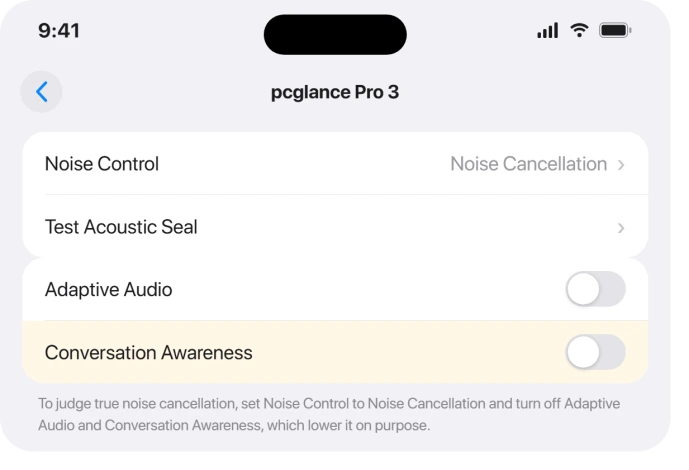
If it tells you to adjust or try another size, swap tips and run it again until you get a good seal.
Apple even notes your two ears can need different sizes, so mix them if you have to.
Make sure ANC is on, and not being dialed down on purpose
Sometimes the cancellation is not weak at all, it is being lowered by design, and a setting is doing exactly what Apple built it to do.
First, confirm the mode. Open Control Center, touch and hold the volume control, tap the listening mode button, and pick Noise Cancellation.
Adaptive and Transparency both let outside sound in on purpose, so ANC will feel weak in those.
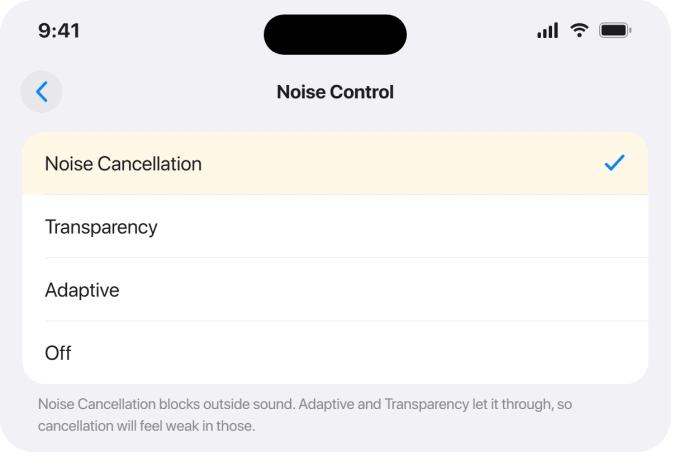
Then rule out two features that quietly soften ANC. Adaptive Audio raises and lowers cancellation based on your surroundings, and Conversation Awareness ducks it the moment you start talking.
Turn both off while you judge the cancellation. You will find them under your AirPods name in Settings. If ANC feels strong with them off, nothing is broken, you just preferred the constant setting.
Clean the mesh the way Apple now says
A clogged microphone mesh chokes noise cancellation and can add noise of its own, and the same gunk can leave your microphone muffled on calls.
The Pro 3 is fussier about earwax than older pairs.
Apple updated its cleaning steps for these.
Dip a soft, clean toothbrush in a little micellar water, brush each mesh in circles for about fifteen seconds, then blot it on a paper towel.
Repeat that three times per mesh, then go over it again with distilled water.
Pull off the ear tips and rinse them with water, no soap, and let everything dry fully before you put the AirPods back in the case.
You can use isopropyl alcohol on the charging case, but never on the meshes, and never poke them with anything sharp.
Update the firmware, with realistic hopes
If a recent update is when this started, get on the newest firmware, since the issue and the fix can both ride in on one.
AirPods firmware only updates on its own. To push it, put both buds in the case, close the lid, plug the case into power, and leave it near your iPhone with Wi-Fi and Bluetooth on for at least half an hour.
Check the version at Settings > Bluetooth, tap the (i) next to your AirPods, and look under About.
As of 1 October 2026, Apple lists 9A348 as the newest AirPods Pro 3 firmware. It also adds a Custom EQ, and the AirPods EQ page shows where to find it.
The builds rolled out fast, from 8A356 at the September 2025 launch through the 8B series that ran from late 2025 into 2026.
Be realistic about what an update can do here, though.
Apple cured the very similar hiss on the AirPods Pro 2 with a firmware build, which is encouraging, but as of mid-2026 the same fix had not reliably silenced the Pro 3 hiss for everyone.
Update because it might help, not because it is certain to.
Reset and re-pair
Still no better? Reset the connection before you write off the hardware.
On your iPhone, open Bluetooth, tap the (i) next to your AirPods, choose Forget This Device, and confirm.
Then reset the buds themselves. Put them in the case, close the lid 30 seconds, then open it, and double-tap the front of the case while watching the status light, until it flashes amber then white.
Pair them again fresh and test. If your real symptom is audio dropping out rather than hissing, follow the fixes for AirPods cutting out on iOS 26 instead.
When it is the hiss in silence, it is probably the hardware
If you have a good seal, you are in plain Noise Cancellation, the mesh is clean, the firmware is current, and a quiet room still hisses, you have most likely hit the defect.
Be clear-eyed about a few things here. Apple has not published a statement or a repair program for this, so do not wait for one.
Stores have quietly exchanged units for the static, but it is case by case, and some people were told the techs could not reproduce it.
It is also worth knowing that a replacement is not a guaranteed cure.
A number of owners swapped their pair and the new one hissed too, which is part of why this looks like a design trait on some batches rather than a simple dud.
And do not confuse this with the old AirPods Pro Service Program for sound issues. That one covers only first-generation AirPods Pro made before October 2020, not the Pro 3.
So book a Genius Bar appointment, let them hear it, and ask for an exchange. If you are inside your return window and the hiss bothers you, returning them outright is the cleanest option of all.
The Short Version
- Sort it first. Weak, leaky ANC is usually fixable. A constant hiss in a silent room, surviving a clean and reset, is usually the hardware.
- Fixable path: run Test Acoustic Seal under your AirPods name in Settings, size the tips down if needed, set Noise Control to Noise Cancellation, and turn off Adaptive Audio and Conversation Awareness while you judge it.
- Clean the meshes with a soft toothbrush and micellar water (Apple's current method), rinse the tips with plain water, and let them dry fully.
- Update the firmware in case a build helps, but do not count on it. Apple fixed the Pro 2 hiss in firmware, yet the Pro 3 hiss was still unsolved for many in mid-2026.
- Hardware path: there is no official program, replacements sometimes still hiss, and it is not covered by the old first-gen service program. Book a Genius Bar exchange, or return them if you still can.
Where to Next
And if yours never pause when you fall asleep with them in, that is a setting rather than a hardware quirk.
Where the stem press stopped taking photos or the mic stopped working, those two share one cause.
- AirPods cutting out or dropping, not just hissing: AirPods cutting out on iOS 26
- You sound muffled to callers: AirPods microphone muffled on calls
- More iOS 26 fixes: iOS 26 problems and fixes
- Back to the start: pcglance home

Isaac Smith is the founder and editor of PC Glance, a website that covers computers, laptops, and technology. He is a tech enthusiast and a computer geek who loves to share his insights and help his readers make smart choices when buying tech gadgets or laptops. He is always curious and updated about the latest tech trends.