
Your Safari bookmarks have stopped moving between your devices, and you are wondering how many switches you are going to have to hunt through. Good news on that front.
Safari bookmark sync rides on a single iCloud switch and a single Apple Account, and almost nothing else.
So when your bookmarks stop moving between your iPhone, iPad, and Mac, the fix is rarely some hidden Safari setting.
Tabs often keep syncing while bookmarks do not, which makes it feel random. It is not. Tabs and bookmarks travel as separate data under that one switch, so one can flow while the other stays stuck.
Start with the two-minute checks
Most cases end here, so do these first and in order.
- Same Apple Account everywhere. On each device, check you are signed in to the same account. A second Apple ID on one device, or a Family Sharing mixup, silently splits your bookmarks in two. This is the single most common cause.
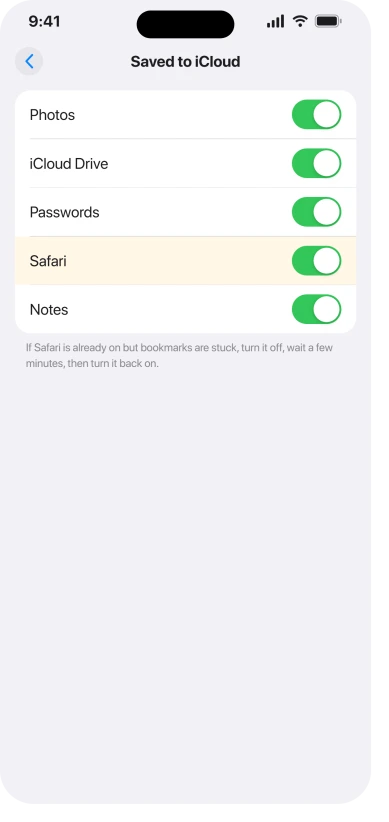
- Safari is switched on in iCloud. On iPhone or iPad, open Settings, tap your name, then iCloud, then See All next to Saved to iCloud, and confirm Safari is on. If it already is, turn it off, wait a few minutes, and turn it back on.
- Same switch on the Mac. Open System Settings, click your name at the top, then iCloud, find Safari (click See All if it is hidden), and make sure it is on. There is no sync switch inside Safari itself on the Mac, so do not go hunting in Safari's settings. It lives here.
- Rule out an outage. Apple's System Status page has a line for iCloud Bookmarks and Tabs. If that is having a bad day, the problem is not yours to fix.
- The basics. Set Date and Time to Automatic, make sure the device is online, and restart it. iCloud sync is slow and lazy by nature, the same way iCloud Photos can sit stuck syncing, so after any change, leave the device unlocked and online for a while before you decide it failed. Apple's own checklist is in If your iCloud or Safari bookmarks aren't syncing.
Turn off any VPN and test
A third-party VPN can block bookmark sync specifically, while letting the rest of iCloud through, so bookmarks look frozen for no reason. Turn the VPN off, add a test bookmark, and see if it moves.
This is not iCloud Private Relay, which people often blame by reflex.
Private Relay is about web pages loading, not bookmarks moving between devices, so leave it out of this.
If tabs sync but bookmarks stay blank
This is the hard case, and it has a look: your open tabs move across devices fine, but bookmarks either never arrive or land as grey, blank rows with no name and no link.
That pattern points at the bookmark store itself, not a setting. It shows up most on accounts with thousands of bookmarks and years of deeply nested folders.
One person trimmed both devices down to two test bookmarks and sync still failed, because the huge, tangled store already sitting in iCloud was jamming everything.
If that is you, adding bookmarks by hand will not fix it. Each new one just becomes another blank row. The store has to be rebuilt.
The durable fix: rebuild the bookmark store
This clears the stubborn cases, but it moves your bookmarks around, so back them up first. It is easiest done from a Mac.
- Export a backup. In Safari on the Mac, choose File, then Export Bookmarks, and save the file somewhere safe. This is your safety net, do not skip it.
- Quit Safari completely.
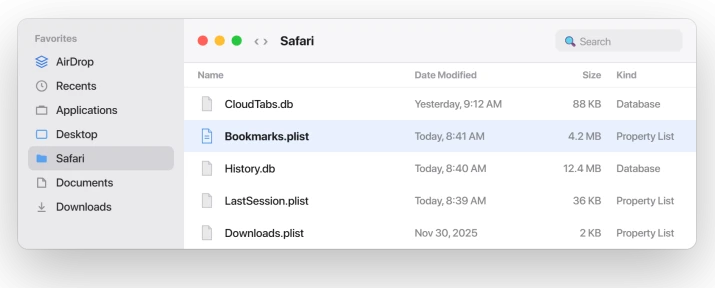
- Move the local bookmarks file out. In Finder, hold Option, click the Go menu, and open Library, then Safari. Drag the file named Bookmarks.plist out to your Desktop. Do not delete it, just move it, so you can put it back.
- Reopen Safari and wait. It rebuilds the file and pulls your bookmarks back down from iCloud. Give it a few minutes.
If the fresh list syncs correctly, you are done, and you can throw away the copy on your Desktop. If it does not, quit Safari, delete the new file, and drag the original back from the Desktop.
When even that fails, the iCloud copy itself is the corrupt one, and you have to reset the whole set:
- Turn Safari off in iCloud on every device, including the Mac after you have moved its Bookmarks.plist out.
- Restart everything with sync still off.
- Turn Safari back on in iCloud on one Mac only, and let a single test bookmark sync up cleanly.
- Then turn it back on one device at a time, letting each settle before the next.
- Finally, bring your real bookmarks back by importing the file you exported, on that one Mac, and let it spread from there.
Bringing devices back one at a time from a single good copy is what untangles it. Two devices racing to sync a bad store is how it got tangled in the first place.
Apple lists where the Mac switch lives in Change iCloud settings on Mac.
Status: Safari bookmark sync has long been flaky, and iOS 26 and Tahoe made it worse. Apple has not acknowledged a bug or named a fix, so the durable answer is to rebuild the store.
What will not fix it
- Signing out of iCloud on every device at once. If the iCloud copy is bad and all your devices drop their local copies together, you can lose the whole set. Sign out one device at a time, and only after you have exported a backup.
- Deleting bookmarks with no backup. Always export the file first. Every safe fix here starts with that.
- Re-adding bookmarks by hand. If sync is jammed, your new bookmarks just pile up as more blank rows or get wiped on the next conflict. Fix the store, then let it sync.
- Blaming Private Relay. It is a separate feature. A third-party VPN can block sync, but Private Relay is not your bookmark problem.
Why do my Safari bookmarks not sync but my tabs do?
Because tabs and bookmarks travel as separate kinds of data under the one Safari iCloud switch.
A large or corrupted bookmark store on Apple's side can stall the bookmark records while the smaller tab records keep flowing.
The switch is on and working, but that one payload is stuck, which is why it looks so random.
Where are Safari bookmarks stored on a Mac?
In your user Library, at Library then Safari, in a file called Bookmarks.plist. Reach it in Finder by holding Option, clicking the Go menu, and choosing Library.
Moving that file out and reopening Safari forces a clean rebuild from iCloud, which is the core of the durable fix, though you should export a backup first.
Does iCloud have a bookmark limit?
Not a hard one that Apple publishes.
The only documented number is that a single folder with more than 500 bookmarks may sort in a different order across devices, which is about order, not sync failing.
In practice, very large and deeply nested collections are the ones that jam, so trimming and rebuilding helps more than chasing a magic number.
The Short Version
- Bookmark sync runs on one Safari switch in iCloud and one Apple Account. Check both first, on every device.
- On the Mac the switch is in System Settings, iCloud, not inside Safari. Toggle Safari off, wait, and on to nudge a stuck sync.
- Turn off any third-party VPN and test. Private Relay is a separate thing and not the cause.
- Tabs syncing while bookmarks stay blank means the bookmark store is jammed, common with huge, nested collections. Rebuild it, do not re-add by hand.
- Durable fix: export a backup, then on the Mac move Bookmarks.plist out and reopen Safari. For the worst cases, turn Safari off in iCloud everywhere and bring devices back one at a time.
Where to Next
Where the search engine changed rather than the bookmarks, look in Search rather than in Safari settings.
- Tabs going missing rather than bookmarks: Safari tabs disappeared on iOS 26, where the usual cause is a timer Apple never documents
- iCloud Drive hiding your files instead: Desktop files missing on macOS Tahoe
- Photos stuck the same lazy way: iCloud Photos stuck syncing or paused
- Pages not loading, not bookmarks: Safari can't connect to iCloud Private Relay

Isaac Smith is the founder and editor of PC Glance, a website that covers computers, laptops, and technology. He is a tech enthusiast and a computer geek who loves to share his insights and help his readers make smart choices when buying tech gadgets or laptops. He is always curious and updated about the latest tech trends.