

You tap the plus, pick a photo, and nothing happens. That exact complaint filled the forums after iPadOS 26.2, so you are far from the only one.
Most of the time the photo is fine and so is the update. Your conversation quietly fell off iMessage onto plain SMS, which cannot send a picture the way iMessage does.
The bubble color tells you which one you are on: blue is iMessage, green is SMS.
Let me show you how to tell which one you are on, because that decides everything else.
If it started with iOS 27
iOS 27 brought a different photo fault, and it hits iMessage itself rather than a green thread.
Owners report it precisely: "It has a blue progress meter under the photo that slowly fills from left to right." It never finishes, and the photo fails with a red exclamation mark.
The usual fixes did nothing for them.
The person who started one thread had checked iMessage, MMS, VPN and a force restart. In their words: "Yes to all questions. Did not fix problem." Another owner said the same: "We have tried all the suggested cures, none worked."
Within days, it fixed itself for that owner: "The problem has now resolved itself and the iOS 27 phones are sending pictures via text message again."
Photos that failed earlier arrived as a grey box reading "Photo failed to send", and sending them again worked.
So if yours matches, give it a few days before resetting anything. That timing is ours, based on the owners who waited.
A newer thread on an iPhone 18 Pro, now with 32 Me too clicks, ended differently. After hours with Apple and then their carrier, the owner erased the phone: "I did a factory reset through i cloud (my idea) and everything works fine."
A second owner tried the lighter reset: "I did a reset all setting as suggested by Apple." Their result: "This did not resolve it for me." So if waiting fails, back up first and then erase. That order is ours.
Photos going to an Android phone are different: a Level 10 adviser says that when the MMS switch is missing, "your SIM will likely need to be reprovisioned by your cell company for the MMS service that they provide".
Check the bubble color first
Open the thread and look at your sent bubbles. Blue means iMessage, which carries photos, video, and everything else.
Green means the message went out as a plain text over the cellular network, and plain texts do not carry pictures on their own.
The difference is spelled out in Apple's iMessage versus SMS and MMS.
If a thread that used to be blue has turned green, that is the whole problem. iMessage dropped the conversation, so the photos you pick never make it out.
The fix is to push the thread back onto iMessage. Start a fresh message to the same person from Messages or Contacts, let it connect as blue, and the photo will attach and send again.
If the bubbles stay green even in a brand-new message, iMessage itself is not active.
Make sure iMessage is actually on
iOS 26 moved these settings. They now live under Settings, then Apps, then Messages, not the old top-level Messages entry.
In there, check that iMessage is on. If it already is, switch it off, restart the device, and switch it back on, then wait for it to finish activating.
That clears a stuck registration, which is the usual reason threads keep going out green.
If activation hangs on Waiting for Activation, iMessage won't activate walks through the deeper fixes.
If the other person is not on iMessage, turn on MMS
Sometimes green is correct. If you are texting someone on Android, or anyone without an Apple device, the thread is always green and iMessage is not an option.
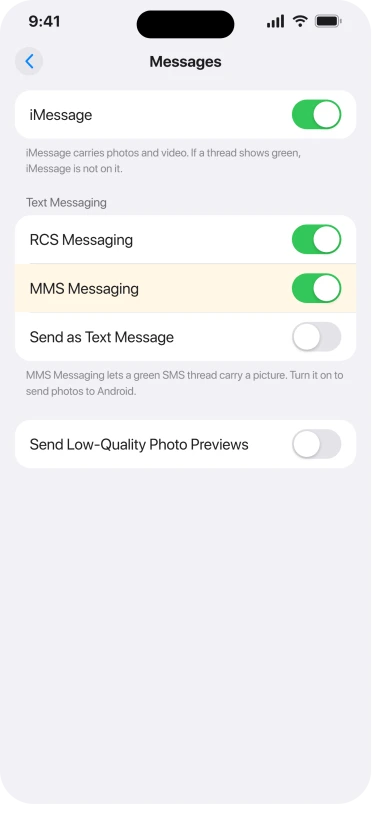
To send them a picture, your iPhone falls back on MMS, and that has its own switch.
In Settings, Apps, Messages, turn on MMS Messaging, and turn on RCS Messaging too if your carrier offers it. A green thread carries a photo through one of those two, so with both off the picture has no way out.
One iOS 26.3 quirk hides that switch when Send as Text Message is on, so if you cannot find MMS Messaging, turn that off, close Settings fully, and open it again.
Getting a picture through to an Android phone is a separate tangle worth its own read, in texts to Android not sending.
Apple's checklist for messages that will not go out at all is If you can't send or receive messages.
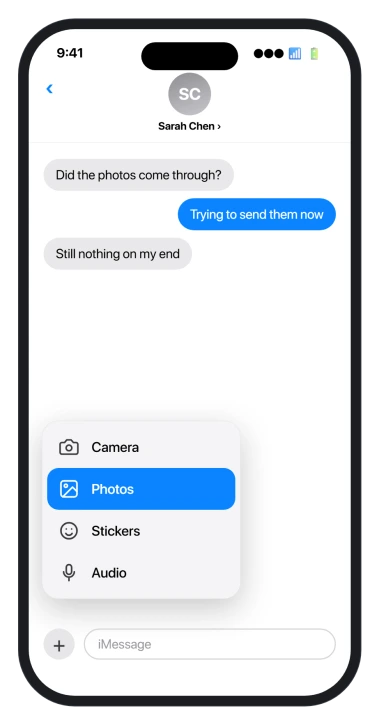
Where the Photos button went in iOS 26
For a lot of people the Photos option did not break, it moved. iOS 26 tidied away the old row of iMessage apps that used to sit above the keyboard and folded it into the plus button, to the left of where you type.
So the steps now are: open the conversation, tap the plus, and a short list appears with Camera, Photos, Stickers, and more. Tap Photos and pick your image. If your list looks short, swipe up or tap More to see the rest.
Voice recordings use a separate choice in that Add menu: send an Audio message rather than starting keyboard dictation.
When even that is being stubborn, you can skip the menu entirely. Open the Photos app, copy the picture, come back to the thread, and paste it straight into the text field.
On an iPad you can also drag the photo in from Photos in Split View.
For a cut-out subject rather than the full picture, create a photo sticker first, then choose it through the app's sticker control.
To send a faster version of a movie, edit its playback speed and export it first, then attach the finished video.
A different problem: your shared photos have vanished
This one gets mixed up with the last one, but it is separate.
In this case the photos are not the ones you are trying to send, they are the ones already in a conversation, shown in the Photos tab when you tap the person's name at the top.
After updating, that grid can come up empty, or only show pictures from after the update.
Nothing is lost. Messages rebuilds its private index of every attachment after a big update, and until that finishes the tab looks bare. Apple support has described it as an indexing bug and said to wait it out.
To help it along:
- Give it time on power. Leave the device on Wi-Fi and charging. A day or two is normal, longer for a huge message history. It often fills back in overnight.
- Rebuild the search index. In Settings, Siri and Search, find Messages, turn off Show App in Search and Show Content in Search, wait ten seconds, then turn them back on.
- Force a sync. In Settings, tap your name, then iCloud, then Messages, make sure it is on, and let it sync on Wi-Fi and power.
- Find one in the meantime. Search the person's name plus the word photos in Messages, and the shared images surface even before the tab rebuilds.
Status: checked 24 September 2026 on iOS 27.0. A new iMessage photo-sending failure after iOS 27 cleared on its own within days for the owners who waited. iPadOS 26.2 photo trouble is usually a thread dropping to green SMS, or the Photos button now hidden in the plus menu. The empty Photos tab is a separate iOS 26.1 re-index.
What will not fix it
- Erasing the iPhone to bring back the Photos tab. It only needs time to re-index. A wipe just makes it start the whole rebuild over.
- Deleting the conversation. That loses your history and does not rebuild the tab.
- Blaming the Photos app. The photos are fine. The fault is in Messages, either the thread's protocol or its index.
- Re-tapping Photos in a green thread. SMS will not attach a picture the way iMessage does. Get the thread back to blue, or turn on MMS, first.
Why can't I attach photos in Messages after iOS 26?
Usually because the conversation slipped from iMessage, the blue bubbles, to SMS, the green ones, and SMS does not carry photos on its own.
Start a new message so it connects as iMessage again, or if the person is not on Apple, turn on MMS Messaging in Settings, Apps, Messages. The Photos button also moved into the plus menu.
Where is the Photos button in Messages on iOS 26?
Tap the plus button to the left of the text field. A short list opens with Camera, Photos, Stickers, and more. Tap Photos to pick an image.
iOS 26 removed the old app row above the keyboard and put everything behind that plus button.
Why is the Photos tab empty in a Messages conversation?
Because Messages is rebuilding its attachment index after the update, which can take a day or two. The pictures are still there. Leave the device on Wi-Fi and power and the Photos tab fills back in.
Rebuilding the search index and forcing an iCloud sync can speed it along.
The Short Version
- If Messages will not send a photo, check the bubble color. Green means the thread fell to SMS, which cannot carry pictures on its own.
- Push it back to iMessage by starting a new message to the person so it connects as blue. Make sure iMessage is on in Settings, Apps, Messages.
- To send a picture to someone on Android, turn on MMS Messaging in that same place.
- The Photos button moved in iOS 26. Tap the plus to the left of the text field, then Photos. Copy and paste a photo into the thread as a backup.
- An empty Photos tab of past images is a separate re-indexing bug. Leave the device on Wi-Fi and power for a day or two and it comes back.
Where to Next
A related setting that refuses to stay where you put it: Live Photos switching itself back on in iOS 26.
- iMessage not turning blue at all: iMessage won't activate on iOS 26
- Your whole Messages app or threads gone: iPhone Messages missing on iOS 26
- Pictures to an Android phone stuck: texts to Android not sending

Isaac Smith is the founder and editor of PC Glance, a website that covers computers, laptops, and technology. He is a tech enthusiast and a computer geek who loves to share his insights and help his readers make smart choices when buying tech gadgets or laptops. He is always curious and updated about the latest tech trends.