
You turn your head and the music in your AirPods shifts with it, pooling in one ear before drifting back. Or it just sits lopsided, one bud quieter than the other, all day.
On iOS 26 this is usually a setting, not a dying AirPod.
Spatial Audio tracking your head, a balance slider off center, or a loose ear tip each tug the sound to one side, and a thirty-second test tells you if it is ever the hardware.
Let me take you through the three in the order I would check them.
Turn off the sound that follows your head
The most common reason the center drifts is Spatial Audio.
With head tracking on, iOS anchors the sound to your iPhone, so when you turn away the center slides toward where you were looking, then settles back a few seconds later.
That movement is head tracking, not a fault, and you can switch it off.
Put your AirPods in, then open Control Center and touch and hold the volume slider. Tap Spatial Audio in the corner, and choose Fixed to keep the surround effect without the movement, or Off to drop it entirely.
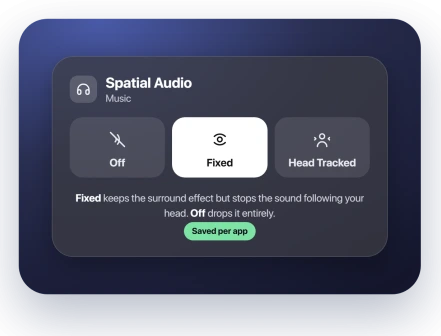
The choice saves per app, so set it in the app where it bothers you most, usually music or video.
Apple describes the modes in Control Spatial Audio and head tracking.
If the sound still leans with Spatial Audio off, it is not head tracking, so move on.
Re-center the balance slider
A steady lean that never moves is often the accessibility balance slider knocked off center. It is easy to nudge by accident and it colors every app.
Open Settings, tap Accessibility, then Audio and Visual, and find the Balance slider marked L and R. Drag it to dead center.
If you had pushed it earlier to even things out, that was masking the real cause, so zero it and start clean.
Fix the ear-tip seal
If one side sounds quieter and it shifts when you chew or reposition the bud, the seal on that ear is weak. Noise cancellation leans on a matched seal, and a loose one throws the balance off.
In Settings, tap your AirPods name and run the seal check, called the Ear Tip Fit Test, or the Acoustic Seal Test on AirPods Pro 3.
Reseat the leaning bud first, and if the test says the fit is loose, try a larger tip on that ear alone. The two ears do not have to match sizes.
The drift on trains and in wind
A separate shift lasts only a few seconds and corrects itself, showing up mainly on fast public transit or in strong wind.
This transient drift happens while a listening mode is active, not in the Off mode, and it appears to come from the noise-cancelling system re-balancing the pressure in each ear and briefly overshooting.
To stop it, switch the AirPods to the Off listening mode. In Settings, tap your AirPods name and choose Off.
If Off is missing when you press and hold the force sensor, add it under Button Cycles Between on that same screen.
Apple has looked at this one.
A user who filed it through Feedback Assistant was told the drift could not be isolated and that no fix was planned, though that was a private reply rather than a public statement.
For now the Off mode is the workaround, not a patch.
Status: AirPods balance drift on iOS 26 is several issues, not one. Most are settings or seal fixes; Mono Audio flags a hardware fault. Apple has no fix for the ANC drift; use the Off listening mode.
Is it actually broken? The one-toggle test
If the lean survives every fix, one accessibility switch settles whether a bud is faulty.
With the balance slider already centered, turn on Mono Audio, which feeds both AirPods the same combined signal and removes the spatial and equalizer differences on top of it.
Open Settings, tap Accessibility, then Audio and Visual, and turn Mono Audio on. Now listen.
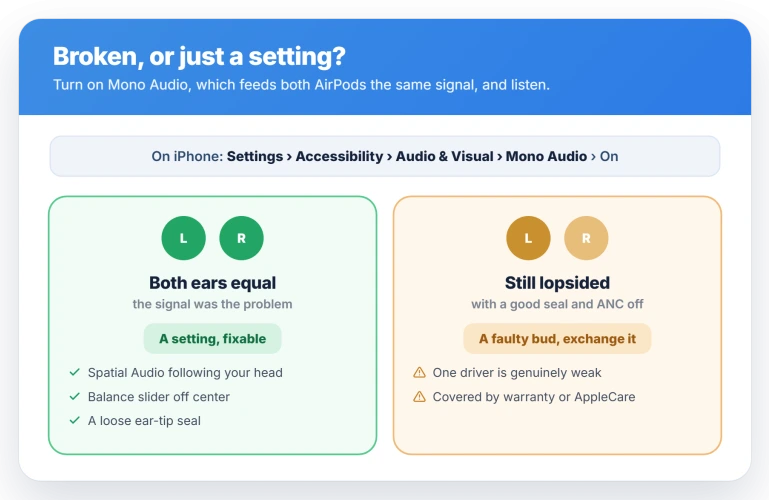
- Both ears sound equal. The problem was in the signal, so it is a setting, a seal, or Spatial Audio, all of which you can fix.
- One side is still quieter, with a good seal and the listening mode Off. That points at a weak driver, and the bud is worth exchanging.
A faulty unit is covered by the one-year warranty or AppleCare, and if you are inside the return window a straight swap is simplest. Do the Mono test first, though.
Apple's own diagnostics sometimes report no fault when you can plainly hear one, and replacement pairs often lean the same way because the cause was a setting all along.
This is a different fault from a constant hiss or weak cancellation, which is AirPods Pro 3 hissing or weak ANC.
A few more checks
Work through these if the balance is still off.
- Update the firmware. Check it under Settings, Bluetooth, the (i) next to your AirPods, then About. The latest is 8B41. It has no update button, so leave the AirPods in the case on a charger, lid closed, with your iPhone nearby, and it lands on its own. No firmware note mentions a balance fix, so treat this as housekeeping.
- Reset the AirPods, once. With both in the case, close the lid for thirty seconds, then open it. On Pro 3, double-tap the front of the case three times until the light flashes amber then white. On Pro 2 hold the setup button about fifteen seconds for the same flash. A reset can clear the transit drift for a day, but it is not a lasting cure, so do it once, not on repeat.
- Clean the mesh. Only if one bud sounds muffled rather than merely quieter, wipe it with a dry, soft, lint-free cloth. Do not push anything into the mesh.
- Turn off Loud Sound Reduction. In the EU, one reader evened their balance by switching off the Loud Sound Reduction hearing-protection limit under Settings, Accessibility, then their AirPods.
None of this is the volume dropping when you speak, which is AirPods lowering the volume on their own, and none of it is a Bluetooth dropout.
Why does my AirPods sound move to one ear?
Most often Spatial Audio's head tracking, which anchors the sound to your iPhone, so turning your head slides the center toward where you looked before it re-centers.
Open Control Center, hold the volume slider, tap Spatial Audio, and pick Fixed or Off. If it still leans, check the ear-tip seal.
Why is one AirPod louder than the other?
Usually a weaker ear-tip seal on that side, which confuses noise cancellation and Adaptive EQ, or the accessibility balance slider drifted off center.
Swap tip sizes, run the seal test, and re-center the slider. If it stays quieter in Mono Audio with a good seal, the driver is likely faulty and worth exchanging.
How do I turn off head tracking on AirPods?
You pick a mode rather than flip a single switch. Fixed keeps the surround effect but stops the sound moving with your head, while Off disables spatial audio completely.
Choose one in Control Center by holding the volume slider and tapping Spatial Audio, then repeat it in each app, since the setting does not carry over.
Is my AirPod broken or is it a setting?
The Mono Audio switch answers it: equal in both ears means a setting you can fix, still lopsided with a good seal means a faulty bud.
Before booking a swap, know that Apple's diagnostics sometimes report no fault when you can plainly hear one, and replacement pairs often lean the same way, so trust the test over the counter.
The Short Version
- The sound sliding as you turn your head is Spatial Audio. Control Center, hold the volume slider, Spatial Audio, then Fixed or Off.
- A steady lean is usually the balance slider. Settings, Accessibility, Audio and Visual, and center the L and R slider.
- One quieter side that shifts when you move is a loose ear-tip seal. Reseat it and run the Acoustic Seal Test, sizing each ear on its own.
- A brief drift on trains or in wind is the noise-cancelling system. Switch to the Off listening mode. Apple has offered no fix.
- To settle broken versus setting, turn on Mono Audio. Even means fixable; still lopsided with a good seal means a faulty bud to exchange.
Where to Next
And if the sound is crackling rather than shifting sides, that is a different symptom with different answers.
Where one side squeals rather than going quiet, a swap test tells you whether the bud or the phone is at fault.
Where Sound Recognition stopped alerting you, that has its own breakdown by symptom.
- Constant hiss or weak cancellation instead of a lean: AirPods Pro 3 hissing or weak ANC
- The volume dropping whenever you talk: AirPods keep lowering the volume on iOS 26
- Audio stuttering or cutting out entirely: AirPods cutting out on iOS 26

Isaac Smith is the founder and editor of PC Glance, a website that covers computers, laptops, and technology. He is a tech enthusiast and a computer geek who loves to share his insights and help his readers make smart choices when buying tech gadgets or laptops. He is always curious and updated about the latest tech trends.