
You nod to answer a call and nothing happens. You shake your head to decline and the ringing carries on regardless.
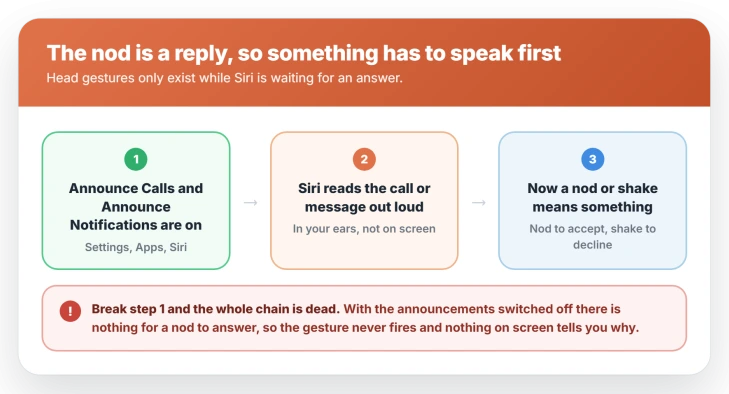
A nod is a reply, so something has to speak first. Siri reads the call aloud and your nod answers it, which means the gesture only exists while an announcement is waiting.
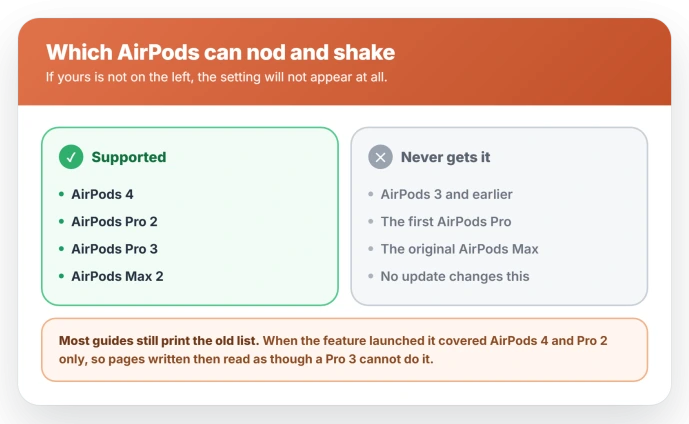
On iOS 26 that makes head gestures depend on Announce Calls and Announce Notifications, and both ship switched off. It also needs AirPods 4, Pro 2, Pro 3, or Max 2, so on anything older the setting is simply absent.
Nothing on your end is broken, and I will show you the two switches that bring it to life.
Turn on the feature the gestures depend on
For a lot of people this is the whole fix, though it is a prerequisite rather than a guarantee.
Apple states the requirement plainly in its own guide to AirPods controls: to use head gestures to respond to Siri, Announce Calls and Announce Notifications have to be on.
The logic follows once you see it. Siri reads an incoming call or message aloud, and your nod or shake is the reply. Silence that announcement and the gesture has nothing to answer.
On the iPhone, open Settings and tap Siri, which reads Apple Intelligence and Siri on newer models. It sits alongside General and Accessibility rather than under Apps.
Turn on Announce Notifications and Announce Calls there. Set Announce Calls to Headphones Only or wider. On Never, the whole chain is dead.
Then test with an actual incoming call rather than by nodding at nothing. The gesture only exists while an announcement is waiting for a reply.
Then check the gestures switch itself
Announcements being on is necessary, not sufficient. There is a second switch on the AirPods themselves, and it is the one the article-length guides tend to skip past.
Wear the AirPods and make sure they are connected, then open Settings on the iPhone and tap the name of your AirPods near the top of the screen. Tap Head Gestures and turn the switch on.
Underneath it you assign what each movement does. Pick Accept, Reply, Decline, or Dismiss, then choose Up and Down or Side to Side.
Setting one automatically gives the opposite movement to the other, so you cannot use the same nod for both.
That screen also carries a test option, which walks you through the movements and confirms audibly when one registers.
Use it before assuming the feature is broken, because it tells you whether the gesture is being detected at all without needing someone to ring you.
Check your AirPods are on the list
Apple supports head gestures on AirPods 4 in both models, AirPods Pro 2, AirPods Pro 3, and AirPods Max 2, plus Powerbeats Pro 2.
Nothing older appears on Apple's list, and since the feature is tied to the H2 chip, older pairs are unlikely to gain it.
The list grew with the hardware. iOS 18 launched the feature on AirPods 4 and AirPods Pro 2 only, and Pro 3 and Max 2 came later, so any list written at launch is missing two models.
One trap worth closing. AirPods Max 2 arrived in 2026 with an H2 chip in each cup. The 2024 AirPods Max with USB-C is a different product that kept the older chip, and it does not qualify, despite looking identical.
If your pair is not on Apple's list, the setting will not appear at all, which is its own answer.
If a second device is stealing the connection
Gestures that worked last week and then stopped are usually a connection problem rather than a settings one.
AirPods can hold a connection to more than one of your devices, and a nearby iPad or Mac can end up owning the audio channel while your iPhone shows them as connected.
One owner traced exactly this in 2024: gestures dead until Bluetooth was switched off on a nearby iPad, at which point the gesture test screen started responding.
It is a single report rather than a pattern, but it costs nothing to rule out.
So if gestures fail in one room and work in another, turn Bluetooth off on the other devices nearby and test again.
If your AirPods keep handing themselves to the wrong machine generally, that is a switching problem rather than a gesture one.
If the nod works but the shake does not
Nodding is more reliable than shaking, and this comes up often enough to be worth ruling out.
Up and down registers reliably for most people. Side to side is the one that misses, and plenty of users report having to exaggerate the movement well past what feels natural before it takes.
Make the shake deliberate and slow, two clear turns rather than a quick twitch. A small polite head-shake often does not register at all.
If everything is on and it still does nothing
This happens, and it is worth saying rather than pretending the two switches always settle it.
One iOS 26 reporter had announcements configured correctly and still got nothing, with Siri failing to read the caller out at all.
That points at the announcement rather than the gesture. If Siri is silent on an incoming call, fix that first, because the nod has nothing to attach to until Siri speaks.
Two version checks are worth making at that point.
Apple ties head gestures to the H2 chip and recent AirPods firmware, so check yours under Settings, your AirPods name, then About, where the version sits.
Firmware installs on its own while the AirPods are charging near your iPhone, and there is no manual trigger for it.
On the phone side, Apple lists head gestures as needing the latest iOS, so an iPhone a version or two behind is worth updating before you conclude the hardware is at fault.
What does not fix it
- Re-pairing the AirPods. It rebuilds the Bluetooth connection, which was never the thing standing in the way. Worth doing only if audio itself is broken.
- Resetting the AirPods to factory settings. Same reasoning, and it costs you your settings and name for nothing.
- Toggling Announce Notifications off and on. If it was already on, switching it twice changes nothing. The fix is having it on in the first place, not cycling it.
- Nodding harder at nothing. The gesture is not live except while an announcement is playing, so testing it in silence will always look broken.
Status: on iOS 26, head gestures need Announce Calls and Announce Notifications switched on, and work only on AirPods 4, Pro 2, Pro 3, and Max 2. Apple has published no fix note for it.
When it is a different problem
- Siri never announces anything. Then the prerequisite itself is broken rather than the gesture, and that is the thing to fix first. Announcements have to be audible before a nod means anything.
- Siri does not respond at all. That is a different subsystem, and no gesture setting will help until Siri itself is answering.
- The volume ducks while you talk. That is Conversation Awareness, not gestures, and it has its own switch.
How do I turn on head gestures for AirPods?
Wear the AirPods, connect them, then open Settings on the iPhone and tap your AirPods name at the top of the screen. The head gesture controls sit with the rest of that pair's settings.
They will do nothing until Announce Calls and Announce Notifications are on under Settings, Siri.
Which AirPods support head gestures?
AirPods 4, AirPods Pro 2, AirPods Pro 3, and AirPods Max 2. Older AirPods, including the first AirPods Pro and AirPods Max, do not, and no software update changes that.
Why does nodding work but shaking does not?
Side to side is the less reliable of the two, and it is a commonly reported pattern. A deliberate, slower shake registers where a small one does not.
The Short Version
- Head gestures do nothing unless Announce Calls and Announce Notifications are on. Settings, Siri, not Settings, Apps.
- Set Announce Calls to Headphones Only or wider. On Never, the whole chain is dead.
- Only AirPods 4, Pro 2, Pro 3, and Max 2 support it. Guides still listing the iOS 18 lineup are out of date.
- A nearby iPad or Mac holding the connection can kill gestures. Turn its Bluetooth off and test again.
- Shaking is less reliable than nodding. Make it deliberate and slow.
- Test on a real incoming call, since the gesture only exists while an announcement is waiting.
Where to Next
- AirPods handing themselves to the wrong device: AirPods not switching between iPhone and Mac
- The volume dropping when you speak: AirPods keep lowering the volume
- Audio dropping out mid-use: AirPods cutting out on iOS 26

Isaac Smith is the founder and editor of PC Glance, a website that covers computers, laptops, and technology. He is a tech enthusiast and a computer geek who loves to share his insights and help his readers make smart choices when buying tech gadgets or laptops. He is always curious and updated about the latest tech trends.