
Your iPhone keeps opening apps on its own, usually the Camera, usually while it is in your pocket. That is unsettling before it is even annoying.
The app that keeps opening is never the cause. Something else on the phone is launching it, and on iOS 26 there are a handful of candidates.
Let me take you through them in the order I would check.
If it is the Camera that keeps opening
Beyond the Lock Screen swipe, some iPhones have a button for it. Apple documents the swipe itself on its Lock Screen page, and it works on every iPhone.
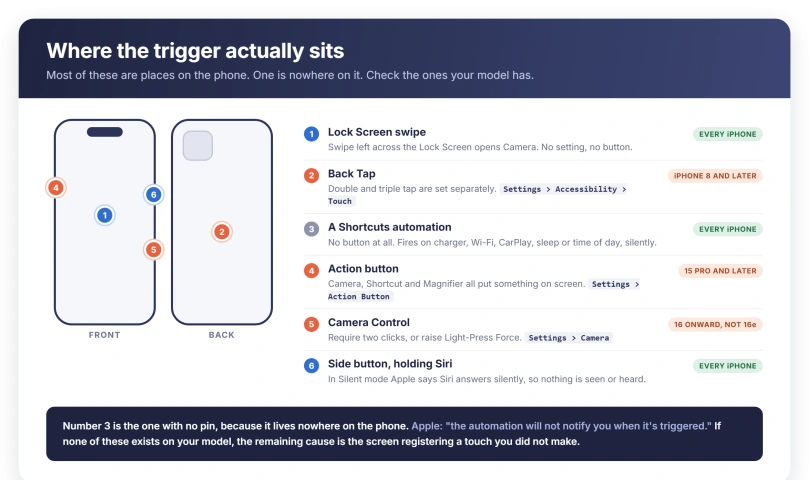
The Camera Control is on iPhone 16, 16 Plus, 16 Pro and Pro Max, iPhone Air, and the iPhone 17 models. It is not on iPhone 16e, so on that phone the settings in this section do not exist.
Three fixes, in increasing severity:
- Make it harder to trigger. At Settings > Camera > Camera Control, Apple lets you change "the number of clicks it takes to open Camera with the Camera Control from one click to two". Tap Single Click or Double Click.
- Raise the pressure. At Settings > Accessibility > Camera Control, choose a firmer setting for Light-Press Force, and there is a Double Light-Press Speed setting beside it.
- Switch it off. The same accessibility screen has "Disable the Camera Control entirely: Turn off Camera Control." Choosing None at Settings > Camera > Camera Control is the softer version, which Apple describes as "No app opens when you click the Camera Control."
Update, 29 September 2026: the Camera can also start recording in a pocket. One iPhone 17 Pro owner later found it "has been recording video for 10 minutes or more" after locking the phone.
Turning off Raise to Wake and Always On Display did not stop it for them. Another owner suggested removing the Lock Screen camera and flashlight buttons and turning off Tap to Wake.
Back Tap, and what it can actually launch
Two or three taps on the back of the phone run an assigned action, and a knock against a table or a bag counts.
Apple's description: "You can double-tap or triple-tap the back of iPhone to perform actions such as taking a screenshot, turning on an accessibility feature, running a shortcut, and more."
Note what is not in that list. Back Tap has no plain "open this app" option. It reaches apps by running a Shortcut, or by opening an accessibility feature such as Magnifier.
Check it at Settings > Accessibility > Touch > Back Tap. Double Tap and Triple Tap are set separately, so switching one off leaves the other live.
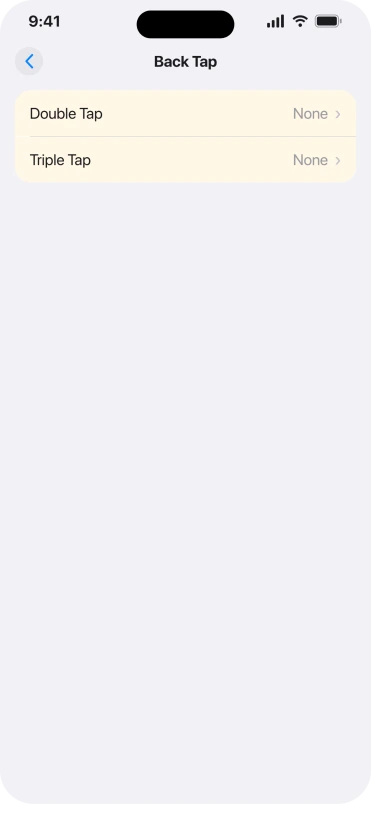
To clear them, choose Double Tap and tap None, then go back in, choose Triple Tap, and do the same.
The Action button
On models where an Action button replaces the Ring/Silent switch, a press and hold runs whatever is assigned, and Apple's list has several options that put something new on screen: Camera, Shortcut, Magnifier, Translate, Voice Memo and Visual Intelligence among them.
Apple describes Shortcut as "Open an app or run your favorite shortcut", and offers No Action, "Do nothing", at Settings > Action Button.
One detail before you assume this is your culprit.
For the Controls, Shortcut and Accessibility actions you have to pick a specific option under the action name, and until you do the button does nothing at all.
So a button that looks assigned may be doing nothing, and the real trigger is elsewhere.
The same half-finished assignment is why some phones stop going into Silent Mode, which is one cause in iPhone not vibrating on iOS 26.
An automation you set up and forgot
This one needs no button at all, and Apple lets it run without telling you.
A personal automation in Shortcuts fires on an event.
Apple's list of triggers that can run without asking includes Time of Day, Alarm, Sleep, Arrive, Leave, CarPlay, Email, Message, Transaction, Wi-Fi, Bluetooth, Apple Watch Workout, NFC, App, Airplane Mode, Do Not Disturb, Low Power Mode, Battery Level, Charger and Sound Recognition.
The silence is a setting. Apple: turn off Ask Before Running, confirm with Don't Ask, and "the automation will not notify you when it's triggered".
That list explains the classic nightstand case. If a phone opens an app every night, check it against Charger, Time of Day, Sleep and Bluetooth, all of which fire while you are asleep.
Open Shortcuts, tap Automation, and read the list. To stop one without deleting it, tap it and turn off Enable This Automation, then tap Done.
Apple: "The automation will not notify you or run automatically."
Siri can do this in complete silence
Rival pages get this one backwards, and so did an earlier draft of this page.
Apple states it plainly: "When you activate Siri with a button, Siri responds silently when iPhone is in Silent mode."
On a Face ID iPhone, Siri is activated by pressing and holding the side button.
A phone wedged in a pocket, in Silent mode, can therefore take a spoken instruction and act on it with no chime, no voice and nothing to see afterwards.
So a silent app launch does not rule Siri out. It is exactly what Apple documents.
To stop the voice trigger, Apple's route is Settings, tap Siri (or Apple Intelligence & Siri), tap Talk to Siri (or Talk & Type to Siri), then choose Off.
Apple adds a physical option on the same page: placing the iPhone face down also prevents it responding.
For the button, Settings > Accessibility > Side Button carries Press and Hold to Speak, which decides whether Siri answers a long press at all, plus a Click Speed setting.
One more voice route: Vocal Shortcuts, at Settings > Accessibility > Vocal Shortcuts, lets a chosen word or sound run an action, and Apple allows that action to be a Siri request.
If the screen is registering touches you never made
Everything so far is a feature doing its job. This is the exception, and Apple has a separate page for it.
Apple's list for a screen that "is too sensitive or responds intermittently to touch", in Apple's order:
- Restart your iPhone or iPad.
- Make sure the screen is clean and free of debris or water.
- Disconnect any Lightning or USB-C accessories. Apple: "If your screen works after removing an accessory, try using a different outlet, cable, or charger."
- Remove any cases or screen protectors.
If it survives all four, Apple's next step is service rather than settings.
Two accessibility settings reduce how much stray input registers.
At Settings > Accessibility > Touch, Tap to Wake stops "touches on the screen from waking iPhone" on supported models, and Touch Accommodations offers Hold Duration, where "taps and swipes within the duration are ignored", which is the one aimed at brief phantom taps.
What this is not
A charging iPhone on its side enters StandBy, which fills the screen with a clock, photos or widgets.
Apple says it activates by "tapping the screen, gently nudging the table your iPhone is on, or using Siri", so a nudge at 3am looks a lot like an app launching.
It has its own switch at Settings > StandBy, and our guide to StandBy widgets changing on their own covers the rest of its behavior.
Apps that open and then immediately close are a different fault with different causes, covered in our guide to iPhone apps opening then closing instantly.
Work through it in this order
Ordered by how many iPhones have the control, so the universal checks come first.
- Lock Screen swipe. Every iPhone. Nothing to turn off, but it explains a pocket camera launch.
- Back Tap. iPhone 8 and later. Both Double Tap and Triple Tap set to None.
- Shortcuts automations. Every iPhone. Turn off Enable This Automation on anything unexpected.
- Siri. Every iPhone. Talk to Siri off, and Press and Hold to Speak under Accessibility, Side Button.
- Action button. iPhone 15 Pro and later. Set to No Action to test.
- Camera Control. iPhone 16 onward except 16e. Double Click, or a firmer Light-Press Force.
- The screen itself. Restart, clean it, unplug accessories, remove the case.
Change one at a time. Changing all of them at once tells you nothing about which was responsible.
What does not help
- Deleting and reinstalling the app that keeps opening. Nothing about the app decides this.
- Assuming it must be a virus. Every cause on this page is a documented iOS feature or a touch registering.
- Ruling out Siri because the launch was silent. Apple documents Siri responding silently in Silent mode, so silence proves nothing either way.
- Resetting all settings first. That undoes a great deal to fix something you can find in a handful of screens.
- Ignoring a charging cable. Apple names charging accessories as a cause of an over-sensitive screen, which is easy to test by unplugging.
Status: current for iOS 26.6. Apple documents the Lock Screen camera swipe, Camera Control, Back Tap, the Action button, automations and silent Siri responses, each with a setting behind it.
Why does my iPhone keep opening apps by itself?
Something is triggering it, and the app itself is never the cause. On iOS 26 the documented candidates are the Lock Screen camera swipe, the Camera Control button, Back Tap, the Action button, a Shortcuts automation, and Siri activated by a long press on the side button. Stray touches on a faulty or dirty screen are the remaining possibility.
Why does my iPhone camera open in my pocket?
Most likely the Lock Screen gesture, since Apple opens Camera on a swipe left from the Lock Screen on every iPhone. On iPhone 16 and later, except iPhone 16e, the Camera Control button can also be clicked through fabric. You can require two clicks instead of one at Settings, Camera, Camera Control, or raise Light-Press Force under Accessibility.
Can Siri open an app without me hearing anything?
Yes. Apple states that when you activate Siri with a button, Siri responds silently while iPhone is in Silent mode. Since a long press on the side button activates Siri on Face ID models, a phone pressed in a pocket can take an instruction and act on it with no sound and nothing visible afterwards.
Can a Shortcuts automation open an app without telling me?
Yes. Apple documents that turning off Ask Before Running, then confirming with Don't Ask, means the automation will not notify you when it is triggered. Triggers that run this way include a charger, Bluetooth, Wi-Fi, CarPlay, NFC, arriving somewhere, an alarm, sleep and time of day.
The Short Version
- Camera opening in a pocket? The Lock Screen opens it on a swipe left, on every iPhone.
- Camera Control is on iPhone 16 onward but not iPhone 16e. Require Double Click, raise Light-Press Force, or turn it off in Accessibility.
- Back Tap is at Settings > Accessibility > Touch > Back Tap, and Double Tap and Triple Tap are separate. It reaches apps through a Shortcut or an accessibility feature.
- Action button: Shortcut, Camera, Magnifier and others all put something on screen. No Action does nothing.
- Automations run silently with Ask Before Running off. Charger, Sleep, Time of Day and Bluetooth all fire overnight.
- Silence does not rule out Siri. Apple documents Siri responding silently in Silent mode.
- Screen registering ghost taps? Apple's order is restart, clean it, unplug accessories, remove the case, then service.
- Full-screen clock while charging is StandBy, not an app.
Where to Next
The app that keeps opening is not the thing to investigate. Something is launching it, and on iOS 26 the list of candidates is short.
Work down the physical triggers first, because they are the ones that fire in a pocket.
If none of them fits and it keeps happening, tell me which app it is and whether the phone is locked at the time, and I will help you narrow it.

Isaac Smith is the founder and editor of PC Glance, a website that covers computers, laptops, and technology. He is a tech enthusiast and a computer geek who loves to share his insights and help his readers make smart choices when buying tech gadgets or laptops. He is always curious and updated about the latest tech trends.