
You tap an app, the loading screen flashes, and you are back on the Home Screen before it has opened. Then the next one does the same thing.
If Apple's own apps still work while everything else dies on launch, that split tells you a great deal.
Let me explain what that pattern actually means, because Apple does not document it anywhere and it points squarely at one cause.
Reinstall any one app, and the rest come back
A different fault hit on the night of 28 September 2026: many apps crashed at launch on iOS 27.0.1. It was not the update.
Google says Firebase, a service built into many apps, sent a bad payload from 17:41 to 19:52 US Pacific time, and it fixed that on its own servers. Reinstalling did not help that night. The iOS 27.0.1 page has Google's account.
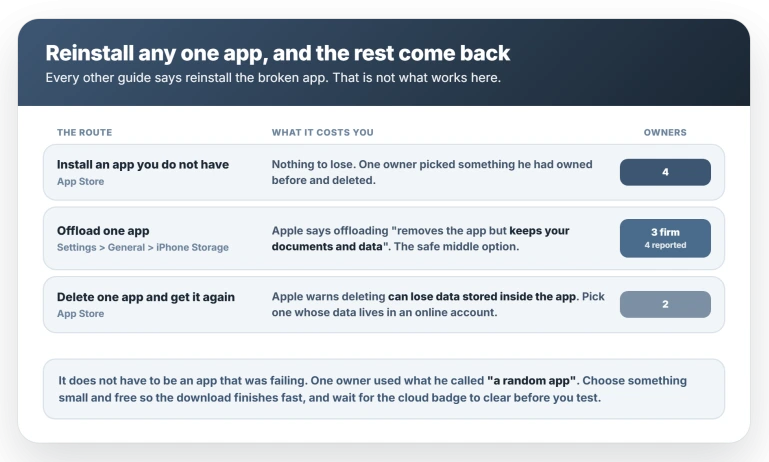
Ten owners report this working, across a MacRumors thread and two Apple discussions. Three routes get there, with no comparison between them, so take the cheapest one that suits you.
- Install an app you do not currently have. Nothing to lose, and four owners used this. One picked something he had owned before and deleted.
- Offload one app. Go to Settings, General, iPhone Storage, tap any app, and choose Offload App. Apple's own description of offloading is that it "removes the app but keeps your documents and data", so this is the safe middle option. Four owners used it, though two of those were first-time posters with consecutive account numbers, so count it as three firm.
- Delete one app and get it again from the App Store. Apple warns that deleting an app can lose data stored inside it, so pick something whose data lives in an online account. Two owners used this.
Whichever you pick, choose a small free app so the download finishes quickly. It does not have to be an app that was failing. One owner used what he called "a random app".
How to tell it worked. Offloading leaves a cloud badge on the icon. Tap it, and wait for the badge to clear before testing anything, because a half-finished download reads as a failed fix.
Then open two other apps. If both are still on screen after a few seconds, you are done.
There is a fourth route that works for some people and not others, so keep it in reserve: open the App Store and start any waiting app update.
One owner reports that restores everything and that which app updates is irrelevant. Against him, another lists updating all his apps among the things that changed nothing.
It also needs an update to be waiting, where a reinstall is available either way.
If the reinstall does not fix it
Rule out two things before you assume this is even the same fault.
Check your storage, because a full iPhone produces the same symptom and is more common right now. Then check whether Apple's apps really are fine: if Safari and Mail are dying too, this is not the fault described here.
While you are stuck, Apple's own apps still work, so you are not locked out of the phone. Confirm which release you are on at Settings, General, About, in the Software Version row.
It can come back
This changes what you should expect.
One owner on an iPhone 16 Pro fixed it by installing an app he did not have. Afterwards he reported: "After a while the problem occurs again."
Another watched it clear overnight without touching anything, then wrote the next morning: "I was too optimistic, the phone doesn't work anymore."
Waiting it out is unreliable for the same reason. One owner did have it clear on its own two days after updating.
Another was still stuck twelve hours in, and he had updated days before it started, so the fault does not always arrive with the update.
If it returns, the same reinstall works again. Expect to redo it.
Nobody knows why, and Apple's own guide sends you the wrong way
No explanation has been published, by Apple or anyone else. The fix was found by accident and passed around.
Apple does have a page for apps that will not open, and its steps send you the wrong way.
The troubleshooting steps are to close and reopen the app, restart the device, check for updates, and then:
> "Delete the app. When you do this, you might lose data that was stored in the app. Then redownload the app. Then check to see if the problem with the app is fixed."
The last sentence is the giveaway. Apple is describing how to repair the app you deleted.
What works on iOS 26.6 is reinstalling an app that was never broken in order to repair the ones that were, and no reading of that page gets you there.
It was published in March 2026, four months before iOS 26.6 shipped.
Make sure it is this and not a full phone
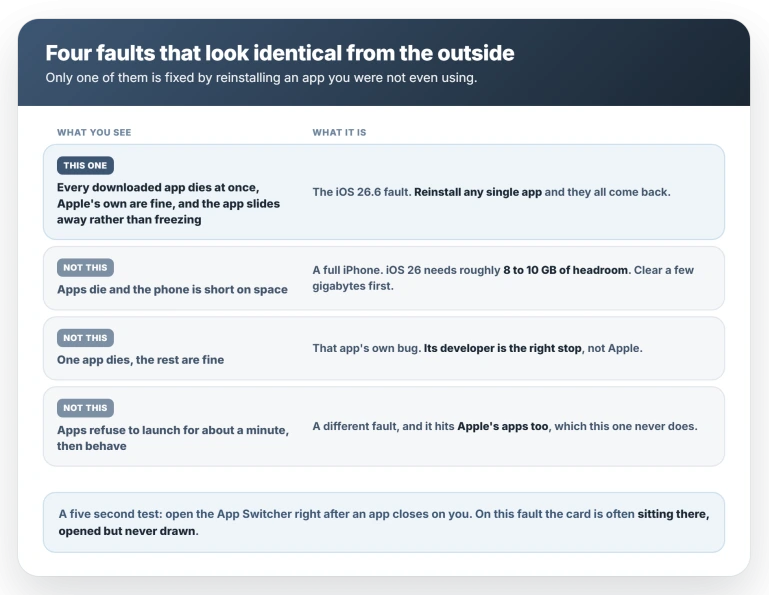
You can tell it apart two ways. Every third-party app fails at once while Apple's own carry on, and the app slides away instead of freezing. One owner described it as "vanishing to the left or bottom screen side".
There is also a five-second test. Open the App Switcher after an app closes on you. On this fault the card is often sitting there, opened but never drawn.
Three other things look like this from the outside.
A phone with no space left. This is the common one, so check it first.
System Data swelling after an update can squeeze you without warning, and iOS 26 needs something like 8 to 10 GB of headroom.
One owner posted that after updating he "basically cant use any of my apps", which reads exactly like this bug. His real problem was a full phone, and turning off automatic updates fixed it.
Look at Settings, General, iPhone Storage, clear a few gigabytes, then reopen an app.
Only one app is dying. This fault takes every third-party app at once. If just one dies while the rest are fine, that is the app's own problem and its developer is the right stop.
It is slow, not dead. One owner describes apps refusing to launch for about a minute and then behaving, and he says it hits all his apps rather than only the ones he downloaded.
Apps that never finish installing at all are a third thing again.
How many people this is actually hitting
The evidence for this is thin and you should weigh it accordingly.
Seventeen accounts turn up across one MacRumors thread, two Apple discussions and a pair of Reddit posts, and the busiest Apple thread carries sixteen Me too votes.
Several of those accounts only say a fix worked and never describe the fault.
MacRumors runs a dedicated thread cataloguing what changed in 26.6. It is six pages and 137 posts long, and it does not mention this once, which is the strongest reason to think it is not widespread.
Confirmed models are thin too. Only five people give one at all, between them naming the iPhone 17, 17 Pro, 16 Pro and 16 Pro Max, so nothing can be said about which iPhones are spared.
One report does not fit the pattern.
A Reddit owner with identical symptoms traces his to unplugging the iPhone from a Windows PC after USB tethering rather than to the update, and his computers stopped recognising the phone as well, which no other report mentions.
What does not help
- Restarting, and force restarting. One owner force restarted two or three times with no change.
- Signing out of the App Store and back in. Reported as failing by two people, and a third got nowhere signing out of his Apple Account.
- Turning Screen Time off. Raised early as the likely culprit, then ruled out by two owners, one of whom removed every restriction and rebooted.
- The Background Security Improvements toggle. This circulates as a fix. One owner reports it failing outright, and the single apparent confirmation was retracted by its author two minutes later.
- Assuming a patch is imminent. No point release has followed 26.6. The expectation of one traces to a forum member saying there was "room for" it, not to Apple.
Status: still reported 2 Aug 2026, six days after iOS 26.6. Apple has published nothing and no point release has followed. The reinstall is a reset, not a cure. Recheck at the next iOS 26 release.
Why do my apps open and close immediately on iOS 26.6?
Reinstalling any single app repairs all of them. Install something you do not currently have, or offload one app in Settings, General, iPhone Storage and tap its icon to reinstall.
It does not have to be an app that was failing. Ten owners report this working. Restarting, signing out of the App Store and turning off Screen Time all fail.
Nobody has published why the reinstall works.
Why do only my third-party apps close and not Safari or Messages?
That split is the clearest sign you have this fault rather than a full phone or one broken app, so confirm it before you try anything. Open the App Switcher straight after an app closes on you.
On this fault the card is usually sitting there, opened but never drawn, which a phone out of storage does not normally leave behind.
Will a software update fix this?
Possibly, but nothing is scheduled. iOS 26.6 is still the current release, Apple has never mentioned this in a release note, and the expectation of a quick patch traces to one forum member's guess.
Use the reinstall meanwhile, and expect to repeat it.
If your apps are opening when you have not touched the phone, that is the opposite symptom and a different set of causes, covered in our guide to an iPhone that opens apps by itself.
The Short Version
- Every third-party app dies on launch while Apple's own apps keep working. That split is how you identify it.
- Reinstall any one app and the rest come back. Install one you do not have, offload one in Settings, General, iPhone Storage, or delete and reinstall one.
- It does not have to be a broken app. One owner used a random one. Every other guide tells you to reinstall the app that failed, which is not what works here.
- Pick a small free app, and wait for the download to finish before testing.
- It is a reset, and it can come undone. One owner had it return, and one saw it clear overnight and break again by morning.
- Restarting, force restarting, App Store sign-out, Screen Time and the Background Security Improvements toggle have all failed for someone.
- Check your storage first. iOS 26 needs 8 to 10 GB of headroom, and a full phone looks just like this.
- Seventeen accounts, against a six-page MacRumors thread on 26.6 that never mentions it. Not widespread, and no publication has covered it.
Where to Next
The split is the whole diagnosis. Every third-party app failing while Apple's own apps carry on is not a coincidence, and it tells you where the problem sits.
Do not delete and reinstall everything before you have read what that pattern means.
If yours matches and the documented fix does not hold, tell me your iOS build number exactly, because this behaves differently across point releases.
If only Apple Music closes on iOS 27, the Apple Music crash page traces it to the Home tab.

Isaac Smith is the founder and editor of PC Glance, a website that covers computers, laptops, and technology. He is a tech enthusiast and a computer geek who loves to share his insights and help his readers make smart choices when buying tech gadgets or laptops. He is always curious and updated about the latest tech trends.