
You open Apple Music on your iPhone, and it closes before you can play anything. It started with iOS 27, and reinstalling the app has not helped.
I went through the forum thread about it, where 14 people pressed Me too. Owners traced the crash to one place, the Home tab, and two of them found a way past it.
What the thread shows
The opening post is short. In their words: "whenever I open Apple Music, it crashes immediately". Apple Support's answer for that owner was network related: "the best they could advise is to reset my network settings", blaming their VPN.
That owner was not happy. "this is not a permanent solution, as I will need to reset my network again whenever I use my VPN".
Your iPhone may have no VPN at all, and neither did memepj: "I am getting the same issue but not using a VPN or private relay at all". Their conclusion: "An element on the home page must be the cause."
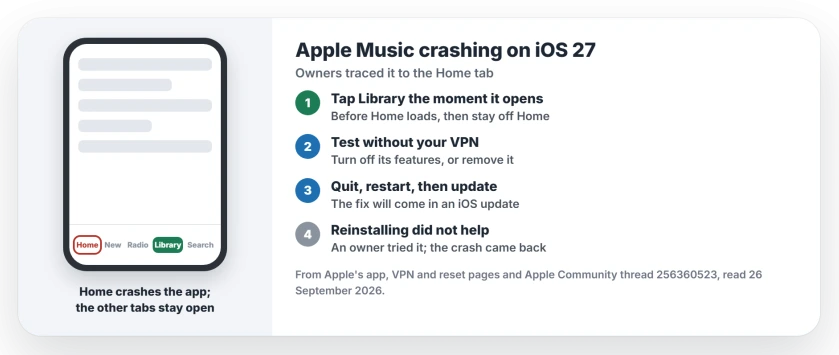
Status: Apple Music on iOS 27, checked 26 September 2026. The app can crash as soon as it opens on the Home tab. No Apple fix yet; switching tabs quickly keeps it open.
1. Tap another tab before it crashes
memepj found the way in: "The only workaround I've found is to mash any Music menu button besides the music home page before the app crashes again".
nder_21 confirmed it the same week. "when I quickly smash the New, Radio, Library or Search button it will open and remain open". But the Home tab is the trap: "But once I tap the Home button it will crash again".
So open Music and tap Library at once. Do not wait for your Home tab to load. Then stay off it.
I would start with Library. It holds your own playlists and albums, and Search reaches the rest of the catalog. You lose very little. That tip is ours.
2. If you use a VPN, test without it
A Level 10 volunteer pointed at VPN apps: "VPN's will commonly cause problems when accessing content from Apple Servers".
They added that switching it off may not be enough. "Turning one off will not likely resolve the problem, and it would need to be uninstalled".
Apple's own article on VPN software gives the first step: "Use the app to turn off its features, then see if the issue continues". It also suggests searching Settings for "VPN, profile, firewall, and filter".
Apple Support told the first poster to reset network settings. Apple's guide warns that "All network settings are removed", including saved Wi-Fi networks, so keep your Wi-Fi passwords handy first.
The path is Settings, General, Transfer or Reset iPhone, Reset, then Reset Network Settings. Do not tap Erase All Content and Settings by mistake.
3. Quit, restart, and watch for the update
Apple's first steps for any app that closes on its own are simple: "If an app isn't responding, you can quit it and then reopen it to try and resolve the issue".
To quit, Apple says to "open the App Switcher, swipe right to find the app, then swipe up on the app". If that fails, restart your iPhone.
Music comes with iOS. So its fix will arrive in an iOS update. Keep an eye on Settings, General, Software Update.
4. What did not help
nder_21 tried the heavy steps already: "Deleted Apple Music, redownloaded it, turned phone on and off, deleted any possible VPN apps but no avail".
Aaronrtt had the same result: "I've tried all suggested solutions and nothing resolves this". So skip the reinstall for now. Any albums you downloaded would need fetching again.
If the Home tab is blank instead
A Home tab that loads empty rather than crashing is a different fault. The blank Home tab page covers it, and it usually comes down to one switch. If other apps also close the moment they open, see apps that open then close.
In the car, if CarPlay lists a playlist oldest first whatever order you pick, the CarPlay playlist page has the re-sort trick.
And if you would rather not see Apple Music in the app at all, the hide Apple Music page shows the switch in Settings.
Why does Apple Music crash on iOS 27?
Apple has not said. Owners in the forum thread traced it to the Home tab, since the app stays open on the other tabs.
How do I stop Apple Music crashing when I open it?
Tap Library, Search, Radio or New the moment Music opens, before Home loads. Then avoid the Home tab until an iOS update fixes it.
Does a VPN make Apple Music crash?
It can, according to a Level 10 volunteer and Apple Support's advice to one owner, but other owners without any VPN see the same crash.
Will deleting and reinstalling Apple Music fix it?
Not in the thread. One owner deleted and redownloaded it, restarted, and removed VPN apps, and it still crashed.
The Short Version
- Music can crash on the Home tab since iOS 27.
- Tap Library or Search the moment it opens.
- Then stay off the Home tab.
- If you use a VPN, test with it off.
- Quit and reopen, then restart.
- Install the next iOS update when it appears.
Where to Next
Next time Music opens, go straight to Library and see whether it stays open for you too.
If a particular iOS update fixes it, tell me the version number in the comments. I will add it here as soon as I see it.
On a Mac, if your star ratings vanished from the song list, the ratings page shows the View Options setting that brings them back.

Isaac Smith is the founder and editor of PC Glance, a website that covers computers, laptops, and technology. He is a tech enthusiast and a computer geek who loves to share his insights and help his readers make smart choices when buying tech gadgets or laptops. He is always curious and updated about the latest tech trends.