
You updated your Apple Watch, and Walkie-Talkie has vanished from the app list. You did not delete it, and it is not hiding in a folder.
Apple discontinued it with watchOS 27. I read Apple's own support page on it, plus the forum thread where a parent asked for it back, and there are three close substitutes.
What Apple says
Apple's Walkie-Talkie support page now opens with the news: "With watchOS 27, Walkie-Talkie has been discontinued."
It goes on: "After you update your Apple Watch to watchOS 27, the Walkie-Talkie app will no longer appear on your watch, and it's not available to download from the App Store". So you have nothing to reinstall.
It also breaks the link for people who have not updated. "If you're using watchOS 26 or earlier, you won't be able to start a Walkie-Talkie conversation with a friend who has updated to watchOS 27".
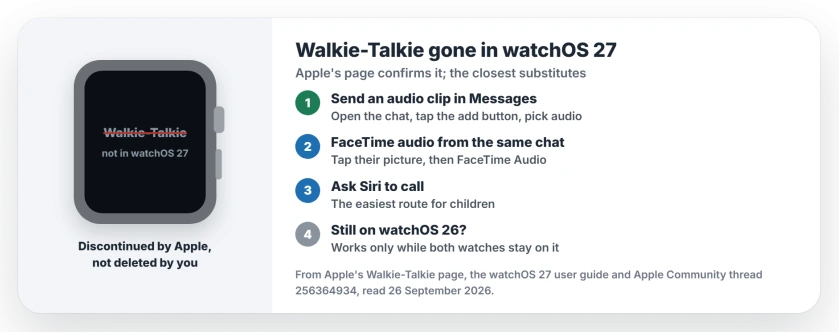
Status: watchOS 27, checked 26 September 2026. Apple has discontinued Walkie-Talkie. It cannot be downloaded again, and a watch on watchOS 26 cannot talk to one on watchOS 27.
What owners are saying
The thread came from a parent who used it with their children every day. In their words: "I am sooo angry the watch update to os27 removes the walkie talkie feature I use this daily with my kids."
Their reason is one many families will share. It was "easier for them to navigate to the walkie talkie vs to call", and the kids loved it.
A Level 10 volunteer confirmed it plainly: "Indeed Walkie-Talkie has been removed under watchOS 27." A Level 8 volunteer suspected Apple saw it as "a seldom used feature".
1. Send a quick audio clip in Messages
The closest thing on watchOS 27 is a voice clip. Apple's Messages guide lists what you can send from the watch, including "Send stickers, GIF images, audio clips, Digital Touch effects, and more".
Open Messages and the conversation, tap the add button, and pick audio from the options. Record, then send.
Our view: it is not live like Walkie-Talkie was, but it keeps the feel of pressing and talking. Your child hears your voice, not a transcript.
2. Start a FaceTime audio call from the same chat
For a real back-and-forth, Apple says "You can make FaceTime audio calls right from the Messages app on your Apple Watch".
In the conversation, tap their profile picture, tap the button that appears, then tap FaceTime Audio. Apple's wording ends "FaceTime Audio to make a call". It rings like a normal call.
3. Let Siri place the call
A Level 10 volunteer suggested the simplest route for children: "Teach your kids to say, 'Siri, call Mom.'"
It asks nothing of small fingers. For a child who found Walkie-Talkie easier than calling, a voice command may be the easiest replacement of all, in our view.
4. If your family is still on watchOS 26
Apple lists who can still use Walkie-Talkie: "you and your friend both need Apple Watch Series 1 or later with watchOS 5.3 through watchOS 26.6".
So if every watch in your group stays on watchOS 26, Walkie-Talkie keeps working between them. The moment one watch updates, that pair loses it.
That is a trade-off, and it is ours to point out. Holding back an update also holds back its fixes, so take it as a short delay rather than a plan.
5. Tell Apple you miss it
The Level 8 volunteer's advice was to send feedback rather than post in the forum. Apple has a feedback form for Apple Watch.
Describe how you used it, especially with children. Feedback does not guarantee anything, but it is the channel Apple reads.
Other Apple Watch changes in watchOS 27
watchOS 27 moved other things around too. If a cycling workout lost its speed readout, the cycling speed switch brings it back. And if Siri stopped setting timers, the Siri timers page covers it.
Walkie-Talkie is not the only thing missing on the new watches. The Series 12 and Ultra 4 have no Handwashing timer either, and the Handwashing page shows the stand-in.
Did Apple remove Walkie-Talkie in watchOS 27?
Yes. Apple's support page says Walkie-Talkie "has been discontinued" with watchOS 27, and the app disappears from the watch after the update.
Can I get Walkie-Talkie back on my Apple Watch?
Not on watchOS 27. Apple says it is not available to download from the App Store.
Does Walkie-Talkie still work on watchOS 26?
Yes, between two watches that both run watchOS 5.3 through 26.6. It stops working with anyone who has moved to watchOS 27.
What is the closest substitute for Walkie-Talkie on Apple Watch?
Audio clips in Messages come closest. For a live conversation, start a FaceTime audio call from the same Messages chat, or ask Siri to call.
The Short Version
- Apple discontinued Walkie-Talkie in watchOS 27.
- It cannot be downloaded again.
- Send audio clips in Messages instead.
- Or start a FaceTime audio call from the chat.
- Children can simply ask Siri to call.
- Watches all on watchOS 26 still work together.
Where to Next
Try an audio clip with your family today, so the switch feels familiar before you need it.
If you found a better substitute, especially one children can use, share it in the comments. I will add the good ones to this page.

Isaac Smith is the founder and editor of PC Glance, a website that covers computers, laptops, and technology. He is a tech enthusiast and a computer geek who loves to share his insights and help his readers make smart choices when buying tech gadgets or laptops. He is always curious and updated about the latest tech trends.