
You finish a ride and check your Apple Watch. The route is there, the distance is there, but your speed is not. No current speed during the ride, and no average afterwards.
It is annoying when the one number you ride for disappears after an update. The good news is that two owners got it back with one switch. I cover that switch first, then what to try if it does not work for you.
The symptom
On Apple's forum, the first owner to post described it exactly: "my Apple Watch doesn't track cycling (average) speeds anymore. It does show the route taken and distance".
It is not one model: owners report it on SE 3, Series 10, Ultra 2 and Ultra 3 watches, all after watchOS 27. One wrote: "The speed, both average and current seems to be missing. I've checked location services".
That last detail matters, because the setting that fixed it was already on for them.
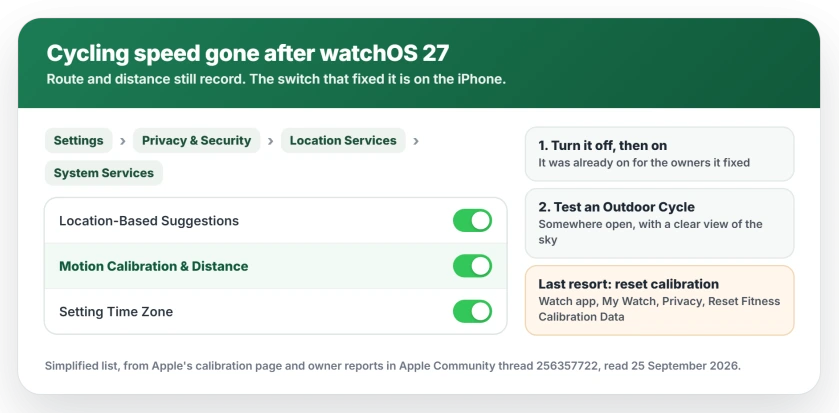
Status: watchOS 27, checked 25 September 2026. Apple has not commented. Two owners fixed it by turning Motion Calibration & Distance off and on again on the iPhone, even though it was already on. Apple's calibration page documents where that switch lives.
1. Turn Motion Calibration & Distance off and on
This is the fix, and the switch lives on your iPhone rather than the watch. A Level 6 member pointed to the setting: "check Settings > Privacy & Security > Location Services > System Services > Motion Calibration & Distance".
Apple's calibration page gives the same route. "Scroll down, then tap System Services. Make sure that Motion Calibration & Distance is turned on."
Yours is probably on already, which is why it gets missed. Turn it off, then on again.
One owner with an Ultra 3 did just that: "I toggled the Motion Calibration and Distance switch; it was ON, toggled it OFF and ON again, after that, the problem was fixed."
An Ultra 2 owner confirmed it the same way: "i did this on my ultra 2 today and now its working like it should".
2. Confirm Location Services itself is on
While you are there, look one level up. Apple's first check on the same page is simple: "Make sure that Location Services is turned on."
Without it, your watch cannot measure a ride properly. It takes a second to confirm, and I would rather you rule it out.
3. Test it on a short ride outside
Start an Outdoor Cycle workout somewhere open, with a clear view of the sky, and check that speed shows up on the watch.
Apple notes that the Ultra, the Series 8 and later, and the SE (2nd generation) "use the built-in Apple Watch GPS even when your iPhone is nearby." So a newer watch can measure speed without your phone in your pocket.
4. Last resort: reset your calibration data
If speed is still missing, Apple documents a reset. On your iPhone, open the Watch app, tap My Watch, then "Tap Privacy, then tap Reset Fitness Calibration Data."
This throws away what your watch has learned about your stride, so walks and runs start from scratch.
Apple's advice is to recalibrate with an outdoor walk or run of "about 20 minutes". No owner in the thread needed this step, so treat it as a fallback.
Other watchOS 27 problems
Some watches have more than one problem after watchOS 27.
If Siri now refuses to set timers, a separate fix covers that one. If a workout will not save at all, the workout-not-saving checks still apply.
On an Ultra 4, if the Action button is slow to turn on the flashlight, that has its own page.
Why did cycling speed disappear from my Apple Watch?
Since watchOS 27, some owners see the route and distance of a ride but no current or average speed. Two owners fixed it by turning Motion Calibration & Distance off and on again, on the iPhone.
Where is Motion Calibration & Distance?
On your iPhone, open Settings, then Privacy & Security, then Location Services, then System Services. The Motion Calibration & Distance switch is in that list.
Does resetting fitness calibration data fix cycling speed?
Apple documents the reset, and it wipes what your watch has learned about your stride. No owner in the thread needed it, so try the off-and-on switch first.
Do I need my iPhone with me for cycling speed?
Not on newer watches. Apple says the Ultra, the Series 8 and later, and the SE (2nd generation) use the watch's own GPS even when the iPhone is nearby.
The Short Version
- watchOS 27 dropped cycling speed for some owners, while route and distance stayed.
- The fix is on the iPhone: Location Services, System Services, Motion Calibration & Distance.
- It is probably on already. Turn it off, then on again.
- Two owners got speed back that way.
- Test with an Outdoor Cycle workout outside.
- Resetting fitness calibration data is the last resort.
Where to Next
Flip the switch before your next ride, since it takes less time than pumping a tire.
Did it bring your speed back? Let me know in the comments, with your watch model. If it did not, tell me that too.
watchOS 27 also retired Walkie-Talkie, and the Walkie-Talkie page covers what to use instead.

Isaac Smith is the founder and editor of PC Glance, a website that covers computers, laptops, and technology. He is a tech enthusiast and a computer geek who loves to share his insights and help his readers make smart choices when buying tech gadgets or laptops. He is always curious and updated about the latest tech trends.