
You open Music on your Mac, and the star ratings you gave your songs are nowhere in the list. Nothing looks deleted, the column is simply gone.
That is a view setting, and it takes seconds to fix. I checked one owner's thread against Apple's own Music guide, and the only part left open is playlists.
What one owner noticed
The report was specific: "In the most recent update (Tahoe 26.5, I believe), Apple Music no longer shows the star rating system." The ratings still showed in Get Info, which the owner found slow.
In their words: "I find this frustrating and would like to ask for it back." A Level 10 volunteer answered within minutes: "You can include it when viewing a list of songs."
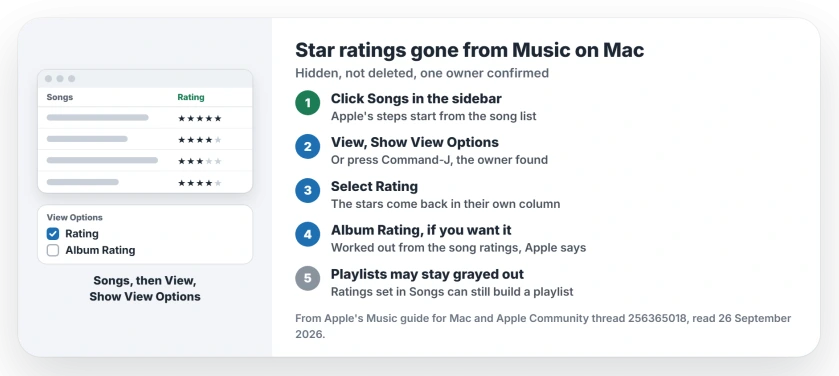
Status: Music on macOS Tahoe 26.5, checked 26 September 2026. Star ratings come back through View Options. In playlists the option stayed grayed out for one owner, and that part is unresolved.
1. Turn the Rating column back on
Open Music and click Songs in the sidebar. Apple's Music guide then says to "Choose View > Show View Options, then select Rating."
The volunteer gave the same route: "Then all you need to do is place a checkmark next to Ratings." They added: "I have it showing in Apple Music on Tahoe."
The owner found a shortcut too: "Looks like Command-J should do that function as well."
2. Rate songs straight from the list
With the column showing, you rate in place. Apple says to "move the pointer over the song you want to rate, then click or drag in the Rating column to add or remove stars".
That beats opening Get Info for every track. It was the owner's main complaint.
3. Turn on album ratings if you want them
The same View Options panel has a second box. Apple says "You can also choose Album Rating to turn on album ratings".
You do not rate albums by hand for this. Apple explains that "an album rating is calculated by combining all the individual song ratings".
4. Playlists are the open question
The fix did not reach everything. The owner's follow-up began "It works for songs, so points!" In playlists, though, the option stayed grayed out for them.
A rating belongs to the song, so stars you set in Songs travel with it into every playlist. That reading is ours.
Apple also says ratings can "help you automatically create playlists". So a playlist built from your top ratings can gather those songs for you, even while the column stays grayed out.
5. Get Info still works for one song
The owner's fallback was Get Info, where the stars never went away. It is slower, but it works one song at a time.
Other Apple Music problems
If Apple Music keeps closing on your iPhone, the iOS 27 crash page has a workaround. And for a Home tab that shows nothing, the Home tab page starts with Sync Library.
On a Mac, if a song found in Spotlight opens the Music window instead of the track, the Spotlight song page shows how signing out and back in cleared it.
If your shared library vanished from the Apple TV or another Mac, the Home Sharing fix starts by counting your authorized computers.
Why did star ratings disappear from Apple Music on my Mac?
For one owner, the Rating column went missing from the song list after an update. View, Show View Options, then Rating brings it back.
How do I show star ratings in Apple Music on a Mac?
Click Songs in the sidebar, choose View, then Show View Options, and select Rating.
Can I show ratings in a playlist in Music?
One owner found the option grayed out in playlists. Set ratings in Songs, and use them to build a playlist by rating.
Are my old ratings gone?
No. The owner could still see them in Get Info, and they showed again once the column was back.
The Short Version
- The ratings are hidden, not deleted.
- Click Songs, then View, Show View Options.
- Select Rating to bring the stars back.
- Command-J opens the same options.
- Album Rating is a second box there.
- Playlists may show it grayed out.
Where to Next
Open Songs now and turn the Rating column on. Then check that a few songs you rated still show their stars.
Found a way to show ratings inside a playlist? Tell me in the comments. I will post it on this page for the owner who asked.

Isaac Smith is the founder and editor of PC Glance, a website that covers computers, laptops, and technology. He is a tech enthusiast and a computer geek who loves to share his insights and help his readers make smart choices when buying tech gadgets or laptops. He is always curious and updated about the latest tech trends.