
Your iPhone is offering iOS 27.0.1, and you are weighing whether it fixes anything you care about or breaks something new. That is a fair worry, especially if you read about apps crashing the night it came out.
I read Apple's notes for the update, a MacRumors thread where owners reported after installing it, and Google's own account of the crashes. I would install it, and I explain why the crashes were not its fault.
The short answer
Install it. Apple lists three fixes, and two of them are for the 18 Pro models. If you own one of those, it matters more for you than for anyone.
It also fixes a touchscreen freeze that Apple does not limit to one model. Nothing Apple lists makes the update risky.
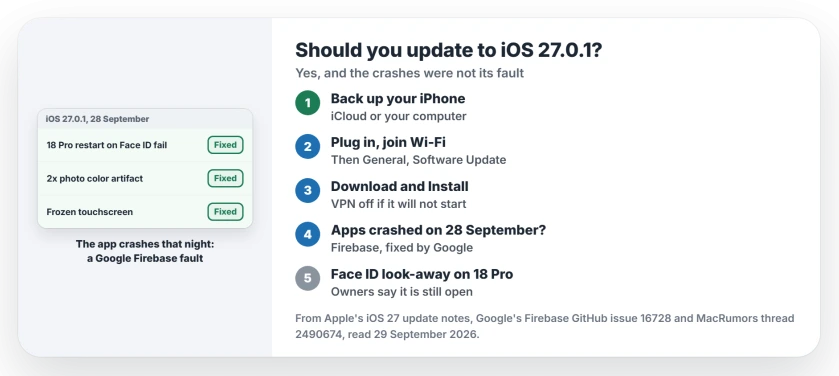
Status: iOS 27.0.1, released 28 September 2026, checked 29 September. Apple lists three fixes, two for iPhone 18 Pro models. Apps crashing that night was a Google Firebase fault, not this update.
What Apple says it fixes
Apple's iOS 27 update notes list three problems, each of which you may have seen:
- An iPhone 18 Pro or Pro Max "may unexpectedly restart when Face ID fails to authenticate".
- "A color artifact may appear on photos captured at 2x under certain lighting conditions at f/1.48", on a small number of 18 Pro models.
- "Opening Notification Center and Control Center simultaneously may cause the touchscreen to become unresponsive".
The first one matters most if your phone is an 18 Pro. Owners of the 18 Pro Max had been reporting restarts, and a Face ID failure could trigger one.
The app crashes were not iOS 27.0.1
On the night of 28 September, many of your apps may have crashed as soon as they opened. The timing pointed at the update.
It is reported by owners in the MacRumors thread. One wrote: "I've had an unusual number of app crashes after updating to 27.0.1."
Another listed "Reddit, amazon, etc", all closing back to the Home Screen. The owner who first raised it then found the real cause, a fault in Firebase, a Google service that many apps build in to count how they are used.
Google's Firebase team confirmed it on GitHub, and I read its summary. It said Google Analytics for Firebase "experienced an issue causing crashes on launch due to an incorrectly formatted payload received by the SDK."
It began at 17:41 US Pacific time on 28 September. Google said: "We fully rolled out a fix by Monday, 2026-09-28 at 19:52 US/PDT."
Some apps kept crashing a while longer because of cached data. Google said those cases "should automatically resolve themselves by 2026-09-28 at 23:52 US/PDT." You did not need to change anything on your iPhone.
What it does not fix
The update does not touch every Face ID complaint on the new phones. Owners in a separate thread say Require Attention still lets the 18 Pro unlock when they look away. One wrote on 28 September: "The bug has not been addressed".
Face ID that will not set up at all on an 18 Pro is its own problem. Brighter light and taking glasses off fixed setup for most owners.
How to install it
Apple says to back up first, then "Plug your device into power and connect to the internet with Wi-Fi." Open Settings, then General, then Software Update, and tap Download and Install.
Apple also warns that "VPN or proxy connections might prevent your device from contacting the update servers." If the update will not start, I would switch your VPN off and try again.
Other update pages
For an 18 Pro Max that has been restarting by itself, the restart page walks through the log. If apps still open and close instantly now, the apps page covers what brings them back.
If your iPhone 18 Pro Max drops to SOS on AT&T, one owner saw 27.0.1 update the modem firmware. The SOS page shows where to check yours.
If your screen froze after both top panels opened, the touchscreen page has the button restart to use until the update is on.
If you chose to stay on iOS 26, the iOS 26.7.1 page explains the security fix Apple shipped for it the same day.
If Outlook is the one app still closing as soon as it opens, the Outlook iPhone crash page covers the build that caused it.
Is iOS 27.0.1 safe to install?
Yes. Apple lists only fixes, and the app crashes reported that night came from a Google service, not from the update.
What does iOS 27.0.1 fix?
Restarts when Face ID fails on iPhone 18 Pro models, a color artifact in some 2x photos on those phones, and a touchscreen that freezes after opening Notification Center and Control Center together.
Did iOS 27.0.1 make my apps crash?
No. Google says a Firebase fault crashed many apps from 17:41 to 19:52 US Pacific time on 28 September, with stragglers fixed by 23:52.
Does iOS 27.0.1 fix Face ID on the iPhone 18 Pro?
It fixes restarts when Face ID fails. Owners say the Require Attention problem remains.
The Short Version
- Install iOS 27.0.1.
- It fixes three things Apple names.
- Two are for iPhone 18 Pro models.
- One is a frozen touchscreen.
- The app crashes were Google's Firebase fault.
- Google fixed that within hours.
- Require Attention on 18 Pro is still open.
Where to Next
Join Wi-Fi, connect your charger and install 27.0.1 tonight. If something new goes wrong after it, post it as a comment. I compare every report with what other owners see.

Isaac Smith is the founder and editor of PC Glance, a website that covers computers, laptops, and technology. He is a tech enthusiast and a computer geek who loves to share his insights and help his readers make smart choices when buying tech gadgets or laptops. He is always curious and updated about the latest tech trends.