
You grab the iPhone 18 Pro Max you just got to make a call, and it fails. The top of the screen says SOS or shows no bars, in a spot where you always had signal.
That is worrying on a phone this new. Apple has now confirmed the fault: update first, and a phone that already lost service gets replaced.
I read two MacRumors threads from AT&T owners, MacRumors' reports and Apple's pages on SOS and carrier settings.
What AT&T owners report
Twice in one weekend, the first poster had zero bars where they normally get four or five. Two friends with new 18 Pro Max phones had the same thing.
Another owner described it plainly: "In and out of SOS, even when connected to cellular it only works occasionally." They had AT&T issue a new eSIM, with the same result.
MacRumors reported on 25 September that "Affected users are unable to connect to the AT&T network for phone calls, text messages, or data." A few owners on T-Mobile and Verizon posted similar drops, so the checks apply to you there too.
Status: corrected 4 October 2026. Apple confirmed the fault on 2 October. iOS 27.0.1 and a carrier update help prevent it, and a phone that already lost service must be replaced.
What Apple confirmed on 2 October
Apple gave MacRumors a statement on 2 October: "We have identified an issue affecting a small number of iPhone 18 Pro Max users on the AT&T network that may cause a device to lose service and be unable to make calls."
It goes on: "We released iOS 27.0.1 earlier this week and strongly encourage all iPhone 18 Pro Max users to update now, and are also issuing a carrier settings update today."
The two updates "together are meant to help prevent this issue from occurring". They do not revive an affected phone.
MacRumors reports that those phones "cannot have service reactivated with a software update". In its words, "Apple said the device must be replaced entirely".
So contact Apple Support or AT&T, or visit an Apple Store or an AT&T store. MacRumors adds: "It is also unclear if there will eventually be an Apple Service Program dedicated to this issue."
The carrier update "will automatically download for AT&T users over the next 14 days, according to Apple". Fetch it sooner in Settings, General, About.
Why it may be this model
If your 18 Pro Max came from a US store, MacRumors points out it is "the only new iPhone released this month that is equipped with a Qualcomm cellular modem". The 18 Pro and the iPhone Duo use Apple's own modem.
It adds: "However, it is unclear if this is a contributing factor." The cause is not confirmed. Treat the modem as a clue, not an answer.
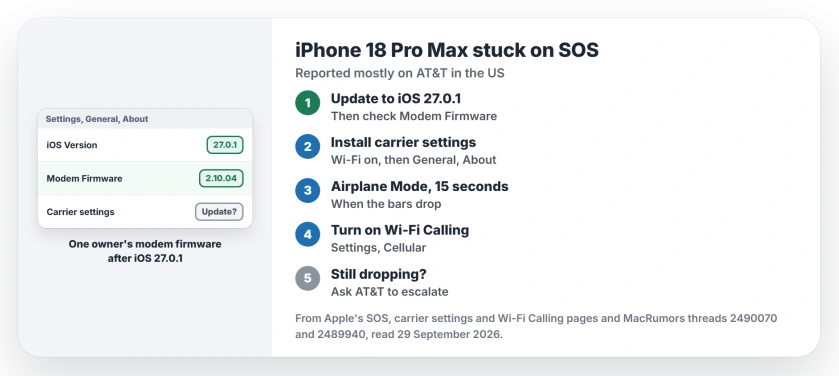
1. Update to iOS 27.0.1, then check the modem
Apple's SOS page starts where you would expect, with the newest iOS. That is iOS 27.0.1 now.
Apple's notes for 27.0.1 list three fixes and none of them mention cellular. Still, one owner found this: "18 Pro Max got a new modem update with the 27.0.1 update. Version was bumped from 2.10.01 to 2.10.04."
You can see yours in Settings, General, About, next to Modem Firmware. Our 27.0.1 page covers what else the update changes.
2. Install any carrier settings update
Your carrier can push a small settings update that improves how the phone connects to its network. Apple issued one for this fault on 2 October. Join Wi-Fi first, then open Settings, General, About.
In Apple's words: "If an update is available, you'll see an option to update your carrier settings." Its carrier settings page says installing one "takes less than one minute".
3. Toggle Airplane Mode when it drops
Apple suggests you "Turn on Airplane Mode for at least 15 seconds", then turn it off again. A user-reported workaround keeps one owner going: "put the phone into Airplane mode, count to 10, come back and it magically works again".
The same owner had already reset network settings, and the drops came back twice after that. I would not expect a reset to hold.
4. Keep calls working with Wi-Fi Calling
The first poster noticed that Wi-Fi Calling kept working while cellular had dropped. Apple's Wi-Fi Calling page says you can use it "in an area with little or no cellular coverage".
Open Settings, tap Cellular, then Wi-Fi Calling, and switch it on. At home at least, your calls go through while you wait for a fix.
5. Already lost service? Get it replaced
AT&T is aware of it. One owner's store visit ended with a text: "The issue with making and receiving calls on your new device was verified. A case has been escalated to the back office team for resolution."
Another owner got a call from AT&T tech support: "He said 3-4 days before they have the issue fixed. They are working with Apple."
Apple's statement settles the swap question. A phone that has already lost service has to be replaced, so book it through Apple Support, AT&T or a store. Before the statement, one Apple Store had warned a new phone might do the same.
If your SOS started after an older update
If you are not on an 18 Pro Max, or your trouble began with iOS 26, our SOS and No Service page covers the general steps. And if a new eSIM will not finish activating, the eSIM page has the checks.
What causes the SOS drops with AT&T on the 18 Pro Max?
Apple confirmed the fault on 2 October but has not named a cause. MacRumors notes the US model is the only new iPhone with a Qualcomm modem.
Does iOS 27.0.1 fix the AT&T SOS problem?
It is meant to prevent the fault, not cure it. Apple says iOS 27.0.1 and the 2 October carrier settings update together are meant to help prevent it. A phone that already lost service is not fixed by either.
Will a replacement iPhone 18 Pro Max fix it?
Yes, if yours has already lost service. Apple says those phones must be replaced, through Apple Support, AT&T, an Apple Store or an AT&T store.
The Short Version
- Apple confirmed some 18 Pro Max phones lose service on AT&T.
- Update to iOS 27.0.1 and check Modem Firmware.
- Install any carrier settings update.
- Switch on Airplane Mode for 15 seconds when it drops.
- Turn on Wi-Fi Calling to keep calls working.
- Ask AT&T to escalate your case.
- No service at all? The phone needs replacing, says Apple.
Where to Next
Open Settings, General, About now. Install any carrier settings update it offers, then note your Modem Firmware number.
No service at all after both updates? Contact Apple Support or AT&T about a replacement, and leave a comment on how the swap went. I add what owners confirm to this page.

Isaac Smith is the founder and editor of PC Glance, a website that covers computers, laptops, and technology. He is a tech enthusiast and a computer geek who loves to share his insights and help his readers make smart choices when buying tech gadgets or laptops. He is always curious and updated about the latest tech trends.