
You glance at your new iPhone 18 Pro Max and it is on the Apple logo again. You were not updating anything. It just went off and came back.
Before you wipe it or book a swap, there is a quicker way to know where you stand. I cover how to confirm the restarts in the phone's own log, what Apple's diagnostics decided for owners, and why a replacement did not always end it.
What owners are seeing
If yours does this, you are one of many. 387 owners have pressed Me too on Apple's forum thread, on the 18 Pro Max and a few on the 18 Pro.
One owner's phone "randomly rebooted 4 times in 36 hours". Another wrote: "This has happened 18 times since I activated my phone on Friday evening".
There is no single trigger. Owners name phone calls, FaceTime, Apple Pay, Maps and plain idle time. For some, the watch went too: "My apple watch s12 also restarted itself on its own".
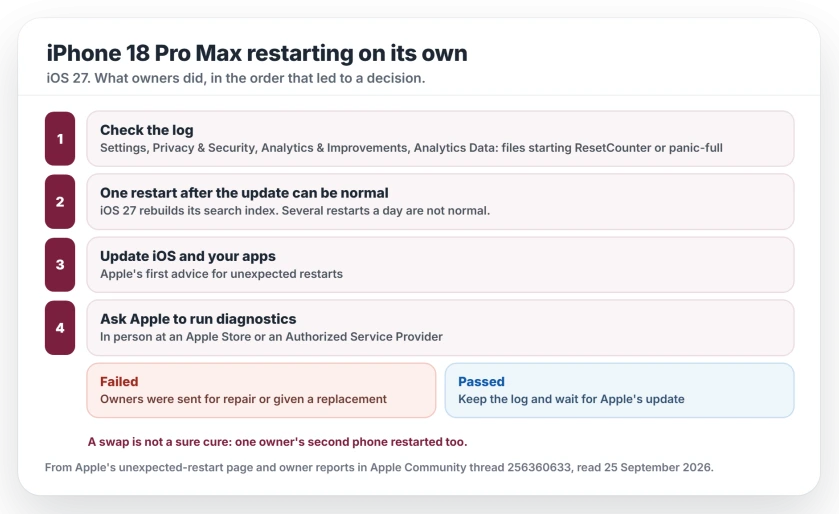
Status: iOS 27.0.1, rechecked 29 September 2026. Apple says it fixes iPhone 18 Pro models restarting when Face ID fails. Before it, failing phones were repaired or replaced, not always for good.
1. Confirm it in the log
Open Settings on your iPhone, then Privacy & Security, then Analytics & Improvements, then Analytics Data. The list is long. Look for files that start with ResetCounter or panic-full.
The thread's starter found them: "I found two ResetCounter analytics logs." Both carried the line "rst wdog". Another owner had two panic-full files, one naming PMGR and one naming SEP.
A second thread, on the iPhone 18 Pro with 35 Me too clicks, ties some SEP panics to Face ID. One owner wrote: "Same here, 2 kernel panics after/while Face ID usage the last 2 days".
Another tested colleagues' phones: "I just tested with 3 iPhone 18 pro with coworkers and all 4 of them including mine did freeze then restarted".
Do not try to decode them. A Level 10 adviser put it bluntly: "Iphone analytics mean absolutely nothing to humans". The files only prove your phone restarted on its own. They will not tell you why.
2. One restart after the update can be normal
A second Level 10 adviser gave a reason for a single reboot: "When you update to iOS 27 the entire search database must be reindexed, and when that process completes the phone probably needs to restart."
So one restart in the first day or two is not a verdict. Several a day is. If yours keeps going after that, move on to the next steps.
3. Install the update when Apple ships it
Apple's page on this symptom starts with software. Apple says to update iOS and your apps first.
As of 25 September there is no newer version for the iPhone 18 Pro Max, so check Settings, General, Software Update every few days. Update your apps meanwhile. It costs you a few minutes.
Update, 29 September 2026: Apple has now shipped iOS 27.0.1. Its notes say iPhone 18 Pro and iPhone 18 Pro Max "may unexpectedly restart when Face ID fails to authenticate", and 27.0.1 fixes that.
It matches the Face ID panics in the second thread, so install it first. The iOS 27.0.1 page covers its other fixes.
4. Ask Apple to run diagnostics
This is the step that settled it for owners, and it can settle it for you. A Level 9 adviser said where: "It can be done in person at an Apple Retail Store or at an Apple Authorized Service Provider."
The results split the thread. One owner wrote that "they ran a diagnostic my phone failed". Another was told: "After their diagnosis, they said my phone needs to be repaired".
A third phone got worse first: "Now it just turns on and off and puts itself into Recovery Mode". Apple's answer there was simple: "they are doing a replacement for my phone".
Apple's own page points the same way. If the battery is fine and the phone keeps restarting, "you might need service", in Apple's words.
5. Know that a swap is not a sure cure
One owner took a refund early: "I informed apple and I was refunded". That was clean for them.
But another owner was already on a second phone with the same fault: "I already in process to return my second device." That owner asked the question the thread keeps coming back to: "Is it device issue or software issue?"
My reading, labeled as ours: a failed diagnostic is proof enough for a repair or a replacement, and you should take it. If yours passes, the update is the more likely fix, so keep the phone and keep the log.
If you bought it from Apple, the return window still matters. Apple's 14 calendar days and how owners used them apply here too.
If it is not this
If yours runs hot and drains rather than restarting, a new iPhone 18 Pro Max can run warm for its first days.
If the screen blinks off but the song you were playing carries on, and the phone never asks for your passcode, that is a respring. The general restart guide helps you tell the two apart.
And if your new Apple Watch Series 12 or Ultra 4 restarts on its own too, the watch restart page covers watchOS 27.0.1, Apple's fix for it.
And if the back glass sits slightly in at the top edge, the back glass page shows how to compare it with a store model.
Why is my iPhone 18 Pro Max restarting on its own?
Owners report restarts on iOS 27 with no pattern, during calls, FaceTime, Apple Pay, Maps or while idle. Apple has not explained it. Phones that failed Apple's diagnostics were repaired or replaced, and others are waiting for an update.
What does rst wdog mean in ResetCounter?
It appears in the ResetCounter log that iOS writes when the phone resets itself. Owners use it to show Apple that a restart happened. A Level 10 adviser warns that these logs mean little to users, so let Apple's diagnostics read the phone.
Will Apple replace an iPhone 18 Pro Max that keeps restarting?
If yours fails Apple's diagnostics, owners in your spot were offered a repair or a replacement, and one got a refund. One owner's second phone restarted too, so a swap does not always end it.
Is one restart after updating to iOS 27 normal?
It can be. A Level 10 adviser explained that iOS 27 rebuilds its search index after the update and may restart when that finishes. Repeated restarts over several days are not normal.
The Short Version
- Hundreds of iPhone 18 Pro Max owners report restarts on iOS 27.
- Check Analytics Data on your iPhone for ResetCounter or panic-full files as proof.
- One restart after the update can be normal. Several a day are not.
- Update iOS and your apps when Apple ships a fix.
- Ask Apple to run diagnostics. Failed phones were repaired or replaced.
- A swap is not a sure cure: one owner's second phone restarted too.
Where to Next
Book the diagnostics before anything else. It is the one step in the thread that ended with a decision, either way.
How often does yours restart, and what were you doing when it happened? Leave both in the comments. Enough of those may show a pattern before Apple explains it.

Isaac Smith is the founder and editor of PC Glance, a website that covers computers, laptops, and technology. He is a tech enthusiast and a computer geek who loves to share his insights and help his readers make smart choices when buying tech gadgets or laptops. He is always curious and updated about the latest tech trends.