
Your iPhone has called emergency services and you did not mean it to. If that call is connecting right now, read this line before you do anything else.
Do not hang up. Apple's own instruction is the opposite of your instinct, and there is a good reason for it.
Stay on, wait for the responder, and tell them it was an accident. Then I will show you how to stop it happening again.
The call is already connecting
Stay on it. Apple does not say why, and dispatch practice varies by country, but the reason usually given is that a call nobody can account for gets someone sent out to check.
Apple repeats it almost word for word on its Crash Detection article, and again on its satellite page. Those three sentences are the only accidental-call advice it publishes.
Several things happen around that call whether you wanted it or not, and two of them go to other people.
Your emergency contacts get a text. Apple: "After an emergency call ends, your iPhone alerts your emergency contacts with a text message, unless you choose to cancel."
That cancel is the text to your contacts, not the call. Apple does not say where or for how long that choice appears, so do not count on catching it.
Your location goes with the message, and contacts keep receiving updates if you move, for a period Apple never puts a number on.
And in the United States and Canada, your Medical ID can be shared during the call automatically.
You already hung up
Do not switch the phone off and do not silence it. Emergency services may ring straight back, and Apple says features that block or silence calls may be disabled for a short period so that call can reach you.
Answer it. Say the phone dialled by accident, give your location, and say that nobody is hurt.
If no callback comes, call the emergency number yourself and explain. An unexplained emergency call is the whole reason Apple's instruction at the top of this page exists.
The countdown is running and it has not called yet
Let go of the buttons. Then read why that is the best answer available rather than a documented one.
For an Emergency SOS countdown, Apple documents how to start one and never how to stop it. We read eight of its pages end to end: the Emergency SOS page, both Crash Detection pages, the gestures page, the power-off page, the satellite page, the Personal Safety guide and the iOS 26 What's New page.
None of them tells you how to cancel.
What Apple does print is the gesture: "Simultaneously press and hold the side button and either volume button until the sliders appear and the countdown on Emergency SOS ends, then release the buttons."
Reading that, the call completes at the end of a hold you keep going. So let go now.
Apple never prints that as the way to stop one, so this page will not call it documented, but letting go is free to try and it is the only lever the gesture gives you.
If the call goes out anyway, do not hang up. Wait for the responder and tell them you do not need help.
Do not slide to power off either. Apple does not address that, but powering off a phone with a call on it ends the call, which is what the instruction at the top of this page tells you not to do.
If the screen in front of you says a crash was detected, look for the cancel button, because that screen has one.
Apple's own screenshot of it is described as showing "an Emergency Call SOS slider with a cancel button", and it is the only cancel control Apple confirms anywhere in its iPhone documentation.
Tap it. If the call goes out anyway, stay on the line and tell the responder you do not need help.
Before you switch either trigger off
These triggers exist for the case where you cannot use the screen. Holding the buttons works in the dark, with the phone face down, and while somebody is stopping you from looking at it.
Switching that off is a trade rather than a tidy-up. So turn off the one that is actually firing, and leave the other alone.
It keeps happening in your pocket
Three switches sit on one screen at Settings > Emergency SOS. Two are the button triggers here, and the third is Crash Detection, which has its own section further down.
Change the one that matches what happened to you.
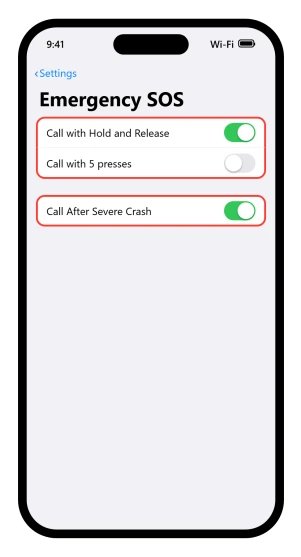
Call with Hold and Release. Apple describes it as: "Hold and release the side and volume buttons to start a countdown to call emergency services."
Call with 5 presses. Apple's own words: "Rapidly press the side button five times to start a countdown to call emergency services." Apple describes what it does and never states its default, so check the switch rather than assume.
The pocket case has a mechanical explanation Apple never spells out.
The hold gesture is the same one that brings up the power off screen, so steady pressure from a car seat, a bag strap or a tight pocket produces exactly the input the phone is waiting for.
Apple lists both gestures on the same page, four bullets apart, and neither one points at the other. The connection is ours.
If calls are not reaching you rather than going out on their own, our guide to a Focus that blocks calls covers that end of it.
It was Crash Detection, and you were parking
If that countdown is on screen right now, the cancel button described earlier is the thing to tap.
Apple scopes the feature to cars: "Crash Detection is designed to detect severe car crashes", and its list of vehicles is sedans, minivans, SUVs, pickup trucks and other passenger cars.
It also states the limit plainly: "Crash Detection cannot detect all car crashes."
The same feature on an Apple Watch does give you a documented way out of a live alert, which our guide to Apple Watch fall detection covers.
The silence described on this page is about the iPhone.
The countdown is where Apple contradicts itself.
Its iOS 26 guide page says the phone "will automatically initiate an emergency phone call after 20 seconds unless you cancel".
Its support article says the alert runs "for 10 seconds", and then "your device begins another 30 second countdown". Both pages are current.
Plan for the 20 second version, because it leaves you the least time.
If nobody answers, the phone speaks for you.
Apple: it "plays a looped audio message to emergency responders", tells them a severe crash was detected and that you are unresponsive, and shares your coordinates with a search radius.
Apple says it is on by default on supported models. Turning it off means that if you are knocked out in a crash, nothing dials and nothing plays that message.
The switch is Call After Severe Crash, on that same Emergency SOS screen. Two things to know before you use it. Turning it off on one device turns it off on your paired devices too.
And "if you have third-party apps registered to detect crashes on your device, they will still be notified".
On theme parks, Apple publishes nothing. We checked its Crash Detection pages for rollercoaster, theme park, amusement and ride, and none of those words appears.
The only anchor is that Apple's own description covers passenger cars, so switching Call After Severe Crash off at the gate is a move Apple does not endorse either way.
Switch it back on before you get in the car.
The drive is the part it was built for, and turning it off on the phone turns it off on your paired devices too, so a Watch is not covering you in the meantime.
What those switches do not stop
Read this before you decide you have disabled anything.
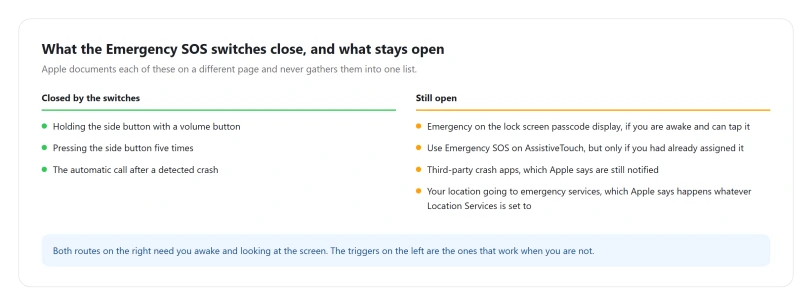
The lock screen dialler. Apple documents it as its own route: on the passcode screen, tap Emergency. Nothing on the Emergency SOS screen governs it.
AssistiveTouch. Apple lists "Use Emergency SOS" among the actions you can assign to the AssistiveTouch button, at Settings, Accessibility, Touch, AssistiveTouch. Again, a separate path.
Third-party crash apps, in the sentence quoted earlier.
Your location reaching emergency services. This one runs the other way: "The call will share your location regardless of whether you have enabled Location Services."
Apple never gathers those into one reassurance for iPhone owners.
It does write exactly that kind of sentence for Apple Watch, telling those users they can still call using the Emergency Call slider, and publishes no equivalent for the phone.
So the summary is ours: turning both toggles off leaves the Emergency button on the passcode screen working, and AssistiveTouch too, but only on a phone where that action was already assigned to it.
Both of those need you awake, looking at the screen and able to tap it. The two triggers you just switched off are the ones that work when none of that is true.
Why Face ID stopped working afterwards
A symptom people never connect to any of this. Apple lists the conditions under which Face ID will not unlock the phone, and one of them is: "An attempt to use Emergency SOS is initiated."
An attempt. The call does not have to go through. So a pocket that started a countdown is enough to put you back on your passcode.
Apple does not say how long that lasts, and our guide to Face ID not working on iOS 26 covers the other reasons it happens.
The after-effects run wider than that.
Apple documents that features which block or silence calls, including Do Not Disturb, Silence Unknown Callers and Screen Time, "may be disabled for a short period of time to allow a callback from emergency services".
That is deliberate, and it is there so you pick up. If an unknown number rings shortly after an accidental emergency call, answer it rather than declining it.
And if you texted rather than called: "After you text 911, your iPhone enters emergency mode for 30 minutes. To get out of emergency mode, restart your iPhone."
On Android, a trip to India can leave a different trigger behind, three presses of the power button, and it stays tied to the Indian SIM.
Status: unchanged through iOS 26.6. Apple has published no cancel instruction for an Emergency SOS countdown, and its two Crash Detection pages still give different countdown lengths.
How do I stop my iPhone calling emergency services by accident?
Turn off whichever of Call with Hold and Release and Call with 5 presses is switched on, at Settings, Emergency SOS. For crash-triggered calls, turn off Call After Severe Crash on the same screen. Neither change removes the Emergency button on the passcode screen, so you can still dial by hand. What you lose is the ability to call without looking at the phone.
My iPhone is calling 911 right now, what do I do?
If it has connected, stay on the line. Apple's instruction is not to hang up, but to wait for a responder and explain that you do not need help. Hanging up on an emergency call can result in someone being sent to your location to check on you.
Can I cancel the Emergency SOS countdown?
Apple does not document how. We read eight Apple pages end to end, including its Emergency SOS page, both Crash Detection pages, the gestures page and the Personal Safety guide, and none explains cancelling. Releasing the buttons is the obvious thing to try and is probably right, but it is not Apple's published instruction.
Why did Crash Detection go off when I was not in a crash?
Apple says the feature is designed for severe car crashes and admits it "cannot detect all car crashes", but publishes nothing about false triggers, theme parks or rides. The switch is Call After Severe Crash at Settings, Emergency SOS, and turning it off also turns it off on paired devices.
Why is my iPhone asking for a passcode instead of Face ID?
Because an Emergency SOS attempt was made. Apple lists that among the conditions where Face ID will not work, and it applies to an attempt rather than a completed call. A pocket that started a countdown is enough to trigger it.
The Short Version
- If the call connected, do not hang up. Apple's own instruction is to wait for a responder and explain.
- Apple never documents how to cancel a countdown. Releasing the buttons is the best available answer, not a published one.
- Both triggers are at Settings, Emergency SOS, and Apple never states which of them arrives switched on.
- The hold gesture is the same one that opens the power off screen, which is why pockets manage it.
- Crash Detection has its own switch, Call After Severe Crash, and it changes your paired devices too.
- Apple's two pages disagree on the crash countdown, at 20 seconds against 10 plus 30.
- The switches do not remove the Emergency button on the lock screen, though that route needs you awake and looking at the screen.
- An SOS attempt disables Face ID until you enter your passcode.
Where to Next
If the call has connected, stay on it. That is the one thing to take away, and it is Apple's own instruction rather than mine.
Afterwards, decide whether the trigger that fired it is one you want to keep, because the two triggers are separate and you can keep one without the other.
If yours went off in a pocket or a bag more than once, tell me which iPhone and what you were doing, and I will help you work out which trigger it was.

Isaac Smith is the founder and editor of PC Glance, a website that covers computers, laptops, and technology. He is a tech enthusiast and a computer geek who loves to share his insights and help his readers make smart choices when buying tech gadgets or laptops. He is always curious and updated about the latest tech trends.