
Orders you never added are appearing in Wallet, and it feels as though something has been reading your email. In a sense it has, and you can stop it.
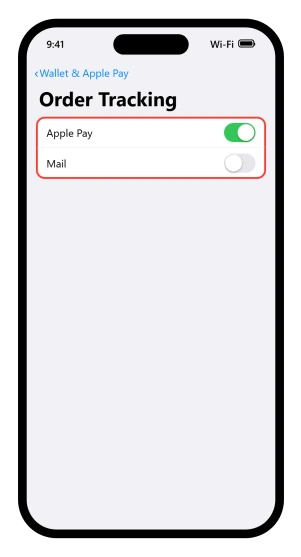
The setting is at Settings > Wallet & Apple Pay > Order Tracking, and there are two switches sitting there rather than one.
Which one you want depends on what is actually bothering you, so let me split them apart for you.
Which switch you are actually looking at
The Mail one needs your consent, and Apple says so outright: the feature "requires customers' consent to start scanning Mail for order information".
Apple describes two ways that consent gets given. One is tapping Track in an order confirmation email, where you "might be prompted to tap Allow".
The other is simply turning the Mail switch on in Settings, which Apple lists as step two of its own instructions.
So a memory of tapping Track is a reliable yes and its absence is not a reliable no. Check the switch rather than your memory.
The Apple Pay one has no such moment.
Apple's own description, on the iOS 26 Apple Pay page, is: "Orders from participating merchants will be automatically added to Wallet when you use Apple Pay on your iPhone, iPad, or Mac."
If the row is missing, or there is only one switch
Order Tracking sits inside Settings, Wallet & Apple Pay, so a phone with no Wallet & Apple Pay section will not have it, and Apple Pay is not available everywhere.
Apple's own sentence for the Mail source names Apple Intelligence, which does not run on every iPhone.
Apple never says what this screen looks like on a phone that cannot run it, so if you see one switch where this page describes two, that is the likeliest reason.
What Apple never states
Apple never states whether the Apple Pay switch is on or off when you get the phone.
For the Mail switch the question is answered differently: Apple says it requires your consent, so it cannot arrive already on.
We read its Apple Pay pages, its Wallet settings page, its setup pages and its What's New page for iOS 26, and none of them gives a default.
Its settings blurb says purchases "are automatically added"; the screen you tap says "Turn on order tracking". Both are Apple's, on the same guide, in the same version.
Three places the details come from
Apple documents three, and only one of them touches email.
The merchant sends them. From Apple's Apple Pay privacy page: "upon making an Apple Pay purchase, a participating merchant sends your device-limited order information for your device to use to track your order."
You tapped a button at checkout. Apple calls this the manual route: a Track with Apple Wallet button on an order confirmation screen, in apps or on the web.
Mail, through Apple Intelligence and Siri. The switch itself is described as: "Allow Apple Intelligence & Siri to update Wallet with order tracking information from your emails."
Apple says it "leverages Apple Intelligence to automatically identify order confirmation and shipping details sent from either the organization or the delivery carrier within the Mail app", and extracts the organization name, order status and tracking number.
Two things narrow that third one.
It works only in Apple's Mail app, and Apple says it is used only when there is no direct merchant integration, so a shop that sends order updates itself is handled by the first route rather than by anything reading your email.
What it does not narrow is payment: Apple says it "tracks orders regardless of the payment method used".
Nothing in any Apple page we read describes Safari history or page scanning as a source. The phrase "on the web" means a checkout page you are looking at, not your browsing.
What Apple commits to for the Apple Pay side
The fullest thing Apple publishes about the Apple Pay side is not on a support page at all.
It is on the Apple Pay privacy page, under a heading called Apple Pay Order Tracking:
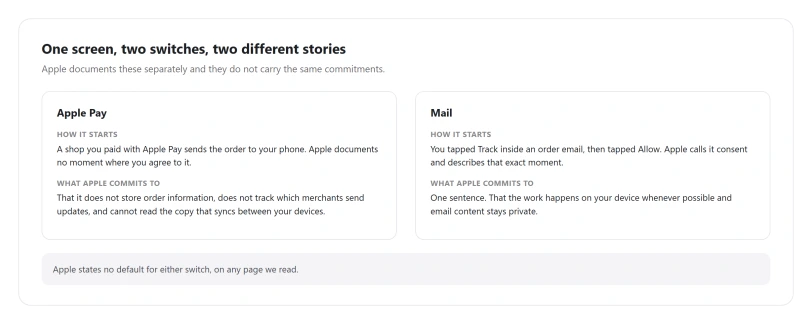
"Apple facilitates merchant updates, but does not store order information, nor track how many, how often, or which merchants send order updates. Order tracking information is stored locally on your devices and is kept up-to-date across devices by syncing an encrypted copy, which cannot be accessed by Apple."
Take that at face value. Apple is saying it does not hold your order history, does not count which shops you buy from, and cannot read the copy that syncs between your devices.
It also documents a loose end after you sign out: the device "may still retain limited information about orders", not visible to you, kept briefly, and used only to stop further updates arriving.
What Apple does not commit to for the Mail side
Here the published position is thinner, and stretching the Apple Pay sentence to cover it would be wrong.
The only statement Apple makes about the Mail source specifically is one answer in its Order Tracking FAQ: "This feature leverages Apple Intelligence, designed with privacy at its core. Apple processes data securely on the customer's device whenever possible, ensuring email content remains private while extracting only the necessary order details."
Note the hedge. Whenever possible is not always, and Apple does not say what happens the rest of the time.
Why the sentence is worded that way is not something anyone outside Apple can know, so this page treats it as a gap in what is published and nothing more.
We looked for more in the places the Apple Pay statement suggests.
That one sits on the Apple Pay privacy page, filed under its parent feature, so the parallel for Mail is Apple's Apple Intelligence privacy page. We read it, and it does not mention order tracking.
Neither does Apple's Mail privacy page, and Apple's feature privacy index lists 117 pages and there is no Order Tracking page among them.
We also read all fifteen Wallet and Apple Pay topics in the Apple Platform Security guide, and none mentions order tracking at all.
So: for Apple Pay orders there is a detailed commitment. For Mail orders there is one sentence with a qualifier in it.
That is a difference in what Apple has published, not a difference in what the two features do, and it is not evidence that either one behaves badly.
If what you want is a documented commitment behind everything Wallet holds, only the Apple Pay side has one today.
So if your orders are coming in through Mail and you want them to stop, I would turn that switch off rather than wait for a rule Apple has never published.
The email links inside an order
One detail inside an order card catches people out, so it is better known in advance.
Apple: "Tap the emails listed under Related Email to view email details." Wallet keeps links back to the messages an order came from, so the order card can open your mail.
That is the Mail switch doing what it says. If you would rather it did not, that switch is the one to turn off.
What Apple says about removing an order
Apple confirms this is possible and never publishes the steps.
Its merchant-facing FAQ says customers "can delete individual orders displayed within the order tracking section of Apple Wallet", and that orders can be marked complete or deleted at any time.
No Apple consumer page we read gives a tap path for it, including the Wallet removal page, which covers cards and passes and never mentions orders.
To reach an order at all: open Wallet, tap the More button, tap Orders, then tap the order.
From there Apple names Manage Order, Email This Merchant, Order Total, Related Email and a Share button.
Only Mute Notifications appears solely in the legal text rather than a how-to.
None of those removes an order.
Whether deleting one stops future ones is not stated anywhere. What is documented is the switch: turning off Apple Pay, Mail, or both is the published way to stop new orders arriving.
Three Wallet lists people mix up with this
Three lists get mistaken for this one, and only two of them are in Wallet.
Apple Card transactions hang off the card, not the More button. Tap the card in Wallet and its recent activity is there.
Your Apple Account balance history is a different list again, under your Apple Account card in Wallet, and needs iOS 18 or later.
App and subscription purchases are not in Wallet at all. They are in the App Store, under your picture, at Purchase History.
If Apple Pay itself is misbehaving rather than merely being chatty, our guide to Apple Pay not working on iOS 26 covers that, and our guide to a card Wallet will not add covers the setup end.
Status: checked against Apple's documentation at iOS 26.6. Apple gates the Mail source at iOS 26 or later. Nothing on this page is a fault, so the two switches are the only thing that changes it.
Why are my purchases showing up in Apple Wallet?
Order tracking is switched on, and Apple documents three ways an order can get in: a shop sending it after an Apple Pay purchase, a Track with Apple Wallet button you tapped at checkout, or Mail. Rather than working out which, open Settings, Wallet and Apple Pay, Order Tracking and look at what the two switches are actually set to.
How do I turn off order tracking in Apple Wallet?
Go to Settings, tap Wallet and Apple Pay, scroll down and tap Order Tracking, then turn off Apple Pay, Mail, or both. Apple confirms that switching both off disables all order tracking, including orders sent directly by shops. Each switch only governs its own source, so turning one off leaves the other running.
Is Apple reading my emails for this?
Only if the Mail switch is on. Apple says that switch requires your consent, given either by tapping Track in an order email or by turning it on in Settings yourself. Apple says the work is done on device "whenever possible" and that email content remains private. It publishes no fuller statement than that one sentence.
Does Apple keep a record of what I have ordered?
For orders that came in through Apple Pay, Apple states it does not store order information, does not track which merchants send updates, and cannot access the encrypted copy that syncs between your devices. That statement sits under a heading called Apple Pay Order Tracking and does not mention orders that Mail found for you, which Apple covers in one separate sentence.
Can I delete a single order from Wallet?
Apple says you can, in a merchant-facing FAQ, but publishes no steps for it on any consumer page. Orders sit behind the More button in Wallet under Orders. Turning the switches off is the documented way to stop new ones arriving.
The Short Version
- There are two switches, not one, at Settings, Wallet and Apple Pay, Order Tracking.
- The Mail one needed your permission. You either tapped Track in an email or turned the switch on in Settings yourself, so check the switch rather than your memory.
- The Apple Pay one has no documented consent step, and Apple never says whether it arrives on or off. Mail is the opposite: Apple says it requires consent.
- Three sources exist: the shop sending details, a Track button at checkout, and Mail.
- For Apple Pay orders, Apple states it does not store your order information and cannot read the synced copy. That statement does not mention the Mail source.
- For the Mail side there is one sentence, and it says on device "whenever possible".
- Order cards link back to the emails they came from, under Related Email.
- Apple confirms single orders can be deleted and publishes no steps for doing it.
Where to Next
Two switches, not one, and they do different jobs. Read which one you actually want before you turn anything off, because the wrong one costs you tracking you probably like.
Everything here happens on the phone, and nothing is shared with a shop.
If orders are still appearing after both are off, tell me where they are coming from and I will help you trace it.

Isaac Smith is the founder and editor of PC Glance, a website that covers computers, laptops, and technology. He is a tech enthusiast and a computer geek who loves to share his insights and help his readers make smart choices when buying tech gadgets or laptops. He is always curious and updated about the latest tech trends.