
Your app automations in Shortcuts stopped firing after iOS 26.6, and you have probably rebuilt one already to see whether it helps.
I will be straight with you rather than sell you a fix. No answer exists yet, including ours, and the one published workaround can destroy every automation on your phone.
Status: Open, 12 August 2026. Affected build iOS 26.6. Apple has named nothing. Checked against its release notes and security notes on 12 August, and this line is the first thing that changes when the situation does.
First, wait five minutes before you conclude anything
Automations do not fire for roughly the first two minutes after a restart.
That is normal, it predates this bug, and the developer of one of the affected apps documents it: "Automations won't be triggered directly after booting the device for about 2 minutes."
The one site that reproduced the bug on real hardware saw its automation come back about three minutes after a restart once it had reinstalled the app.
So restart, then wait five minutes, then test. If it fires, this is not what you are looking at, at least not on that automation.
What people are seeing
Only the App triggers are in any of this. Every report we found names When App Is Opened or When App Is Closed.
Nobody has reported Time of Day, Alarm, Sleep, Arrive, Leave, Charger, Wi-Fi, Bluetooth or NFC automations breaking on 26.6.
If yours runs on one of those, this page does not describe your problem, and the workaround further down would cost you every automation on the phone for nothing.
Two symptoms are described, and they may not be the same fault.
The trigger stops firing after a restart. An automation built on When App Is Opened works the moment you create it, then goes quiet once the iPhone reboots.
No error, no warning, nothing in the app to say anything is wrong. It simply stops.
The trigger fires when it should not. An owner on Apple's developer forums reports that on iOS 26.6, a When App Is Closed automation fires the instant you pull down Control Center or Notification Center, even though the app underneath is still open.
Dismissing the overlay does not then fire the Open automation.
That second report has sat with no replies and no response from Apple.
If it is apps opening on their own rather than automations failing, our guide to why your iPhone opens apps by itself covers that instead.
What Apple documents about these triggers
Apple's wording, from its Shortcuts guide, version selector confirmed on iOS 26:
"Is Opened: Triggers your automation when you open or switch to the selected app."
"Is Closed: Triggers your automation when you close or switch from the selected app."
Note "or switch to" and "or switch from". Whether pulling down Control Center counts as switching away is the whole question in that second report, and Apple's sentence does not settle it.
One more thing, and it is the only part of this we could establish for ourselves.
We diffed those pages across iOS 17, iOS 18 and iOS 26, and the trigger documentation is byte-identical in all three. Not a word has changed since 2023.
No caveat added, none removed, no trigger added or dropped.
So Apple's description of these triggers is word for word the one it published in 2023. That is a fixed point to measure against rather than evidence.
Apple never wrote down what these triggers do after a reboot, so this silence neither supports nor rules out what people are reporting.
What Apple has said about iOS 26.6
Nothing about Shortcuts. The release note is one sentence: "This update includes bug fixes, security updates and optimizes the Spotlight index to prepare for iOS 27."
We also went through the security notes for 26.6 component by component. Seventy-seven entries, and Shortcuts is not among them. The words automation and App Intents do not appear at all.
Apple's own "What's new in Shortcuts" page carries a published date of March 2026 and stops at iOS 26.4, so there is no Shortcuts change note for 26.5 or 26.6 either.
How much is actually being reported
Less than the coverage suggests, and being straight about that matters.
Three genuinely independent reports. The makers of the app one sec posted a warning on 29 July, two days after 26.6 shipped, telling people not to update yet and saying automations "seem to be broken on the new iOS 26.6 version".
A Japanese site published a first-hand reproduction on an iPhone 17 on 4 August. A user post on 3 August named both triggers.
The developer forum post described earlier is a fourth voice, on the other symptom.
The dozen or so news articles are one source. They all trace back to one report, which mentions the bug in a single sentence and links straight to that same developer announcement.
One outlet the others cite never mentioned the bug at all.
The claim that other apps are affected has no corroboration. It rests on one sentence from one vendor.
We checked the App Store listings of the main competing screen-time apps, several of which shipped updates after the bug appeared, and none mentions it.
There is an innocent explanation: their App Store listings point at Apple's Screen Time frameworks rather than this trigger, so they may never have been exposed.
Take that count for what it is. I would not conclude your phone is uniquely broken on the strength of it, and I would not erase anything yet.
The one workaround, and what it costs you
Deleting and reinstalling the Shortcuts app is the one published thing that restored the trigger. It worked for the site that tested it, on one phone, and that same site says it did not work universally.
Read this before you do it. Apple documents the cost in two places, and you have to read both of them to see it.
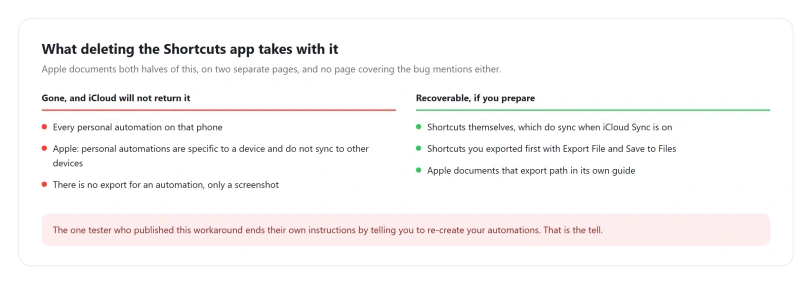
From Apple's personal automation page: "Personal automation is specific to a device. The automation will be backed up to iCloud but will not sync to other devices." And more bluntly on its sync page: "Important: Personal automation shortcuts don't sync to other devices."
And on removing built-in apps, a list Shortcuts appears on: "When you remove a built-in app from your iPhone, you also remove any related user data and configuration files."
Put those together.
Deleting Shortcuts deletes every personal automation on that phone, and iCloud Sync will not put them back, because sync and backup are not the same thing.
Read Apple's sentence again. The automations go into your device backup even though they never sync, so a full iCloud or computer backup made before you deleted the app does still contain them.
Getting them out means erasing the phone and restoring that whole backup, and if the phone has backed itself up since, that copy may already be gone.
The tester's own instructions end by telling you to re-create your automations, which is what it comes to for most.
They also reported that some ordinary shortcuts did not return either, with iCloud Sync switched on.
If you have one automation, the loss is small and you may decide to risk it on something that worked once for one person.
If you have thirty built up over years, you would be betting all of them on a workaround nobody has reproduced.
If you are going to do it anyway
In this order, and the first two are free.
- Try offloading it instead of deleting it, at Settings, General, iPhone Storage. Apple says offloading "removes the app but keeps your documents and data". Whether that clears the same state is untested by anyone, and we are not claiming it works, but it is the only reversible thing on this list.
- Restart and wait five minutes, then retest.
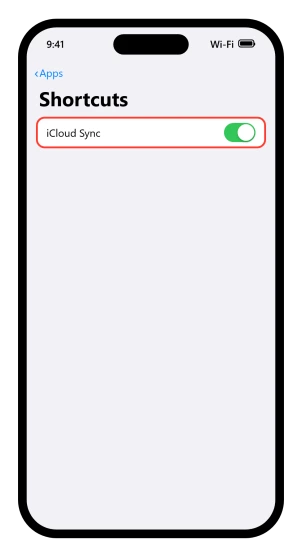
- Check Settings > Shortcuts > iCloud Sync is on. If Shortcuts is not where you expect in Settings, our guide to where app settings went covers the reshuffle.
- Export every shortcut that matters. Open it in the editor, then Export File, then Save to Files. Apple documents that path on its share shortcuts page.
- Screenshot every automation. There is no export for automations, only for shortcuts. A screenshot is genuinely the backup.
- Only then delete the app.
If you already deleted it and the automations are gone
Stop the phone backing up before you check anything, because a fresh backup can push out the last one that still has them in it.
Then look for a backup made before the deletion, at Settings > [your name] > iCloud > Manage Account Storage > Backups, or in Finder on a Mac.
Apple says personal automations are backed up even though they never sync, so a backup from before is the only route back, and taking it costs you everything that has happened on the phone since.
If there is no such backup, they are gone, and re-creating them by hand is the only option left. That is why the list in the previous section says to screenshot them.
What you can actually do while this is open
Four things, and three of them are about not making it worse.
Do not erase the phone, reset all settings, or restore from a backup over this. No report anywhere says any of them helped. A wipe costs you a day and does not touch a bug that lives in iOS.
Re-create the one automation and see how long it survives. The reports say an App trigger works from the moment you build it and goes quiet at the next reboot.
If that matches what you see, you have a workaround with a known expiry and no downside. That reading is ours rather than something anyone has confirmed.
Report it. Apple's Feedback Assistant is at feedbackassistant.apple.com. Name the trigger, your iPhone model, and the build number from Settings, General, About.
A named developer filed a radar for the 26.5 Shortcuts break and it still went four releases unmentioned, so volume is the only lever anyone has.
Tell the app maker if the automation opened a third-party app. The makers of one sec found this before any publisher did.
What happened the last two times
Precedent will not tell you how long this takes, but it does tell you how long it took last time, and that is not encouraging.
iOS 26.5, three months ago. A security update broke the ability for other apps to call a shortcut and get a result back.
The developer of Drafts diagnosed it precisely within hours, published the exact error it returned, tied it to a specific security fix and filed a radar with Apple.
Then nothing.
No fix, no admission, and no mention in the notes for 26.5.1, 26.5.2, 26.6 or the 26.6.1 build. Another developer was still shipping workarounds for it on 1 June, which is the last hard evidence we have that it was still broken.
iOS 18, two years ago. Personal automations broke within two days of release.
When somebody raised it on Apple's developer forums, the staff reply was to redirect them to the consumer support community rather than to acknowledge anything.
People were still reporting it three months later.
Where the guessing starts
Everything to this point is documented or reported. What follows is our reasoning and nothing more.
The two symptoms could be one fault. Apple's own wording ties both triggers to switching between apps.
If 26.6 changed what counts as switching away, then Control Center firing a Close event and a post-restart state never firing an Open event would be two views of the same broken judgement.
The release note mentions the Spotlight index, and this bug shows up after a restart, which is when a phone rebuilds a lot of its own bookkeeping.
That is a tempting bridge and that is all it is.
We found nothing in any Apple document or developer note tying Shortcuts triggers to Spotlight indexing, and we are not going to assert a mechanism inside iOS that we cannot see. Treat it as a question, not an answer.
And on whether 26.6.1 fixes it: that build has not shipped to anyone yet.
What is published for it so far names security fixes and does not name Shortcuts, and the last Shortcuts break went four releases without a word. We would not count on it.
Why did my Shortcuts automations stop working after iOS 26.6?
Automations built on the When App Is Opened trigger are reported to stop firing once the iPhone restarts, with no error shown. Apple has not acknowledged it and its release note for 26.6 does not mention Shortcuts. Restart and wait five minutes before testing, because automations are quiet for the first two minutes anyway.
Is there a fix for the iOS 26.6 automation bug?
No published fix exists. The one reported workaround is deleting and reinstalling the Shortcuts app, which worked for one tester on one phone and not universally. It also deletes every personal automation on that phone, because they do not sync to iCloud the way shortcuts do.
Will deleting the Shortcuts app delete my automations?
Yes. Apple documents that removing a built-in app also removes its user data, and separately that personal automations are specific to a device and do not sync. Shortcuts themselves can be exported to Files first. Automations cannot, so screenshot them before you do anything.
I have not updated yet, should I hold off?
Probably not, and our guide to whether to install iOS 26.6 explains why. It is a security release, so declining costs you those fixes. If your automations matter more for now, turn off Settings, General, Software Update, Automatic Updates so the phone does not do it overnight. Once you install it there is no supported way back.
Will iOS 26.6.1 fix it?
That build has not shipped yet. What is published for it so far names security fixes only and does not mention Shortcuts. When a similar Shortcuts fault appeared in iOS 26.5, it went through four releases without ever being named. That is not a prediction, just the nearest precedent.
The Short Version
- Restart, wait five minutes, then test. Automations are quiet for about two minutes after a boot regardless.
- The symptom is silent. No error, no warning, the trigger simply stops firing after a restart.
- Apple has said nothing. No mention of Shortcuts in the 26.6 note or in its seventy-seven security entries.
- Apple's trigger documentation has not changed a word since iOS 17, so there is no documented change to point at in either direction.
- Deleting Shortcuts destroys every personal automation on the phone. They do not sync to iCloud.
- There is no export for automations. Screenshot them.
- The last Shortcuts break went four releases without a fix or a mention.
- The claim that other apps are affected comes from one vendor and nothing corroborates it.
Where to Next
This one is open, and I would rather say that than invent a fix for you. Restart, give it five minutes, and test properly before you conclude anything.
While you wait, do not rebuild every automation from scratch and do not erase the phone. Neither is documented as helping and both cost you real time.
If yours starts working again, please come back and tell me which build you were on. That is how pages like this get their answer.
On iOS 27, shortcuts that run everywhere except Control Center have a different cause, and the Control Center shortcuts page traces it to a Screen Time limit.

Isaac Smith is the founder and editor of PC Glance, a website that covers computers, laptops, and technology. He is a tech enthusiast and a computer geek who loves to share his insights and help his readers make smart choices when buying tech gadgets or laptops. He is always curious and updated about the latest tech trends.