
You are trying to decide whether to install iOS 26.6, and you have probably been burned by an update before. That is a perfectly fair reason to hesitate.
My answer is to install it, and I would rather tell you exactly why than just say yes.
It is a security release, and on an iPhone 11 or later there is nothing supported left to stay on.
The one-line answer
Install it. It is a security release, and on an iPhone 11 or later there is no supported version to stay on instead.
Two things should shape when you do it. There is no going back to the version you are running now, and the phone will run warm for a couple of days afterwards while it rebuilds its search index.
Neither is a reason to skip it. Both are reasons to pick your moment rather than tapping Install at midnight before a flight.
If you are still on iOS 26 now, the iOS 26.7.1 page covers the newer security fix and the attack Apple's note describes.
What is actually in iOS 26.6
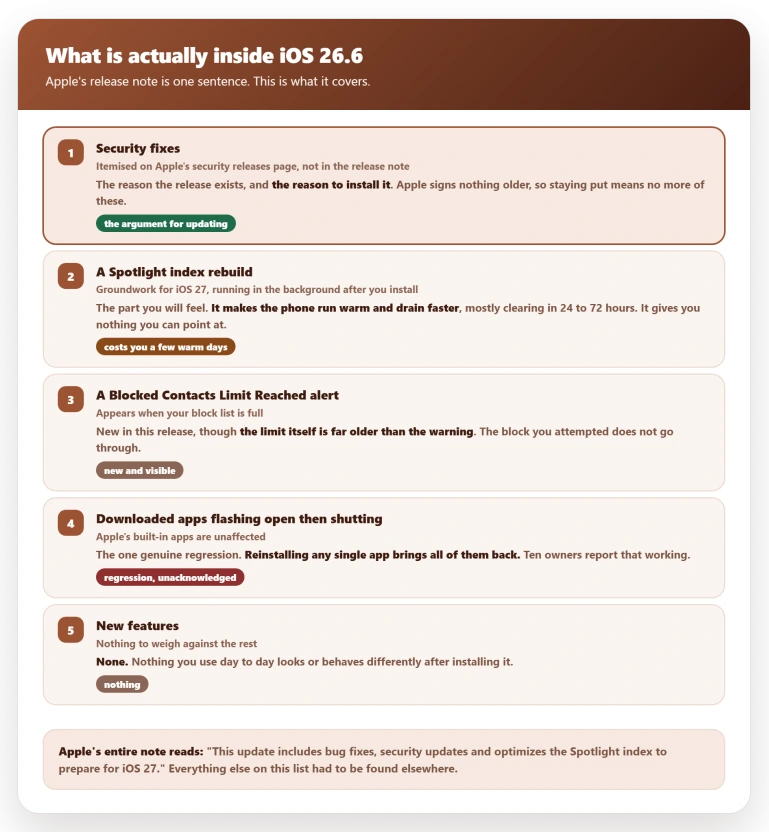
Apple's entire note for the release is one sentence. The update "includes bug fixes, security updates and optimizes the Spotlight index to prepare for iOS 27".
That vague middle is doing a lot of work. What follows is what the sentence actually covers once you go looking, and it is the part no forum reply assembles.
Security fixes. The reason the release exists. Apple itemises them on its security releases page rather than in the release note, which is why the note looks so thin.
One visible new alert. iOS 26.6 started showing a Blocked Contacts Limit Reached warning to people whose block list has filled up, and the block they attempted quietly fails.
The cap itself is far older than the warning. If you block a lot of numbers, this alert is new to the release.
One regression. Downloaded apps flash open and shut instantly on some iPhones after this update, while Apple's built-in ones are unaffected.
Owners recover by reinstalling any single app, which brings the rest back with it. Ten of them report that working.
Apple has not acknowledged it.
Groundwork for iOS 27. The Spotlight index rebuild, which is the part you will feel. It costs you a warm phone for a few days and gives you nothing you can point at.
Nothing else you touch day to day changes. There is no new feature to weigh against any of this.
You cannot go back once it is installed
Apple says so in one line on its security releases page: "after a software update is installed for iOS, iPadOS, tvOS, watchOS, and visionOS, it cannot be downgraded to the previous version."
That is not a rule about ancient versions. It is about the one you are running now. Checked on 6 August 2026, an iPhone 13 has exactly one version Apple will still install: 26.6.
Every iOS 18 build for it is closed, and so is every earlier iOS 26 build. There is no rollback in Settings, and a backup made on 26.6 will not restore onto an older version.
So if you are on 26.5 wondering whether you can try 26.6 and retreat if you dislike it, you cannot.
That is not an argument for skipping it, because the version you are sitting on is also unsigned and collecting no more fixes. It is an argument for installing it on purpose, at a time you chose.
The warm phone, and what Apple does not actually say
Your iPhone rebuilds its Spotlight search index in the background after the update.
That work is why the phone runs warm and drains faster for the first few days, and Apple describes the effect on its software updates page:
> "Immediately after completing an update, particularly a major release, you might notice a temporary impact on battery life and thermal performance. This is normal, because your device needs time to complete the setup process in the background, including indexing data and files for search, downloading new assets, and updating apps."
Apple puts no number on it.
Our own iPhone battery drain page settles on 24 to 72 hours for the bulk of the work, and our overheating page draws the line at three full days, past which it is no longer indexing.
Two senior contributors on Apple's forum run longer than that. One tells people to expect it "for about 4 days after the update".
The other is the only owner I found who timed his own: "It took my iPhone about a week to complete indexing and my iPhone was warm every morning from the overnight processing".
Plan around 24 to 72 hours. Treat four days as the outer edge of normal, and a week as the point where you stop waiting and start looking.
One claim to be careful with. The contributor who timed his own at a week also wrote that "Apple stated that iOS 26.6 would take longer to complete indexing this update".
Apple stated no such thing. Its note says the update optimizes the Spotlight index to prepare for iOS 27, and says nothing at all about how long that takes.
Apple also staples the same performance and battery paragraph to every one of its fourteen iOS 26 release notes, word for word, so that warning is standard text rather than a comment on this release.
So when should you install it
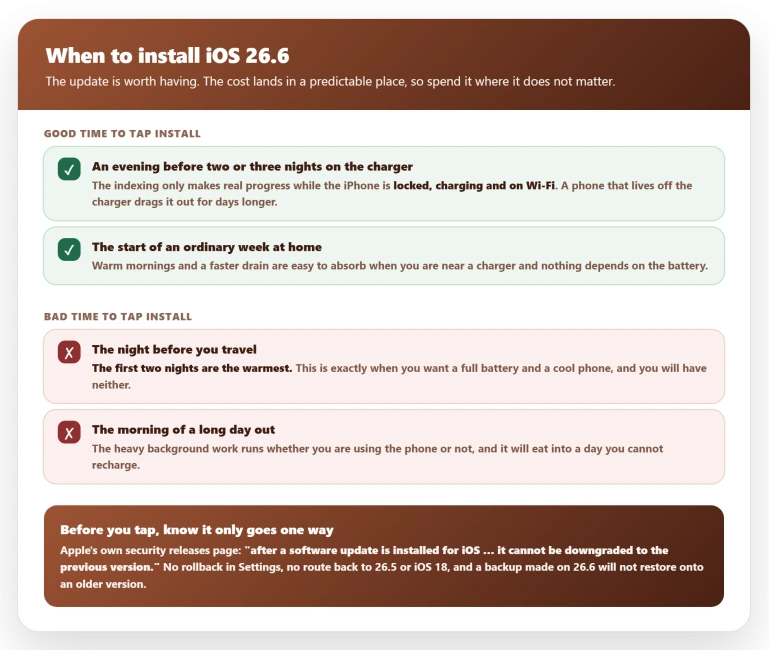
The cost is small, but it lands in a predictable place, so spend it somewhere it does not matter.
Install it on an evening when the phone can sit on a charger overnight for two or three nights running.
The indexing only makes real progress while the iPhone is locked, charging and on Wi-Fi, which our Spotlight search page covers in more detail, so a phone that lives off the charger drags the process out for days longer than it needs to.
Do not install it the night before you travel, the morning of a long day out, or before anything where you need a full battery and a cool phone.
That is the whole of the timing advice, and it is the part the forum answers skip.
If you have stayed on iOS 18
The decision changes here, and the popular advice is wrong.
Owners still on iOS 18 tell each other to hold. One asked whether it was "dumb to stay on iOS 18", and of his four replies, three told him to stay put, including "No bro keep it on ios 18 i beg you".
The branch has, in practice, already ended. The final iOS 18 build, 18.7.9 on 11 May 2026, reached only four old models, none of which can run iOS 26.
Everything newer was left behind on 18.7.8 from 22 April and has had nothing since.
Apple has published no end-of-support notice for iOS 18, so that is the pattern rather than Apple's word, but the pattern is now three and a half months and four iOS 26 releases deep.
There is a trap attached to it. Some owners on 18.7.8 are still offered what looks like another iOS 18 update, and tapping it installs iOS 26 instead.
Status: iOS 26.6 shipped 27 July 2026 and is the only build Apple still signs. Apple documents no specific fix in it beyond security. Recheck when iOS 27 ships.
What does not help
- Turning off Background App Refresh. The usual reflex, and a Level 10 contributor on Apple's forum answered it directly: switching it off has no effect on the indexing, because it is a different mechanism. It does help with other kinds of post-update heat, which our overheating page covers. Find it under Settings, General, Background App Refresh.
- Signing out of your Apple Account, or resetting the phone. One iPhone 16e owner had already done both and was still losing ten to twenty percent overnight. A reset is worse than useless for indexing, because it starts the whole job again. His thread carries a second warning: told he was watching normal post-update indexing, he answered that his drain had been there since the phone was new. Once you have decided the update is to blame, you stop looking at the things that actually are. The sign-out is under Settings, then your name at the top, then Sign Out.
- Turning off Wi-Fi to save power. It does the opposite, because the indexing wants Wi-Fi and power together. Leave it on under Settings, Wi-Fi.
- Skipping the update to protect your battery. The drain is temporary, and the version you would be staying on is unsigned and unsupported.
Is iOS 26.6 worth installing if my iPhone is working fine?
Yes, because the alternative is not staying on a good version, it is staying on an unsupported one.
Apple no longer signs anything below 26.6, so your current build stops receiving security fixes from here.
The visible changes are small: one new blocking alert, and a bug affecting how downloaded apps launch.
Why is my iPhone hot and draining after iOS 26.6?
It is rebuilding the Spotlight search index in the background, which Apple's release note calls optimizing the index to prepare for iOS 27.
Apple's own support page describes the resulting battery and thermal impact as normal and temporary. It is heaviest overnight, and most of it clears within 24 to 72 hours.
Can I downgrade from iOS 26.6 back to iOS 26.5?
No. Apple's own security releases page says that once a software update is installed for iOS, "it cannot be downgraded to the previous version".
Apple stopped signing 26.5 after 26.6 shipped, and a backup taken on 26.6 will also refuse to restore onto an older version.
The Short Version
- Install it. It is a security release, and on an iPhone 11 or later there is nothing supported to stay on.
- What is actually in it: security fixes, a new Blocked Contacts Limit Reached alert, Spotlight index work for iOS 27, and no new features.
- What it broke: downloaded apps flashing open and closing on some iPhones. Reinstalling any one app brings them all back.
- You cannot undo it. Apple's own words: once installed, iOS "cannot be downgraded to the previous version".
- Expect a warm phone and faster drain, mostly clearing in 24 to 72 hours, with four days at the outer edge of normal.
- Apple's battery warning is boilerplate. The same paragraph is attached to all fourteen iOS 26 release notes, so it says nothing special about 26.6.
- Install it before two or three nights on the charger, not the night before you travel.
- Do not reset the phone to fix the drain. It restarts the indexing from scratch.
- On iOS 18 with an iPhone 11 or newer, the branch has stopped moving. Nothing has shipped to it since 22 April.
One regression found since this was written: iOS 26.6 broke Shortcuts automations built on the App Is Opened trigger, which our guide to the iOS 26.6 automation break covers.
It is worth knowing about before you install, though it does not change the advice on this page.
Where to Next
Install it. It is a security release, and on an iPhone 11 or later there is nothing supported left to stay on, so waiting only leaves you exposed.
Do it on Wi-Fi with the phone plugged in, and expect no new features at all.
If something breaks for you after installing, tell me what it was in the comments, because a real report is worth more than any amount of speculation.

Isaac Smith is the founder and editor of PC Glance, a website that covers computers, laptops, and technology. He is a tech enthusiast and a computer geek who loves to share his insights and help his readers make smart choices when buying tech gadgets or laptops. He is always curious and updated about the latest tech trends.