
Your Software Update screen is offering iOS 18.7.8, usually under a heading reading Also Available. You are already on iOS 18.7.8.
One owner who tapped it: "I turn my phone back on, and instead, I am greeted with Liquid Glass and a note that my iPhone was updated to iOS 26 instead of iOS 18." There is no undo.
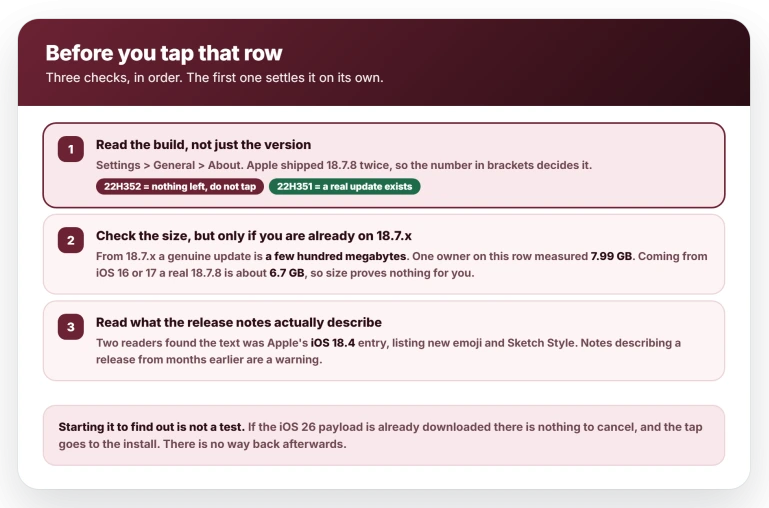
Before you touch it, check one thing. Go to Settings, tap General, tap About, and read the build in brackets after the version.
On 22H352 there is nothing legitimate left behind that button, so do not tap it.
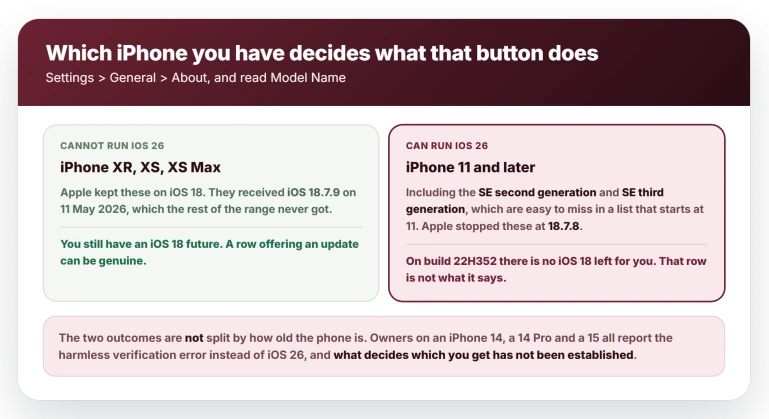
Check which iPhone you have
On that same About screen, read Model Name as well.
iOS 26 runs on the iPhone 11 and later, and that includes the SE second generation and SE third generation, which are easy to miss in a list that starts at 11.
If your Model Name is there, this page is for you.
Reading the version at all is the step that gets skipped.
One reader: "I was unaware what version I was currently on and assumed this was the newest version of 18." Another: "i almost clicked the update to 18.7.8 while failing to notice i was already on 18.7.8."
The build matters because Apple shipped 18.7.8 twice.
If yours reads 22H352 you have the later one and there is nothing legitimate left to install. If it reads 22H351 you are on the earlier build and a real 18.7.8 does exist for you, which is the one case where that row can be genuine.
Why Apple has no iOS 18 left for your iPhone
You can confirm this yourself in about a minute on Apple's own release list.
iOS 18.7.8 came out on 22 April 2026, for a wide list of iPhones from the XR up to the 16 line.
iOS 18.7.9 came out on 11 May 2026, and it went only to the iPhone XS, XS Max, XR and the seventh generation iPad. Those are exactly the models that cannot run iOS 26.
So Apple has already moved the rest of the range on.
Signing is the complication: some owners coming from an older iOS did install 18.7.8 in early August, while others on 18.7.8 already get nothing but errors, so treat it as closed for you rather than closed across the board.
A moderator on one help forum flagged the offer as a bug days before the complaints started: "It should not be able to see (or download) 18.7.8. I'd be reporting that to Apple as a bug."
How to spot the row without touching it
The size gives it away, but only if you are already on 18.7.x. Coming from 18.7.2 or later, a genuine 18.7.8 is a few hundred megabytes.
One owner on this row measured 7.99 GB after clearing his cached download, and put it well: "I'm already on iOS 18.7.8, so why is it showing such a huge update?" So if you are on 18.7.x and the offer runs to gigabytes, it is not iOS 18.
Read that the right way round. Coming from iOS 16 or 17, a legitimate full 18.7.8 download is around 6.7 GB, so a large file is normal for you and size tells you nothing.
The label disagrees with itself. The wording differs from phone to phone, which is why it catches so many. Some see an iOS 18 icon under text reading "Upgrade to iOS 26".
Some see the reverse, a heading saying Update to 26.6 with 18.7.8 in the body. Some see nothing but "Update to iOS 18.7.8" and no mention of 26 anywhere.
If the icon, the heading and the version number are not telling the same story, stop.
Read the release notes, then check what they describe. One reader looked them up and found the text was not the 18.7.8 notes at all but Apple's iOS 18.4 entry, listing new emoji and Sketch Style.
A second reader on another forum spotted the same thing independently. Notes that describe a release from months earlier are a sign the row is not what it says.
Delete the staged download
Do this before anything else, because your phone has probably already fetched iOS 26 in the background whether you asked for it or not.
Go to Settings, tap General, tap iPhone Storage, scroll for an iOS 26 entry, tap it and choose Delete Update.
One owner blames skipping exactly this for what happened to him. He updated, in his words, "before I removed the ios 26 update which my phone keeps downloading".
Being honest about its limits: this step is untested against the swap, and the same owner adopted the habit afterwards rather than proving it.
It costs a minute and it removes the payload the mislabeled row would otherwise have to hand.
Apple has re-issued a version number before
This matters because it is the innocent explanation, and in April it was the right one.
On 1 April 2026 an iPhone XR owner posted that his phone was offering him iOS 18.7.7, which he already had, and that tapping it gave a verification error.
Apple's release list shows 18.7.7 twice, on 24 March for the older devices and again on 1 April for the full list.
That one resolved properly. Apple had issued a genuinely new build of 18.7.7, and once it was signed the owner installed it and confirmed his phone was on the newer build.
A second owner in the same thread reported the same thing two days later.
Do not read that as a reason to wait. Those were phones with an iOS 18 future, being offered a real newer build.
If yours already reads 22H352 there is no further iOS 18 build coming for it, so there is nothing to hold out for. The row will keep appearing and there is no way to clear it. Leave it alone.
If you already tapped it
First, find out where you landed, because it varies. Separate owners report ending up on 26.5, on 26.5.2 and on 26.6, and one who landed on 26.5.2 was immediately prompted to update again.
Go to Settings, General, About and read the version, because you may be a release behind and due another update.
Then accept the position. Across every thread on this, not one person returned to iOS 18.
Apple stopped signing it, and for the iPhone 14 and 15 it is worse than unsigned: the 18.7.x releases went out over the air only, so no restore file for them was ever produced.
There is nothing to restore even if signing reopened. One owner asked whether he could reset and put his data back afterwards, and four people told him no.
A backup only travels forwards: the one your phone makes on iOS 26 will not restore onto iOS 18, so it cannot carry you back.
If the new look is the problem, start with notifications too faint to read.
If apps are misbehaving, apps opening and closing instantly, apps opening by themselves and apps stuck on Waiting are all covered.
If you get an error instead
Some people tap the row and get "Unable to Verify Update" or "Verification Failed" rather than iOS 26. Those two messages are the same refusal worded differently, and it is the outcome that leaves you where you were.
Be clear that this is not decided by how old your iPhone is. The owners who hit the error include an iPhone 14, an iPhone 14 Pro and an iPhone 15, all of them capable of running iOS 26.
What decides which outcome you get has not been established, and this article is not going to invent a rule.
What the error is not about is your network, your storage or your cable, whatever the top results suggest for that message.
The owners who posted had already worked through all of it: one had deleted and re-downloaded, changed networks and confirmed 41 GB free; another had tried a USB cable to a laptop and had roughly 35 GB free; a third had wiped his phone and started from scratch.
The computer route is not a way out either. The owner who tried it reports that a Mac or PC offered him only iOS 26.
One thing genuinely does cure this message in other circumstances, so rule it out: a VPN.
Turn it off and try again, as covered in Apple Watch stuck on Verifying.
Status: unacknowledged by Apple as of 6 August 2026. Apple's system status page reported everything normal, its iOS 18 update notes said nothing about it, and owners were still seeing the mislabeled row on that date. Recheck if Apple publishes an advisory, or if the row stops appearing.
What does not help
- Turning off automatic updates. This is the first reaction, and one owner disproves it precisely. He had both of the settings Apple documents under Automatic Updates switched off, Automatically Install and Automatically Download, kept the phone offline most of the time, tapped the 18.7.8 row deliberately, and got iOS 26 anyway. It may still suit you for other reasons, but it does not stop this.
- Starting the update to see what it is. An owner did report that cancelling revealed the real version, but on a phone with the payload already staged there is nothing to cancel and the tap goes to the install. On an action you cannot undo, that is not a test to run.
- Updating through a computer. It offers only iOS 26.
- Deleting and re-downloading the update. It changes nothing while the build is unsigned.
- Freeing storage, changing Wi-Fi, resetting network settings. All tried and reported failing, including by one owner who wiped his phone entirely.
Why does my iPhone say update to 18.7.8 when I already have 18.7.8?
Because the update catalogue is still advertising a build Apple has stopped signing. Tapping it either installs iOS 26 or throws a verification error, and which one you get is not predictable.
Check Settings, General, About for your Model Name, version and build first. If the build reads 22H352, there is nothing legitimate left to install.
Will turning off automatic updates stop iOS 26 installing?
No. One owner had both Automatic Updates options off and his phone offline most of the time, tapped the row himself and still ended up on iOS 26. The only thing anyone has shown to work is not tapping it.
Can I go back to iOS 18 after this?
No. For recent iPhones no restore file for iOS 18.7.x exists at all, because those releases were delivered over the air only, and Apple is not signing what does exist.
Backups only travel forwards, so the backup your phone takes on iOS 26 will not go back onto iOS 18 either. It has not been done in any thread on this.
The Short Version
- Check the build, not just the version. On 22H352 there is nothing legitimate left behind that button. On 22H351 a real 18.7.8 does exist for you.
- Check Settings, General, About for Model Name and iOS Version. Owners caught by this did not know which version they were on.
- Judge by size only if you are already on 18.7.x. From there a real update is a few hundred megabytes. Coming from iOS 16 or 17, a genuine 18.7.8 is about 6.7 GB, so size proves nothing.
- Delete the staged iOS 26 download in Settings, General, iPhone Storage, so the row has nothing to hand.
- Do not start it to see what it is. With the payload already downloaded there is nothing to cancel.
- Turning off automatic updates does not stop it. One owner had both switches off and was caught anyway.
- The wording differs between phones. Icon, heading and version number disagreeing is the warning.
- There is no way back. No signed build, no restore file, and a backup will not go backwards.
- The error message version is not about age. iPhone 14s and 15s got it too, and what decides the outcome is unknown.
Where to Next
Check the build number rather than just the version, because that is where the answer is hiding.
If you are on the clean build there is nothing legitimate left that behaves this way, and that changes what you should do next.
Tell me your build in the comments if it does not match what I have described, and I will help you work out where yours came from.

Isaac Smith is the founder and editor of PC Glance, a website that covers computers, laptops, and technology. He is a tech enthusiast and a computer geek who loves to share his insights and help his readers make smart choices when buying tech gadgets or laptops. He is always curious and updated about the latest tech trends.