
You went to block one more nuisance caller and your iPhone told you that you have reached the limit, which nobody expects to see. I know how irritating that is when the whole point was to make the calls stop, so let me get you past it.
The short answer, and it is the thing most people get wrong: deleting a few entries will not do it. Owners who have actually tested this get blocking working again once they are under about 3,000.
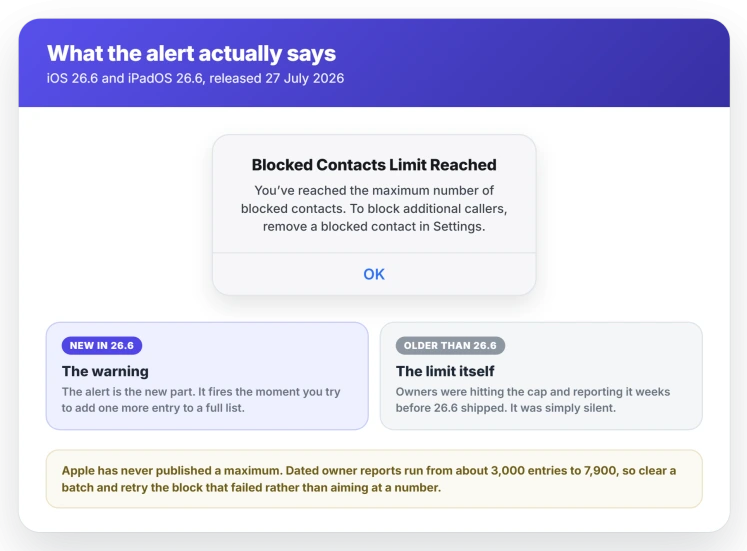
The full alert reads: "You've reached the maximum number of blocked contacts. To block additional callers, remove a blocked contact in Settings."
1. Find out how many you actually have
Do this first, because your iPhone will never tell you.
The Blocked Contacts screen on iOS shows you a list and no count. Scroll it for five minutes and you still will not know whether you are at 900 or 9,000.
A Mac signed in to the same Apple Account does show the number. Open Apple menu, System Settings, Privacy & Security, then Blocked Contacts. The first thing you see is a single line. It tells you how many entries there are.
That one number decides everything below. If you are well under 3,000, your problem is probably not the cap at all. Skip to rung 6.
2. Get under 3,000, not just "a bit fewer"
This is the rung that answers the question people actually ask, and it is why deleting twenty entries changes nothing.
Owners on the two biggest threads keep landing on the same figure. One tested it properly. They deleted in batches until the block finally took, then wrote: "Once I got below 3,000 I tried to block the number of my buddy. AND IT WORKED!!"
Another, two weeks later: "I have blocked just over 3k phone numbers and I am getting the limit reached pop up." A third simply said they were "Confirming the threshold is 3k".
A Level 10 member answering the same thread in August put it as instruction rather than observation: "You will need to get the number of blocked contacts to under 3,000."
Apple has still never published a number, so treat 3,000 as the figure owners keep reaching and testing rather than as an official cap. What matters practically is that it is a target you clear, not a nibble you take.
One correction is owed here. This page said something else before. It previously offered a range of roughly 3,000 to 7,900 and led with the higher figure.
Those higher numbers come from before iOS 26.6 existed, when the phone gave no alert and nobody could test the boundary. Since the alert arrived, the reports that can be tested cluster on 3,000, so that is what this page now leads with.
3. Clear them in bulk on a Mac
Owners report this as the only sane route for a long list, and it is confirmed as recently as August 2026.
iOS has no select-all, so a list in the thousands is hopeless on the phone. A Mac opens the same list. Apple states that "if you block someone on one device, they're blocked on all Apple devices signed in to the same Apple Account."
Go to Apple menu, System Settings, Privacy & Security, Blocked Contacts. Click the summary line. The full list opens.
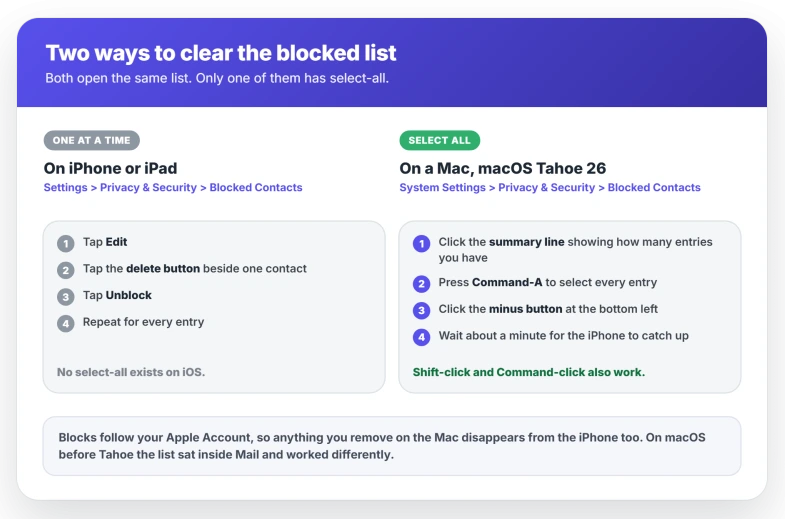
From there it behaves like the Finder. Click one entry and press Command-A to select every entry. Or click one and Shift-click another for a run. Or Command-click to pick individually.
Then click the minus button at the bottom left.
One owner in August could not find an Edit button on macOS Tahoe 26.5.2 and nearly gave up, then posted the answer themselves: "Select 'all' or just the ones you want to delete and tap the tiny '-' at the bottom of the window."
There is no Edit on the Mac.
The minus is the whole control, and it is small.
4. On an iPhone alone, it is one at a time
Slower, and it is what you are left with when there is no Mac in the house.
Apple's own steps in Block phone numbers, contacts, and emails: "Tap Edit, or tap the Unknown contacts then tap Edit. Tap the delete button next to contact that you want to unblock. Tap Unblock."
The list holds its place after each Unblock, so you can work down it without scrolling back to the top every time.
Owners also report that swiping left on an entry removes it in one motion. Apple's instructions do not mention it, so treat it as a shortcut worth trying rather than a documented step.
The same list also sits at Settings, Apps, Phone, Blocked Contacts. It is one list either way.
5. Clear the email senders first
Narrower, and it is where the free space almost always is.
Almost nobody blocks three thousand phone numbers on purpose. The volume comes from Mail. You open a junk message, tap Block this Contact, and that sender joins the same list as your blocked callers.
Apple confirms they share one list and one behaviour: "When you block an email address from Mail, it goes to the trash folder. Email blocking works across all your Apple devices."
So a spam address you blocked a year ago is still using a slot. Spammers rotate addresses constantly. That entry is protecting you from nobody.
On the iPhone list, tap Unknown contacts first. That separates entries with no contact card, which is mostly old junk senders, from the people you deliberately blocked.
Unblocking does let that sender reach you again. Clear from the unknown entries and leave the named contacts alone.
If a single email sender refuses to block and your list is nowhere near full, that is a different fault and an iPhone that will not block an email sender covers it.
6. If the Block button does nothing and shows no alert
This is the same fault wearing a different face, and it caught a lot of people before iOS 26.6.
On a separate thread carrying 204 Me Too and 68 replies, owners describe tapping Block and watching nothing happen. In their words: "The button is there, click it, it does not save it."
That thread runs from April 2026, on iOS 26.4 and 26.5, months before the alert existed. A Level 10 member connected the two in July: "The last update (26.6) added the message when your limit has been reached".
He added that the count still has to come down.
So if your blocking silently fails and you are not on 26.6 or later, you are very likely at the cap. Your phone is simply not saying so. Count the list on a Mac and work down rung 2.
A block that saves and then lets the person through anyway is something else again, and blocked numbers still calling or texting is the page for that one.
Not every case is the cap, and the thread shows it. One owner reported the problem cleared for them with the iOS 26.4.1 update alone: "The issue is fixed for me with the 26.4.1 update."
If you are on an old build with a short blocked list, update before you start deleting anything.
7. Stop the list filling up again
Clearing space buys time. The habit that filled it will refill it.
For calls, go to Settings, Apps, Phone, Screen Unknown Callers. Choose Ask Reason for Calling, which makes strangers state their business before your phone rings, or Silence, which sends them to voicemail.
Either one covers every unknown number at once and costs you no list entries at all.
For email, blocking spends one slot per sender. Spam produces senders faster than you can block them. Junk filtering works on the message instead, so it uses no slots.
On a Mac that is Mail, Settings, Junk Mail. iOS Mail has no equivalent training control, so this side has to be set up on a Mac or with your mail provider.
8. What does not help
Waiting for an update is not a plan. iOS 26.6.1 shipped on 17 August 2026 and Apple's note says it "delivers security fixes that were first made available in the iOS 27 and iPadOS 27 betas". Nothing about blocking, and no larger cap.
The list is data, not a stuck service, so restarting the phone will not shift it. Resetting network settings touches Wi-Fi, VPN and cellular and leaves every blocked entry exactly where it was.
If you delete the junk email itself, the sender stays where it is. Removing the message does not remove the sender from the list. Blocked mail goes to Trash, and emptying Trash does not touch the entry.
Phone, Messages, FaceTime and Mail all write to one shared list, so blocking from a different app meets the same ceiling.
Reset All Settings does work, and it costs far too much. One owner used it to get blocking back and lost over 17,000 blocked numbers along with every other setting on the phone.
There is no undo. It sits here rather than in the ladder for that reason.
Status: iOS 26.6.1, checked 19 August 2026. Apple publishes no maximum. Owners who tested the boundary since the alert appeared consistently report 3,000.
What is the blocked contacts limit on iPhone?
Apple has never published one. Since iOS 26.6 added the alert, owners who tested it by deleting until blocking worked again consistently report 3,000. Older reports of 8,000 or 20,000 come from before the alert existed, when there was no way to tell where the boundary was.
I deleted some blocked contacts and it still says limit reached. Why?
Because the target is a number, not an amount. Removing fifty entries from a list of five thousand still leaves you well over the line. Count the list on a Mac. Get under about 3,000, then try the block again.
Can I increase the blocked contacts limit?
No. There is no setting for it anywhere in iOS, and Apple has never offered one. The only lever you have is making the list shorter.
How long does the iPhone take to catch up after I delete on a Mac?
Give it a minute or two on a normal connection, since the list syncs through your Apple Account rather than living on each device. If the iPhone still shows the old entries after that, lock and unlock it, or open the Blocked Contacts screen again to force a refresh.
Can you bulk unblock on an iPhone?
No. Apple's documented steps are Edit, then the delete button, then Unblock, one entry at a time, and there is no select-all on that screen in iOS 26.6. For a list in the thousands the Mac window is the only practical route.
Does the limit count numbers and email addresses together?
Yes. They sit in one combined list at Settings, Privacy & Security, Blocked Contacts, and blocking from Phone, Messages, FaceTime or Mail all writes to it. Apple documents no separate allowance for each type.
The Short Version
- Deleting a few entries will not clear it. Get under about 3,000.
- Your iPhone never shows the count. A Mac shows it on the first line of the same screen.
- On a Mac, click the summary line, press Command-A and click the small minus button.
- On an iPhone it is Edit, the delete button and Unblock, one at a time, with no select-all.
- Blocked email senders are usually most of the list, so tap Unknown contacts and start there.
- A Block button that silently does nothing on an older build is the same cap with no alert.
- Reset All Settings does empty the list and takes every other setting with it.
Where to Next
The phone tells you to remove "a" blocked contact, which reads like removing one will do. It will not. That single word is why people delete a handful, try again, and decide their iPhone is broken.
Count first, clear to a target, then test. That is the whole job, and on a Mac it takes about two minutes.
If you cleared yours and can tell me roughly what number it started working at, I would genuinely like to know.
Apple publishes nothing here, so this page is built out of what owners have measured, and one more tested figure makes it better for the next person.
Where the phone tells you emergency contacts were notified and you never asked, that message has an explanation.
Where the requests not arriving are Ask to Buy approvals, that has seven fixes of its own.
Two nearby faults that are not this one. If blocks are saving but blocked people still get through, that is blocked numbers still calling or texting. If calls never ring at all, start with an iPhone not ringing after iOS 26.

Isaac Smith is the founder and editor of PC Glance, a website that covers computers, laptops, and technology. He is a tech enthusiast and a computer geek who loves to share his insights and help his readers make smart choices when buying tech gadgets or laptops. He is always curious and updated about the latest tech trends.