
You tap a shortcut in Control Center and nothing runs, yet the same shortcut works at once from the Shortcuts app. On iOS 27, that split points at a time limit on the Shortcuts app.
Twenty-two owners pressed Me too on the thread about it. One of them found the cause, and I checked their fix against Apple's iOS 27 pages for Control Center and Screen Time.
It works everywhere but Control Center
The first post, from an iPhone 14 Pro Max owner, came the day after iOS 27 arrived: "shortcuts launched from Control Center no longer execute properly". One switched their cellular line, another set the volume to zero.
They tested the rest of the phone too. "If I run it from anywhere else, it works." Adding a different shortcut failed as well. The list stayed empty: "It just says 'Unable to load.'"
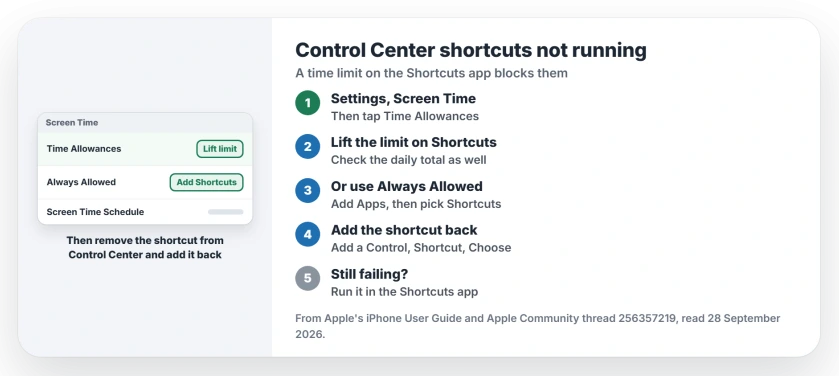
Status: iOS 27, checked 28 September 2026. A Screen Time limit on the Shortcuts app stops its shortcuts running from Control Center. Removing the limit fixed it for one owner.
1. Lift the time limit on Shortcuts
Two days later another owner posted the cause. They had limited the Shortcuts app to quiet its notifications, then found that "if you do that you can't access Shortcuts from control center".
Their answer was to "completely remove the time limit from the Shortcuts app then it works for me". The fix is user-reported and comes from one owner, but the first owner had a Screen Time limit on Shortcuts too.
On iOS 27, limits sit in a new place. Apple says: "Tap Screen Time, then tap Time Allowances." Its Screen Time guide adds that apps run "until they reach either the category's allowance or the daily total".
So check both. Find the category that holds Shortcuts and lift its limit, and make sure the daily total is not the one catching you. Apple does not mention this clash with Control Center.
2. Or keep your limits and exempt Shortcuts
Apple has a list for apps you can use "at all times, regardless of any Screen Time schedules or Time Allowances you've set". Go to Settings, then "Tap Screen Time, then tap Always Allowed."
Then "Tap Add People or Add Apps." and pick Shortcuts. Owners have not tried this route in the thread, so the idea is ours. If Control Center still fails, remove the limit instead.
3. Add the shortcut to Control Center again
A Level 10 volunteer's first suggestion was simple: "I suggest removing them from Control Center and adding them back." Do that only after the limit is gone.
Open Control Center, tap the plus at the top left, and choose Add a Control. Apple's Control Center steps end with: "Tap Shortcut, tap Choose, then select which shortcut to run."
If the list still says Unable to load, I would look for a limit you missed. The owner who saw that message had one in place at the time. That reading is ours.
4. Test the shortcut in the app
A second Level 10 volunteer had no trouble at all: "I have no issue running a Shortcut directly from Control Center". They asked to see the shortcut's actions.
So run yours once from the Shortcuts app, the way the first owner did. If it fails there as well, the actions need work. Control Center is not the problem.
On an iPad, one owner's split screen shortcut failed on iPadOS 27 even after rebuilding it. Split View changed in iPadOS 26, and the Split View page shows how it works now. The link between the two is ours.
Other Shortcuts and Screen Time problems
If your automations stopped firing instead, the Shortcuts automations page covers what broke in iOS 26.6. And if Delete App vanished after the update, the Deleting Apps page finds the Screen Time switch behind it.
Text size per app also left Control Center in iOS 27, and that page shows where it went.
Why won't shortcuts run in Control Center on iOS 27?
A Screen Time limit on the Shortcuts app is the cause one owner confirmed, and removing it brought their Control Center shortcuts back.
Where are app time limits in iOS 27?
Apple's iOS 27 guide puts them under Settings, Screen Time, Time Allowances; limits there apply to categories of apps, plus a daily total.
Do automations stop working too?
Not for the first owner. Their shortcuts still ran from the app, the widget and automations. Only Control Center failed.
Why does Add a Control say Unable to load?
The owner who saw it had a limit on Shortcuts at the time. Lift the limit first, then add the shortcut again.
The Short Version
- Shortcuts fail only in Control Center.
- A time limit on Shortcuts causes it.
- iOS 27 keeps limits in Time Allowances.
- Lift it, or add Shortcuts to Always Allowed.
- Then add the shortcut back.
- Still failing? Test it in the app.
Where to Next
Open Settings, then Screen Time, and look for any limit that covers Shortcuts. Lift it, then tap your shortcut in Control Center.
If it still does nothing with no limit in place, name your iPhone in a reply. I will add the next fix owners find, so you can check back here.

Isaac Smith is the founder and editor of PC Glance, a website that covers computers, laptops, and technology. He is a tech enthusiast and a computer geek who loves to share his insights and help his readers make smart choices when buying tech gadgets or laptops. He is always curious and updated about the latest tech trends.