
You open Control Center, touch the Text Size slider, and look for the switch that sets the size for just the app you are in. On iOS 27 it has gone. The slider now changes every app at once.
A thread with 22 Me too clicks found what brings it back. I checked each setting against Apple's iOS 27 user guide.
The switch at the bottom is gone
The first poster wrote that "text size per app is missing" from the Control Center shortcut. Used from the Home Screen, the same control showed them an odd option called Family Only.
Another owner treats that Family Only label as the sign the control is broken. A force restart brought the switch back for them, but only for a few minutes.
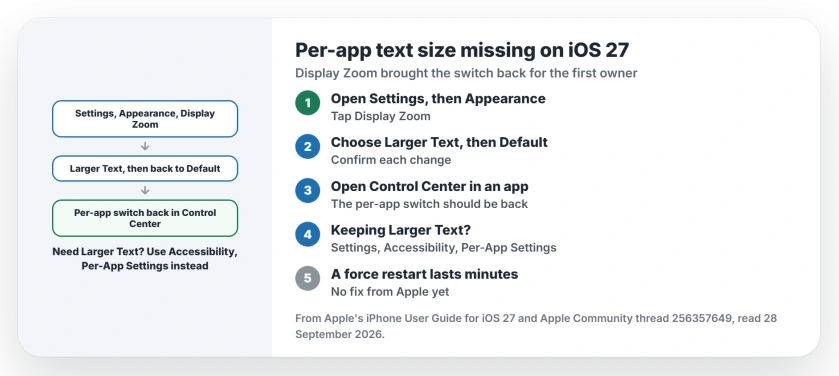
Status: iOS 27, checked 28 September 2026. Turning Display Zoom on and off brought the switch back for the first poster. Settings still sets a text size for one app at a time.
1. Turn Display Zoom on, then off again
The fix came from a Level 7 volunteer, who passed on a tip from Reddit: "toggling on and off Display Zoom to restore the original functionality".
In iOS 27, you find Display Zoom under Appearance. Apple's display and text guide says: "Tap Appearance, tap Display Zoom, then tap Larger Text." Confirm, then go back and choose Default. I would try this first, since it takes a minute.
The first poster tried it the same day and wrote: "This is great it really works". Open Control Center in any app and you should see the per-app switch back under the slider.
2. Need Larger Text? Use Per-App Settings
There is a catch. Staying on Larger Text undoes it: in the first poster's words, "it goes back to the same buggy way".
If you need Larger Text, set sizes app by app in Settings instead. Apple says you "can choose different color, text size, and motion settings for certain apps" in its per-app guide.
Go to Settings, Accessibility, Per-App Settings, tap Add App, and pick the app. Then tap its name and set the text size. Another owner confirmed: "This also works in iOS 27."
3. Save the taps with a shortcut
Settings takes you more taps than the old switch did, and the first poster found that too slow. The same Level 7 volunteer suggested a shortcut that opens Per-App Settings in one tap.
They added a warning that running shortcuts from Control Center may have problems on iOS 27. Test it from your Home Screen first. That last tip is ours.
4. A force restart only buys minutes
If you force restart, the switch may come back, then vanish again. The owner who tried it said "the problem was solved but after a few minutes it came back", and a second restart lasted no longer.
We could not find any word from Apple on this yet. The volunteer asked every affected owner to tell Apple through its feedback page.
Other iOS 27 controls that moved
If AssistiveTouch lost its Screenshot option, the AssistiveTouch page shows where it went. And if you want bigger keys rather than bigger text, the keyboard size page explains what Text Size changes and what it does not.
Shortcut buttons in Control Center can go quiet on iOS 27 too. If yours do nothing, the fix for silent Control Center shortcuts starts with a time limit on the Shortcuts app.
Where is per-app text size in iOS 27?
It should sit under the Text Size slider in Control Center. When it is missing, Settings, Accessibility, Per-App Settings still sets a size for one app.
Why does Text Size say Family Only?
Owners report that label when they open the control from the Home Screen. One owner reads it as the sign the per-app switch is broken.
Does Display Zoom fix it for good?
It worked for the first poster. The fault returned when they went back to Larger Text.
Is Apple fixing it?
Apple has said nothing in the thread yet. Owners have been asked to send Apple feedback about it.
The Short Version
- The per-app switch left Control Center.
- Family Only on the Home Screen shows it.
- Display Zoom on, then back to Default.
- Larger Text brings the fault back.
- Per-App Settings still works in Settings.
- A force restart helps for minutes only.
Where to Next
Open Settings, Appearance, Display Zoom now and switch it to Larger Text, then back to Default. Then check Control Center inside an app.
If the switch is still missing after that, leave a comment naming your iPhone, and I will add Apple's fix here when it lands.

Isaac Smith is the founder and editor of PC Glance, a website that covers computers, laptops, and technology. He is a tech enthusiast and a computer geek who loves to share his insights and help his readers make smart choices when buying tech gadgets or laptops. He is always curious and updated about the latest tech trends.