
Since you installed iOS 27, holding down an app shows you no Delete App option at all. Check the Screen Time switch that blocks deleting apps before anything else. iOS 27 made it harder to find.
I followed Apple's current steps for app restrictions and read a thread where owners and volunteers tracked the switch down. One owner has confirmed the fix.
The delete option vanished
An owner with an iPhone 16 wrote: "After the update I can't delete/remove any app from my phone." They also looked for the old setting in Screen Time and found that "That setting has vanished in iOS 27."
A Level 9 volunteer pointed at the usual suspect, a restriction "turned on in your Screen Time settings". They added that updates can "glitch or reset certain security toggles".
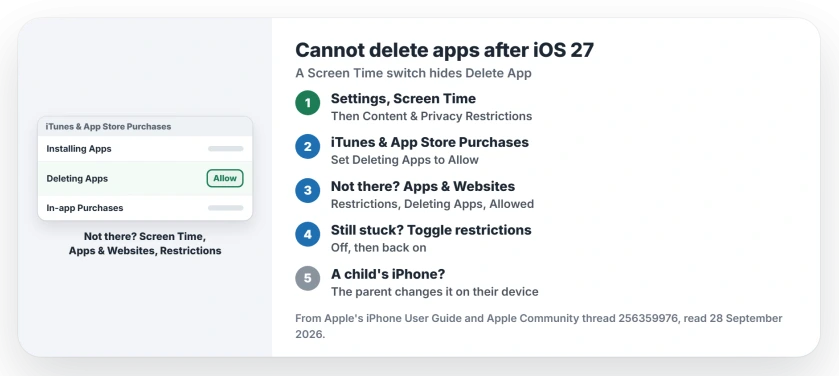
Status: iOS 27, checked 28 September 2026. A Screen Time restriction called Deleting Apps hides the delete option. Setting it to Allow fixed it for one owner.
1. Check where Apple puts the switch
Apple documents the path in its App Store restrictions guide, starting in Screen Time: "Tap Screen Time, then tap Content & Privacy Restrictions."
From there, Apple says to "Tap iTunes & App Store Purchases, then choose restrictions for installing or deleting apps and in-app purchases." Set Deleting Apps to Allow.
A Level 10 volunteer found the setting "in its usual place in Screen Time on iOS 27" and posted a screenshot of it.
2. Not there? Look under Apps & Websites
The owner who fixed it found the switch somewhere else. They went to Settings, Screen Time, Apps & Websites, then Restrictions, and set Deleting Apps to Allowed.
Their verdict, in capitals: "PROBLEM SOLVED!!" That fix is user-reported. Your Screen Time may look different from Apple's steps. If so, try this path next.
3. Turn restrictions off, then on
A Level 10 volunteer suggested a reset of the whole switch. Turn Content & Privacy Restrictions off, then back on, and check Deleting Apps again.
That can clear a stuck toggle. The reading is ours, based on the volunteer's point about updates resetting toggles.
4. On a child's iPhone, ask the parent
If your iPhone is managed through Family Sharing, the setting may not be yours to change. Apple says a parent or guardian can set "restrictions for installing and deleting apps and in-app purchases".
Then the fix is on the parent's device. I would ask them to check the same switch there.
Other Screen Time problems
If Content & Privacy Restrictions refuses to turn off at all, the restrictions page goes through six fixes. And if the new iOS 27 parental controls do not appear, the parental controls page explains what blocks them.
Why can't I delete apps after iOS 27?
Usually a Screen Time restriction called Deleting Apps is set to Don't Allow. Set it to Allow and the Delete App option returns.
Where is Deleting Apps in iOS 27?
Apple's guide puts it under Screen Time, Content & Privacy Restrictions, iTunes & App Store Purchases. One owner found it under Screen Time, Apps & Websites, Restrictions.
How do I delete an app once it is allowed?
Apple's delete apps guide says: "Tap Remove App, then tap Delete App." Touch and hold the app first.
Will deleting an app delete its iCloud data?
No. Apple says data stored in iCloud through the app "isn't deleted when you delete the app".
The Short Version
- Delete App vanished after iOS 27.
- A Screen Time switch usually hides it.
- Content & Privacy Restrictions first.
- Then iTunes & App Store Purchases.
- Or Apps & Websites, Restrictions.
- Set Deleting Apps to Allow.
Where to Next
Open Settings, then Screen Time, and find Deleting Apps in either place. Set it to Allow, then touch and hold an app to test.
If the switch is on Allow and you still cannot delete apps, post your iPhone model as a comment. I will add the next step owners find.

Isaac Smith is the founder and editor of PC Glance, a website that covers computers, laptops, and technology. He is a tech enthusiast and a computer geek who loves to share his insights and help his readers make smart choices when buying tech gadgets or laptops. He is always curious and updated about the latest tech trends.