
You tap the green switch at the top of Content & Privacy Restrictions and it slides off. A second later it is green again. Or nothing moves at all, on a phone nobody else controls.
That is a maddening thing to fight on your own iPhone. I understand why people end up resetting everything over it. Please do not do that yet.
When Content & Privacy Restrictions won't turn off, the switch is usually taking orders from your Apple Account. Six things can give those orders. The first takes ten seconds to check.
1. Check whether Apple has you down as a confirmed adult
In the UK, check this before anything else. Apple added Australia to the same rule on 14 September 2026.
Apple now asks adults in some places to prove they are over 18. Until you do, it switches a filter on for you and will not let you switch it off.
Apple's page for UK accounts is blunt about it: "Web Content Filter and Communication Safety are turned on automatically for kids and teens as well as adults who haven't confirmed their age."
It adds that the phone still works as normal, but "you need to confirm your age before you can adjust these safety settings."
The Australia page went up the day iOS 27 came out, and it carries the same rule almost word for word. In either country, suspect this first.
Checking takes one screen. Apple documents the route as Settings, then your name, then Personal Information, then Age Confirmation.
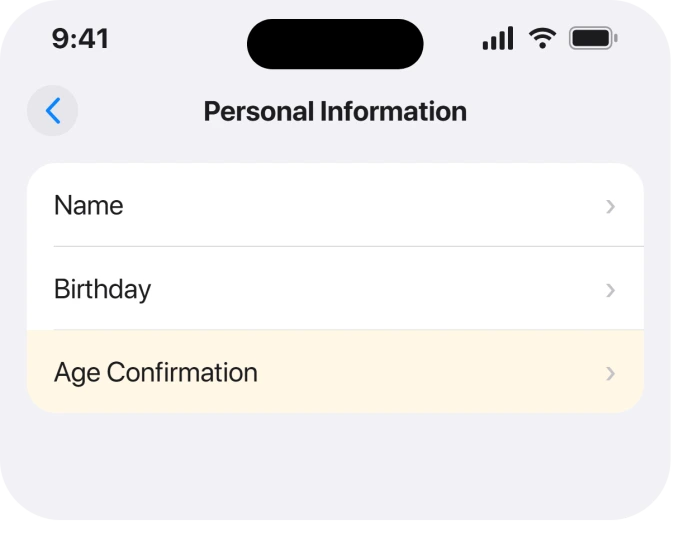
Not confirmed? Apple accepts your own credit card. It also takes a scanned passport, driver's license or government ID, and in the UK a PASS proof of age card. Debit cards and gift cards are refused.
That card rule trips up a lot of people. If yours keeps being declined, the App Store age check has its own page covering why.
Apple lists age checks for Singapore, South Korea and Texas as well. I read those three pages too, and none of them carries the automatic filter line.
One more route came up in August. An owner whose website list stopped responding wrote: "Since the newest release I'm unable to add, remove, restrict or unrestricted any websites".
A force restart fixed it for them: "The forced restart worked - thank you!" It did not help a later owner, so treat it as a quick first try.
2. No age prompt anywhere? Make Apple ask for it
Plenty of people in this position never see a prompt, and without one there is nothing to tap.
Apple says the request can surface in two ways. You "might see a message in the Settings app". Or you might be asked "the next time you take that action (like when trying to download an app with an age rating of 18+)."
So the dependable trigger is a download. Find a free app rated 18+ and tap Get, and the confirmation should appear before anything installs. Delete the app straight after.
A Level 10 member in the main Apple Community thread suggested exactly this in May. The thread's original poster had seen no prompt at all. Their UK account was over twenty years old, with a credit card on file.
The wizard later appeared on its own, during a software update on another device. In their words: "it popped up and ran through an age verification wizard".
Two more things from Apple's page help. Update to the latest iOS first. And use your iPhone, not a Mac or a Watch, because Apple says some methods "are available only on iPhone and iPad."
3. Look for a second Apple Account under Media & Purchases
Most owners who reported a fix in that thread confirmed this one. It also catches people outside the UK and Australia.
An iPhone can keep iCloud on one Apple Account and the App Store on another. Open Settings, tap your name, then Media & Purchases. See which account it shows.
Does it differ from the account shown at the top? Then you have two accounts, and the restriction can come from the second one.
One owner found this with an Australian account for iCloud and a US account for purchases. They tested it until it repeated every time. With both signed in, the switch "moves to OFF and immediately turns itself back ON."
Then they signed Media & Purchases in to the Australian account. Without even restarting, "Content & Privacy Restrictions can be turned off." Signing the US account back in brought the lock straight back.
A second owner read that test and replied a week later: "This fixed it for me too."
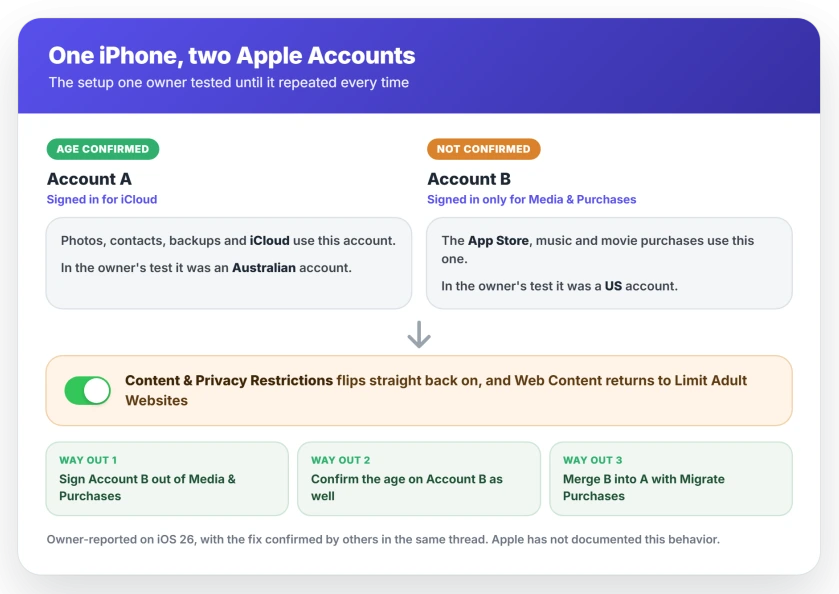
You have three ways out, running from quickest to most permanent.
Sign the second account out. Apple's steps are Settings, your name, Media & Purchases, then Sign Out, twice to confirm. You do not need to sign out of iCloud or iMessage, Apple adds.
Then tap Media & Purchases again to sign in with your main account. One owner reported it "worked with signing out the iTunes account". It had "almost drove me nuts."
Keep both, but confirm your age on the second one too. The owner who found the trigger fixed it this way. With the second account signed in, they downloaded an app that needs age confirmation. That forced the wizard up for that account.
After that, they could turn every restriction off with both accounts still signed in.
Merge the two for good with Migrate Purchases. Apple's steps are Settings, your name, Media & Purchases, View Account, then Migrate Purchases. They are set out in its guide to moving purchases between accounts.
Read Apple's warnings first. The second account's payment methods replace the ones on your main account. And undoing a migration blocks another one for a year.
The owner who suggested merging was thanked three times in a month. One reply read: "This issue has been blocking me for months." A fourth person tried to merge and was refused. They reported the message as "Unable to mitigate".
Mitigate is how that thread spells Apple's Migrate option.
A refusal means Apple thinks you are not eligible. A child account on either side stops it. So do music libraries on both accounts, or an account already used in a migration. If that is you, sign the second account out instead.
4. The account may be down as under 18
Narrower, and it matters most for teenagers and for accounts set up years ago with a wrong birthday.
Since iOS 26.1, Apple switches the same filters on by default for younger users. Its update notes say "Communication Safety and Web content filters to limit adult websites are enabled by default for existing child accounts for ages 13-17".
The exact age varies by country. Check the birthday under Settings, your name, Personal Information. Apple lets you edit your own there, and says the date "helps provide age-appropriate experiences".
Really under 18? Then the switch is not yours to flip. Apple says younger users may need a Family Sharing group "with an adult who has confirmed their age" to change certain safety settings.
On iOS 27 the parent does it from their own phone. The route is Settings, Family, the child's name, then Content & Privacy Restrictions.
If requests to that parent never seem to arrive, the Ask to Buy page covers what blocks them.
If Delete App disappeared from your iPhone after iOS 27, a switch on this same screen hides it, and the delete apps page shows where to find it.
5. A Screen Time passcode can stand in the way
A passcode adds a question before the switch moves. It is rarely why the switch will not stay off.
The owner who started the thread shows it. A guide told them to set a Screen Time passcode, so they did. After that the switch "asks for that and then still doesn't turn off."
Set one and no longer want it? Remove it first. On iOS 27 Apple's route is Settings, Screen Time, Change Screen Time Passcode, and finally Turn Off Screen Time Passcode. You enter the current code.
Forgotten it? Apple resets it through the Apple Account you used when you created it, which may not be the account on your phone now.
On iOS 27 there is no separate Forgot link any more. The forgotten Screen Time passcode page explains the three situations and what works in each.
Screen Time can reach into Safari as well. On iOS 27 one owner found an app with Screen Time access kept their extension switches gray, and the Safari extensions page has the fix.
One reply in the thread offered the passcode as the whole fix in August. No one replied to report success with it. Treat it as a tidy-up step, not the answer.
6. An employer or school profile is enforcing it
The last one. It only applies if an employer, a school or a management app ever touched your phone.
Go to Settings, General, VPN & Device Management. Apple says that if you see no profiles listed, "no device management profiles are installed on your device."
A profile on a phone your employer owns? Ask them, because the restriction is probably deliberate. On your own phone, an unknown profile can go. Deleting it removes every setting it pushed.
A managed profile can lock other switches the same way. The passcode page covers that pattern in more depth.
What does not help
If you already tried the usual resets, you have lost nothing but time. Restarting will not move it, and neither will Reset All Settings.
The owner whose merge worked put it bluntly: they had tried "even restarting the phone, all settings etc; don't try it, it won't solve the issue."
The top-ranked answer in the thread recommended a force restart, then Reset All Settings, then calling Apple. None of the owners who later fixed it went that way.
Setting Web Content to Unrestricted does not hold on its own either. The owner who found the two-account trigger watched it snap back to Limit Adult Websites. It happened every time, until the account itself was fixed.
Nobody in the thread tried a factory reset. This last point is my own reasoning, so treat it as ours rather than a report. Erasing cannot help while the same unconfirmed account signs straight back in. Fix the account first.
If restrictions also seem to have hidden the Watch app's Wallet option, the Watch Wallet page has one owner's two steps.
Status: iOS 27.0, checked 24 September 2026. Apple's UK page says the adult web filter stays on until you confirm your age, and the Australia page it added on 14 September says the same. The second-account trigger in fix 3 is owner-reported, not documented by Apple, and six people in one Apple Community thread say fixing that account is what finally let the switch stay off.
Why can't I turn off Content and Privacy Restrictions on my iPhone?
Usually because your Apple Account is holding it on, not the switch. In the UK and Australia, Apple keeps a web filter on for adults who have not confirmed their age. A second Apple Account under Media & Purchases can hold it on too. Check Age Confirmation under Personal Information first.
Why does Web Content keep going back to Limit Adult Websites?
A condition on the account keeps re-applying it. Owners report it snapping back while an unconfirmed second account is signed in for purchases. Apple documents it staying on for unconfirmed adults in the UK and Australia. Confirm your age, or fix the second account, and it stays where you put it.
Do adults in the UK and Australia have to verify their age on an iPhone?
To change these safety settings, yes. Apple says the Web Content Filter and Communication Safety both start switched on for adults who have not confirmed they are 18 or older. A credit card in your name works, and so does an ID scan. Debit and gift cards do not.
Will Reset All Settings turn off Content and Privacy Restrictions?
Not when the account is the cause. Owners who tried it say it did not help, and that fits the account being in charge. You would lose your other settings for nothing. Check your age confirmation and your Media & Purchases account before resetting anything.
How do I turn off Content and Privacy Restrictions without the passcode?
You cannot bypass it, but you can reset it. Go to Settings, Screen Time, Change Screen Time Passcode, and use the Apple Account that set it up. Removing the passcode only removes the question, though. If the switch still flips back, the account is the real cause.
The Short Version
- Check Settings, your name, Personal Information, Age Confirmation first.
- In the UK and Australia, Apple keeps the filter on for adults who have not confirmed their age.
- No prompt? Tap Get on a free 18+ app, which should bring the confirmation up.
- A second Apple Account under Media & Purchases can hold the switch on. Sign it out, confirm its age too, or merge it.
- A teen account gets these filters by default, and a parent or guardian in the family group changes them.
- Work profiles and Screen Time passcodes can block it as well, though rarely alone.
- Restarting and Reset All Settings did not fix it for anyone who reported back.
Where to Next
The switch looks like the problem, which is why people keep tapping it. It is only reporting what the account behind it has decided.
Start with the Age Confirmation row, then look for a second account under Media & Purchases. Between them, those two explain almost every case I read.
Found a different cause on your phone? Leave a comment with the country your account is in and whether you use one Apple Account or two. Those two details decide which cause it is.
If the whole Screen Time menu is misbehaving rather than just this switch, limits being ignored has its own causes.
On iOS 27, the redesigned parental controls wait for every device in your family. If they have not appeared, check the family's devices first.
If a child's iPad is locked in one app by Guided Access and the Home button will not get you out, a force restart ends it on iPadOS 27.
And if your account country is the tangle, because a leftover balance or subscription is blocking the change, the seven region blockers are listed here.

Isaac Smith is the founder and editor of PC Glance, a website that covers computers, laptops, and technology. He is a tech enthusiast and a computer geek who loves to share his insights and help his readers make smart choices when buying tech gadgets or laptops. He is always curious and updated about the latest tech trends.