On iPadOS 27, the Home button can go dead inside Guided Access, so the triple-click that should end the session does nothing. A force restart frees the iPad and erases nothing: hold the top and Home buttons until the Apple logo comes up.
Once you're out, install iPadOS 27.2, which one owner says cured it. And if a child is the one escaping with that restart, Screen Time can set limits that stay in place after it.
In this guide
Why the triple-click stopped working
The trouble shows up on iPads with a Home button, the iPad 9th generation among them. Guided Access still starts as normal, but inside the session the Home button stops responding, so the triple-click never brings up the passcode screen.
By November 8, 91 owners had added their Me too to the thread about it. A school district saw the same thing on iPads locked into one app by a management app, every single time.
Apple hasn't said anything about it. Its notes for iPadOS 27.0.1 and 27.2 don't mention Guided Access, though one owner reported on October 27 that everything works properly again on 27.2.
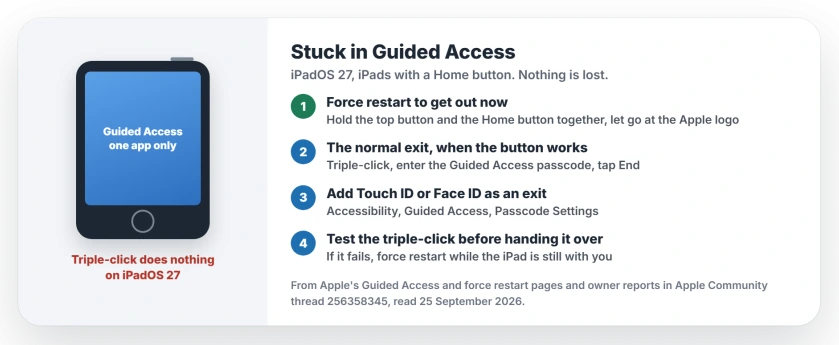
1. Get out now: force restart
A force restart doesn't erase anything. It restarts the iPad and drops it out of the Guided Access session, with every app and file as you left them.
On a Home-button iPad, press the top button and the Home button at the same time and keep both held. Let go when the Apple logo appears. Apple's force restart steps cover every model.
An iPad without a Home button takes three presses. Tap the volume button nearest the top button, then the volume button farthest from it, then press the top button and keep it down until the logo shows.
2. If it restarts straight back into the app
Some iPads, including a school's managed ones, land right back inside Guided Access after the restart. One owner got out with a second trick: restart, and as soon as you're past the Lock Screen, keep pressing the Home button.
The Guided Access passcode screen may come up after a few presses. Enter the passcode, tap End, and the session is over.
3. End it the normal way, once the button responds
This is how a session is meant to finish. Triple-click the Home button, or the top button on an iPad without one, then enter your Guided Access passcode or use Touch ID or Face ID.
On the screen that appears, tap End. If the triple-click does nothing at all, go back to step 1.
4. Install iPadOS 27.2
Once the iPad is free, open Settings > General > Software Update and install iPadOS 27.2 if it's offered. One owner reported that Guided Access works properly again on 27.2.
That's one report, and Apple hasn't confirmed a fix, so test the way out before you rely on it again (step 6).
5. Add Touch ID or Face ID as a way out
Guided Access has its own passcode settings, and you can add your fingerprint or face as a second way to end a session. The Guided Access settings guide walks through them.
Open Settings > Accessibility > Guided Access > Passcode Settings and turn on the Touch ID switch, or Face ID if your iPad unlocks with your face. It won't help while the triple-click is dead, but it saves typing a forgotten passcode.
6. Test the way out before you hand the iPad over
Until Apple fixes this for good, test the exit every time. Start Guided Access, then triple-click straight away while the iPad is still in your hands.
If the passcode screen doesn't appear, force restart now, rather than later with a child waiting. I'd make it a habit; it takes seconds.
7. Last resort: let the battery run down
Two owners got their iPads out by letting the battery run completely flat, then charging it. Use this only when restarts keep landing back in the locked app.
A flat battery carries its own risk. After a full drain on iPadOS 27, one owner's iPad took 90 minutes to six hours to start charging again, and the 9th generation has its own slow-charging fault since the update.
For parents: limits a restart can't undo
Guided Access is a session, and a force restart normally ends it, so a child who learns the button combination is out. Screen Time is different: its limits are saved settings behind their own passcode, and a restart leaves them alone.
Start with that passcode. Open Settings > Screen Time > Passcode & Management, tap Lock Screen Time Settings and choose four digits your child doesn't know. Then set the limits in Settings > Screen Time:
- Screen Time Schedule: turn on Schedule, tap Add Schedule, pick the days, then set each time window and the app categories it allows.
- Time Allowances: set how long each category, such as Games, can be used each day.
- Always Allowed: tap Add Apps and add the app your child should always be able to open.
- Content & Privacy Restrictions: block content and features you don't want, such as AirDrop or the camera.
Those are the iPadOS 27 names; older versions call the first two Downtime and App Limits.
Screen Time can't pin the screen to one app the way Guided Access does. A time window that allows no app categories, with only that one app in Always Allowed, gets close, and a restart won't undo it.
If your child has their own Apple Account in Family Sharing, set this up from your own device: Settings > Family, then your child's name, then Screen Time.
The new schedule needs every family device on version 27, and one older device can hold the new controls back. If a restriction later refuses to switch off, the Content and Privacy Restrictions fixes cover it.
Tell Apple about it
A volunteer on the thread suggested writing to Apple's accessibility team at accessibility@apple.com. Say which iPad you have, your iPadOS version, and that the Home button stops working inside Guided Access.
Apple's iPad feedback page takes the same report, and a short one is fine.
How do I get my iPad out of Guided Access?
Normally, triple-click the Home button or the top button, enter your Guided Access passcode and tap End. If the button does nothing on iPadOS 27, a force restart ends the session: the top and Home buttons together, held until the logo.
Does a force restart erase my iPad?
No. It restarts the iPad and ends the Guided Access session. Your apps and data stay as they were.
Did iPadOS 27.2 fix the Home button in Guided Access?
For one owner, yes: they reported on October 27 that it works properly on 27.2. Apple's notes don't mention it, so test the triple-click once you've updated.
How do I stop my child getting out of Guided Access with a restart?
You can't block the button combination itself. Use Screen Time with its own passcode instead: its schedule, time allowances and restrictions stay in force after a restart.
Can I use Touch ID to end Guided Access?
Yes, as a backup. Add your fingerprint or face in the Guided Access passcode settings. You still need the triple-click to reach it.
The Short Version
- On iPadOS 27, Guided Access can leave the Home button dead.
- To get out, force restart with the top and Home buttons. Nothing is erased.
- If it restarts back into the app, keep pressing Home after unlocking until the passcode screen appears.
- Install iPadOS 27.2, which fixed it for one owner.
- Test the triple-click before you hand the iPad over.
- For children, Screen Time limits stay in place after a restart.
Checked November 8, 2026.
 If you have any business, I can build it online