

Your iPad 9th generation ran flat after the iPadOS 27 update. Now it sits on the charger showing a red sliver of battery and a cable icon. Nothing else happens.
I know that sinking feeling, especially when it is a child's school iPad and the morning is coming. Before you book a repair, try the one thing that has worked for owners so far.
Leave it on the 20W charger it came with. Give it hours, not minutes. Owners who waited got their iPads back.
The short answer
A fully drained iPad 9th generation on iPadOS 27 can take far longer than usual to wake up. For the first stretch it takes almost no power. So it looks dead.
One parent measured it. In their words: "we measured the current draw, which was 0.09A initially and eventually went up to 2.1A." Their son's iPad reached 7 percent after several hours. Then it charged normally all the way to 100.
So plug yours into a proper wall charger and leave it. Check back in a few hours. You do not need to keep unplugging it to test.
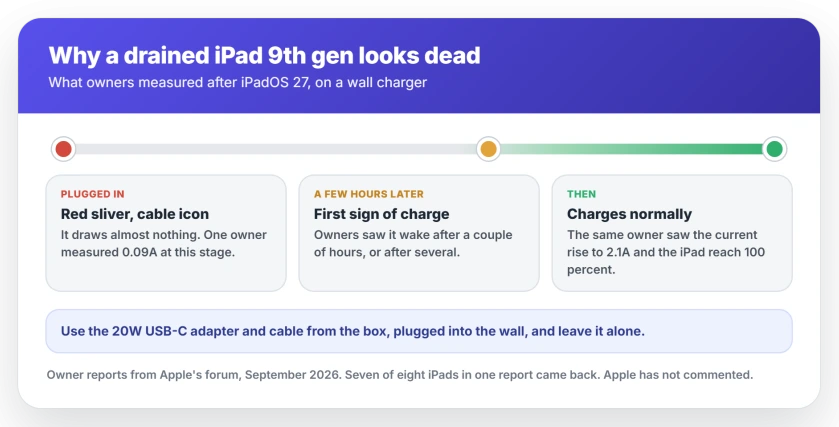
What owners saw, iPad by iPad
The main Apple Community thread has 56 people saying they have the same fault. Their details line up closely, and they will probably match what you are seeing.
The person who started it had tried the obvious. They wrote that they had done "numerous hard resets, using original charger and cable that has been tested and working." The screen showed "one red line" and the cable symbol.
They left it overnight for about seven hours, much as you probably have. Nothing changed. By late the next afternoon it had come back on its own: "it's finally started and has reached 15% battery charge."
One person dealing with a batch of these tablets had the best numbers of all. "Over the last two days I've run into this 8 times with 9th gens."
They went on: "All but one of them did eventually come back up after being left on the charger for a couple hours."
Another owner has three of them. Once drained, they "would take a couple of hours to turn on despite being connected to a fast apple charger with an original apple cable."
Why Apple's hour is not enough here
Apple's own advice for an iPad that will not turn on says you "might need to charge for up to an hour". That is the right figure for most dead iPads.
This model after this update is different. Owners report two hours, then several hours. One was still dead after seven hours overnight.
My reading, not Apple's: an hour is too soon for you to give up on this model right now.
Apple has not published anything about iPadOS 27 and charging. Its page on an iPad that will not charge still dates from December 2025.
Use the charger that came in the box
This matters more than usual, because the iPad is drawing so little at the start.
Apple lists a 20W USB-C Power Adapter and a Lightning to USB-C Cable in the box for the iPad 9th generation. Use that pair, straight into the wall.
One owner fixed theirs with exactly that swap: "Finally switched to plug in 20W block and it's charging properly now." The parent who measured the current recommended a known good charger of 20W or more.
A computer's USB port, a small phone charger or a power bank is the wrong tool for this. Apple's charging page lists a computer port as a power source. But your dead iPad needs every bit of current it can get.
Want to see what your charger is actually delivering? Reading the charging rate explains how, without guessing.
Leave it alone, then force restart once
Constant checking does not speed it up. The owners who got theirs back left one good charger connected.
Give it at least two or three hours on the wall charger. Still just the red battery? Then try Apple's force restart for an iPad with a Home button, with the charger still attached.
Apple's step is: "Press and hold both the top (or side) button and the Home button until you see the Apple logo."
Then leave it again. The person who started the thread did a few force restarts during the morning. It came back later that day. Nobody on the thread can say whether the restarts helped or the time did.
If it still will not wake after a day
At this point, stop waiting.
One of those eight iPads never came back. If yours shows no sign of charge after a full day on the 20W charger, the battery may have been too far gone. A new charger will not change that.
Book it in with Apple or an authorized service provider. Tell them it drained flat after iPadOS 27, and how many hours you left it charging. That saves them starting from zero.
Do not erase or restore it first. A restore needs the iPad to power on and connect to a computer. Your data is safe while it simply sits dead.
iPhone SE owner? A different glitch
An iPhone SE from 2020 is showing its own charging oddity after iOS 27. It is a separate fault.
On a thread with 19 people reporting it, the icon is the problem. One owner described it: "It is charging, but the charging icon disappears after a few seconds when you plug the charger in."
Their fix: "Try restarting your phone (with the charger plugged) and the battery icon will show the actual percentage (it worked for me)."
Another owner said it only happened with a fast charger plugged into the USB-C port of a Mac. A slow charger and wireless charging were fine for them.
If your iPhone really is not taking a charge, the iPhone charging checklist works through it in order.
What does not help
Repeated hard resets on their own did nothing for the person who started the thread. Swapping between chargers every few minutes does not help either.
Buying a new battery or a new iPad on day one is premature for you. Seven of eight came back with time.
And a restore through a computer is the wrong tool while the iPad cannot power on. Wait for charge first.
Status: iPadOS 27.0. Last verified 24 September 2026 with Apple's charging pages and two forum threads. A fully drained iPad 9th generation is taking hours, not the usual hour, to start charging, and seven of eight in one owner's report came back on their own. Apple has not commented. The iPhone SE icon glitch is a separate, display-only fault that a restart on the charger clears.
Why won't my iPad 9th generation charge after the update?
If your iPad drained completely, it is probably charging very slowly at first. One owner measured just 0.09A at the start before it climbed to 2.1A. Give it a few hours on the 20W charger from the box first. It will usually come back.
How long does a dead iPad take to charge?
Apple says a dead iPad might need up to an hour before it turns on. After iPadOS 27, owners of the 9th generation report two hours or more. One was still dead after seven hours overnight. Keep the wall charger connected, and resist unplugging it to check.
Is my iPad battery dead?
Probably not. In one report, seven of eight iPads that looked dead came back after a couple of hours on the charger. If yours shows no sign of charging after a full day on a 20W charger, have the battery checked by Apple.
Does the iPad 9th generation get iPadOS 27?
Yes. Apple lists the iPad 9th generation and later as supported by iPadOS 27. The charging delay owners describe is being reported after that update, not before it.
The Short Version
- A drained iPad 9th generation on iPadOS 27 can look dead for hours while it trickle charges.
- One owner measured 0.09A at the start, rising to 2.1A once it got going.
- Use the 20W USB-C adapter and cable from the box, plugged into the wall.
- Wait two or three hours before a force restart, and do not keep unplugging it.
- Seven of eight iPads in one owner's report came back with time alone.
- Still nothing after a full day? Book a battery check, and do not restore it first.
Where to Next
The red battery sliver looks final, but on these iPads it mostly means patience. Plug it into the right charger, walk away, and come back later.
If yours came back, leave a comment with roughly how many hours it took and which charger you used. Those numbers help the next worried parent more than anything I can write.
If the battery now drains fast once it is running again, iPad battery drain after an update covers what settles down by itself and what does not.
iPadOS 27 has a second fault on these iPads. The Home button can stop working inside Guided Access, and a force restart gets you out.
And if a laptop in the house shows plugged in but stuck, the number it stopped at tells you why.

Isaac Smith is the founder and editor of PC Glance, a website that covers computers, laptops, and technology. He is a tech enthusiast and a computer geek who loves to share his insights and help his readers make smart choices when buying tech gadgets or laptops. He is always curious and updated about the latest tech trends.